Lit. No. 72451, Rev. 03 28 October 15, 2019
MAINTENANCE
CHANGING THE BLADE‑EDGE
ILLUMINATION MODE
On snowplows equipped with NIGHTHAWK™ LED
headlamps, the EdgeView™ technology feature oers
three modes for blade-edge illumination. The factory
default setting is ON.
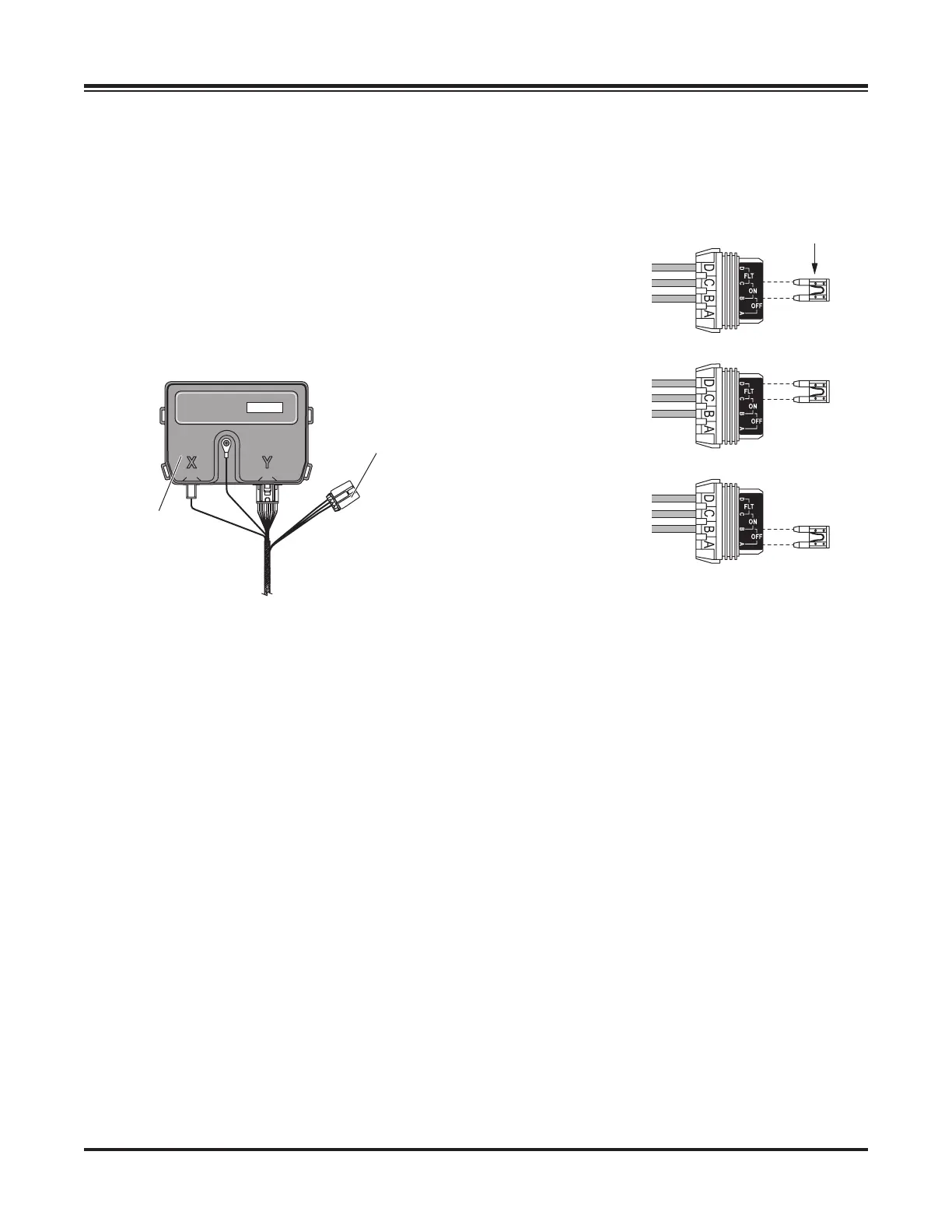
To change the blade-edge illumination mode, remove
the cover from the fuse holder located near the
"Y" port of the headlamp control module installed in
the vehicle engine compartment.
Remove the jumper fuse from the fuse holder and
re-insert it in the desired mode position as shown
below. Replace the fuse holder cover.
HEADLAMP
CONTROL MODULE
and Cover
Default – ON:
Blade edge lights
illuminate when
plow has power
.
T: Blade edge
lights illuminate
when blade is in
FLOA
T mode.
Blade edge
Fuse


 To Next Page