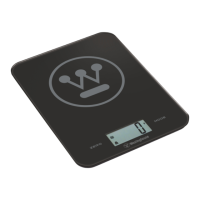
This document describes the Westinghouse Body Fat / Hydration Scales, model WHPS01SK, compliant with ISO 9001:2008 standards. This device is designed to measure various body composition metrics and provide a comprehensive overview of your health.
Function Description
The Westinghouse Body Fat / Hydration Scales are a multi-functional device primarily used for measuring:
- Body Fat Percentage (Fat%): An index of fat content in the human body.
- Body Hydration Percentage (Hydration%): The percentage of water in the body.
- Body Muscle Percentage (Muscle%): The percentage of muscle mass.
- Body Bone Percentage (Bone%): The percentage of bone mass.
- Calorie Intake Requirement: A suggested daily calorie intake.
- Normal Weighing Mode: Standard weight measurement.
The scale utilizes a high-precision strain gauge sensor for accurate measurements. It employs biological resistance analysis, where a safe frequency of low voltage electrical current transmits through the body. Since the impedance of fat is stronger than that of muscle or other human tissues, the scale can reflect body fat percentage based on these resistance differences.
Important Technical Specifications
- Battery Type: 1 x 3V CR2032 lithium battery (included).
- Memory: Built-in memory for 12 different users, allowing for personalized parameter settings and record recall.
- Weight Unit: Selectable units including kg, st, and lb.
- Measurement Ranges:
- Fat%: 4.0% to 60.0% (Division: 0.1%)
- Hydration%: 27.5% to 66.0% (Division: 0.1%)
- Muscle%: 20.0% to 56.0% (Division: 0.1%)
- Bone%: 2.0% to 20.0% (Division: 0.1%)
- Calorie: Division: 1 KCAL
- Height Setting Range: 100-250cm (3'03.5"~8'02.5")
- Age Setting Range: 10-100 years
- Weight Capacity: Division: 0.1kg (0.2lb)
- Indicators: Low battery and overload indication.
- Auto-Off: The scale automatically turns off after 20 seconds of inactivity to conserve battery.
Usage Features
First Time Setting and User Parameters:
- The scale allows for the setting of personal parameters for up to 12 users, including gender, height, and age.
- Default parameters are set to Male, 165cm/5'05.0", and 25 years old upon initial battery installation.
- Parameters can be adjusted using the "SET" button and arrow keys (▲/▼) to navigate and change values.
- If idle for 6 seconds during parameter setting, the parameters are automatically memorized, and the LCD displays "0" to indicate the start of body fat measurement.
Weighing Modes:
- Optional Normal Weighing Mode (Auto Step On Weighing):
- Simply step onto the platform. The scale will display your weight, which will then flash, stabilize, and lock.
- It is recommended to ignore the first reading and take effective records from the second weighing onwards for accuracy.
- Consecutive Add-On Weighing:
- After the digits stabilize from an initial weighing, additional loadings (exceeding 2kg) can be added.
- This feature is useful for weighing items like a baby: weigh yourself first, then hold the baby and weigh again. Subtracting your initial weight from the total weight provides the baby's weight.
- Fat/Hydration/Muscle/Bone/Calorie Measuring Mode:
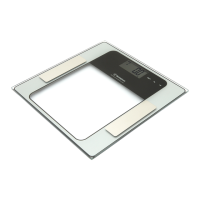
- After setting personal parameters, step onto the scale with bare feet, ensuring both feet touch the metal electrodes.
- The scale will display your weight, then proceed to measure and display Fat%, Hydration%, Muscle%, Bone%, and suggested Calorie intake.
- The measured results are displayed sequentially, repeating three times before the scale shuts down automatically.
Recalling Test Records:
- Users can recall their last test record by pressing the "SET (ON/SET)" button to switch on the scale, then pressing the arrow key (▲) to enter recall mode.
- The scale will display the last test record for the selected user, and users can press the arrow key (▲/▼) for quick page turning through the different metrics.
User-Friendly Tips:
- Always use the scale on a hard, flat surface.
- Remove shoes and socks, and wipe feet clean before using for body composition measurements.
- Step onto the weighing platform gently and keep still during measurement.
- It is advisable to take measurements at the same time of day for consistency.
- Measured results may be misleading after intensive exercise, excessive dieting, or extreme dehydration.
- Certain individuals should not use the device for body composition analysis, including pregnant women, those with edema, those on dialysis treatment, and those with heart pacemakers or other implanted medical devices. Children under 10 or adults over 100 can only use the device in normal weighing mode.
Maintenance Features
Care and Cleaning:
- Clean the scale with a slightly damp cloth.
- DO NOT immerse the scale in water.
- DO NOT use chemical/abrasive cleaning agents.
- Clean plastic parts immediately after contact with fats, spices, vinegar, and strongly flavored/colored foods.
- Avoid contact with acidic citrus juices.
- Store the scale in a cool place with dry air.
Troubleshooting:
- "Lo" (Low Battery Indication): Replace with a new 3V CR2032 battery.
- "Err" (Over-load Indication): The weighing subject exceeds the maximum capacity. Step off to avoid damage.
- "ErrL" (Low Fat% Indication): Suggests a more nutritional diet and self-care.
- "ErrH" (High Fat% Indication): Suggests watching diet and increasing exercise.
- "[" (Re-test): An error exists; re-test to get the correct result.
- If the scale fails to turn on, check battery installation and power.
- If there is an error on the display or the scale cannot be turned off, remove the battery for 3 seconds, then reinstall it to clear soft-faults.
- Do not attempt to adjust or repair the scales yourself. Contact customer service for assistance.
Safety Warnings:
- The platform can be slippery when wet; keep it dry.
- DO NOT strike, shock, or drop the scale.
- Keep away from strong electromagnetic fields.
- The Fat% and Hydration% content are for reference only and not for medical purposes. Consult a doctor if values are outside normal levels.
- Button cell batteries can cause serious injury or death if swallowed. Dispose of safely and store out of reach of children. Visit thebatterycontrolled.com.au for more information.
- The device is not intended for commercial use.


 To Next Page
 General