7
Westward Operating Instructions and Parts Manual
22XP38, 22XP39
Drain Cleaning Machine
AssemblyandDisassembly
TurnRotationSwitchtoOFFandunplugbefore
assemblyanddisassembly.
QuickAssembly
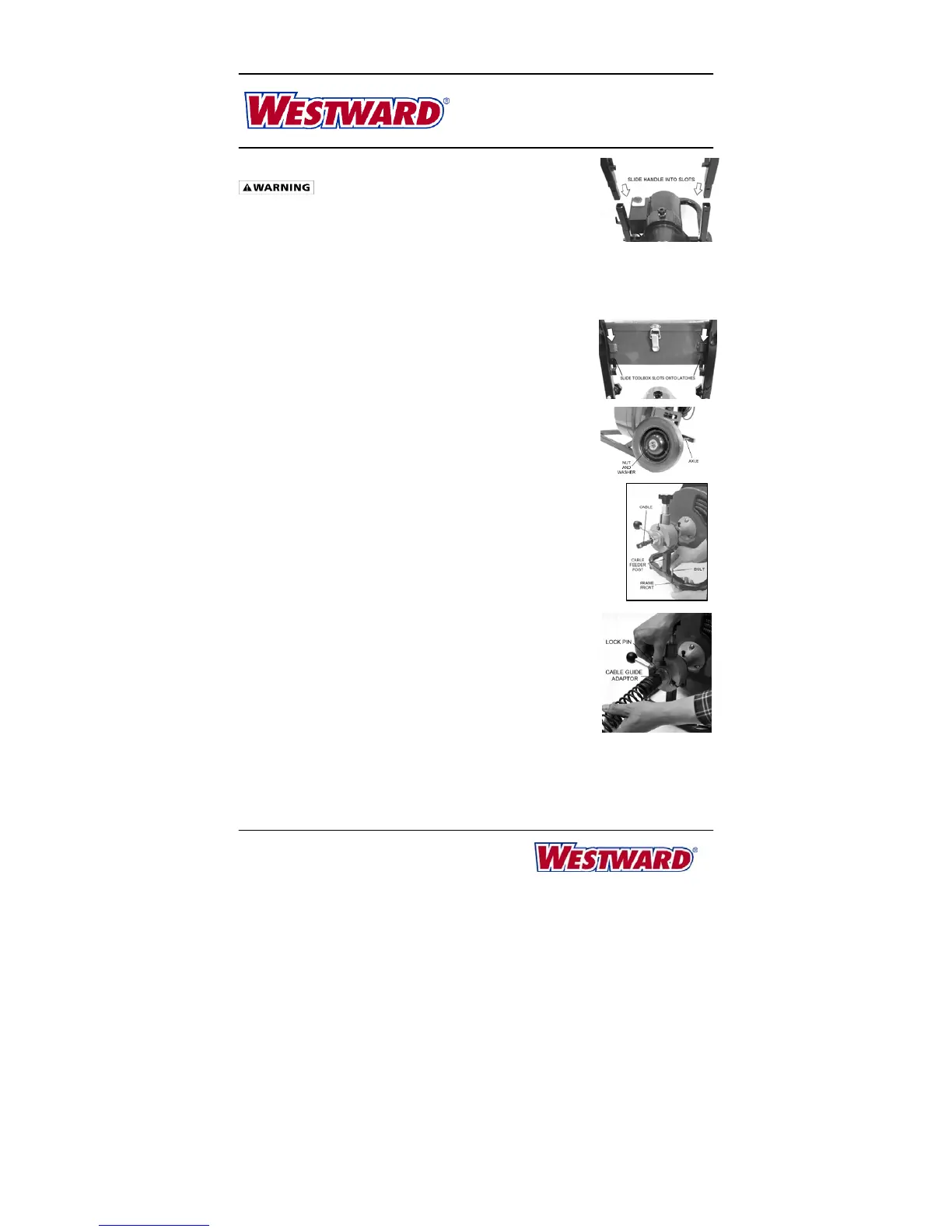
HandleMounting
Thehandleisboundtotheframebutisnotmounted.ToassembletheHandle,takeoffthetwo
setsofhandle‐lockingboltsandknobsfromtheframe.Slidethetwoendsofthehandleintothe
twoopeningsontheframe.Then,usehandle‐lockingblotsand
handle‐lockingknobstotighten
them.
ToolboxMountingtotheHandle
Thetoolboxcanbeattachedtothemachinebysimplyaligningthetwo
slotsontheboxwiththetwopokinglatchesontheframeandsliding
thetoolboxdownwardtoallowthetwolatchestoslip
intotheslots.
WheelMounting
Toassemblethewheels,pushtheaxlethroughtheholesatthebottom
oftheframe,mountthewheelsontheAxleandthenuseoneflat
washerandonenutoneachsidetoattainthewheelontheaxle.
CableFeeder(Optional)Installation
ToinstalltheCableFeeder,followthesesteps:
1. PushthecablethroughtheCableFeeder’sopening.
2. PlacethemountingbracketatthebottomoftheCableFeederunitonthe
frame.Besuretoaligntheholesforthemountingscrews.
3. Tightenthemountingboltsandnuts.
CableGuide(Optional)Installation
ToinstalltheCableGuide
1. Pullthelockpinontheadapterofthecableguideandslidethe
adapterendoftheCableGuideontothefrontoftheCableFeeder.
2. Makesuretoalignthelockpinwiththeholeonthe
shorttubeof
theCableFeeder.
3. Releasethelockpintoletitslideintotheholeandholdthecable
guideontheCableFeeder.



 To Next Page