EasyManua.ls Logo

Wet Sounds WS-MC-20 - User Manual

Wet Sounds WS-MC-20
21 pages
Print Icon
To Next Page IconTo Next Page
Loading...
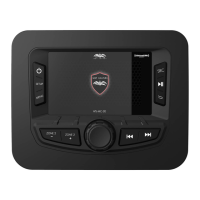
WS-MC-20 1-Piece Marine Receiver
OWNER'S MANUAL
HIGH PERFORMANCE AUDIO
WWETSOUNDS.COM
WS-MC
-2O
FCC ID:2AT9N-WS-MC-20
IC:25357-WSMC20

Questions and Answers

  • D
    Daisy ProctorJul 28, 2025
    What to do if my Wet Sounds WS-MC-20 shows “No Signal”?
    • T
      Tiffany WilliamsJul 28, 2025
      If your Wet Sounds Marine Equipment displays “No Signal”, it means the SiriusXM Connect Tuner isn't getting a satellite signal. Make sure your vehicle is outside with a clear view of the sky and that the SiriusXM magnetic mount antenna is on a metal surface outside your vehicle, away from obstructions. Check the antenna cable for damage or kinks. For more details, see the SiriusXM Connect Tuner installation manual. If the cable is damaged, replace the antenna; you can find SiriusXM products at your local car audio retailer or at www.siriusxm.com.
  • D
    Deanna AndersonAug 2, 2025
    How to fix “Check Antenna” error on Wet Sounds WS-MC-20 Marine Equipment?
    • B
      brandibryantAug 2, 2025
      If your Wet Sounds Marine Equipment displays “Check Antenna,” it indicates a fault with the SiriusXM antenna. This could be due to a disconnected or damaged antenna cable. Verify that the antenna cable is properly connected to the SiriusXM Connect Tuner and inspect it for any damage or kinks. If the cable is damaged, you should replace the antenna. You can find SiriusXM products at your local car audio retailer or online at www.shop.siriusxm.com.
  • N
    Natasha YoungAug 7, 2025
    What to do if Wet Sounds WS-MC-20 Marine Equipment says “Channel Not Subscribed”?
    • N
      nicholas34Aug 7, 2025
      If your Wet Sounds Marine Equipment displays “Channel Not Subscribed”, it means the channel isn't included in your SiriusXM subscription or is no longer included. If you have questions about your subscription package or want to subscribe to the channel, visit www.siriusxm.com or call 1-866-635-2349 in the U.S.A., or visit www.siriusxm.ca or call 1-877-438-9677 in Canada.
  • R
    Robert ParkerAug 11, 2025
    What to do if Wet Sounds WS-MC-20 displays “Check Tuner”?
    • D
      Diana StevensonAug 12, 2025
      If your Wet Sounds Marine Equipment displays “Check Tuner”, the radio is having trouble communicating with the SiriusXM Connect Tuner, possibly due to disconnection or damage. Ensure the SiriusXM Connect Tuner cable is securely connected to the radio.
  • J
    Jennifer MontgomeryAug 17, 2025
    Why does my Wet Sounds WS-MC-20 say “Subscription Updated”?
    • C
      Carl ClaytonAug 17, 2025
      If your Wet Sounds Marine Equipment displays “Subscription Updated”, the radio has detected a change in your SiriusXM subscription status. Press “Enter” to clear the message. If you have questions about your subscription, visit www.siriusXM.com or call 1-866-635-2349 in the U.S.A., or visit www.siriusxm.ca or call 1-877-438-9677 in Canada.
  • A
    Angela CraigAug 22, 2025
    What does “Channel Not Available” mean on Wet Sounds Marine Equipment?
    • M
      Matthew NunezAug 22, 2025
      If your Wet Sounds Marine Equipment displays “Channel Not Available”, the channel you're trying to access is either not a valid SiriusXM channel or is no longer available. For details on the SiriusXM channel lineup, visit www.siriusxm.com.

Summary

Introduction and Compliance Information

FCC Compliance Statement

Details FCC compliance rules and potential interference issues for the device.

WS-MC-20 Basic Controls and Settings

Main Control Knob (MCK) Operation

Allows adjustment of Main Volume and making selections within SETUP and MENU features.

Power and Mute Functionality

Press & hold for power on/off; short press to mute/unmute all zones.

Setup Menu Navigation

Accesses controls affecting all MC2 functions, including AUDIO adjustments like Position and Equalization.

Crossover Frequency Adjustments

Adjusts crossover frequencies for Front, Rear, and Zone 2 outputs, including Subwoofer and Full Range settings.

Bluetooth Device Management

Manages Bluetooth connectivity, including pairing devices and viewing device names.

Menu and Source Navigation

Provides access to functions for each source selected via the MENU and SOURCE buttons.

USB Operation Features

Controls USB playback, browsing files, and repeat/shuffle modes via the MENU button.

Bluetooth Streaming Control

Controls Bluetooth audio playback, browsing content, and repeat/shuffle modes.

SiriusXM Subscription Activation

Instructions on how to activate a SiriusXM subscription after installation.

WS-MC-20 Wiring Diagram and Connections

Troubleshooting SiriusXM Issues

Antenna and Tuner Faults

Diagnoses and resolves issues related to antenna connection and tuner communication.

SiriusXM Signal Reception

Troubleshoots 'No Signal' errors by checking antenna placement and cable condition.

Wet Sounds WS-MC-20 Specifications

General IconGeneral
TypeMarine Media Controller
Zone ControlYes
BluetoothYes
USB InputYes
AUX InputYes
AM/FM TunerYes
WeatherproofYes
Water ResistanceIPX6
Frequency Response20Hz - 20kHz
Signal-to-Noise Ratio> 80dB
Input Sensitivity200mV - 4V
RMS Power Output50W x 4
CrossoverHigh-pass filter

Related product manuals