
 Need help?
Do you have a question about the WeTek Play and is the answer not in the manual?
Presents critical safety guidelines for using the WeTek Play, including warnings about water, ventilation, and heat sources.
Details precautions for power cord protection, placement, non-use periods, internal access, and avoiding water exposure.
Provides guidance on device maintenance and directs users to WeTek's online knowledge base and support services.
Lists all accessories included in the WeTek Play package, such as the box, RCU, and cables.
Specifies necessary external equipment like TVs, monitors, projectors, and network connections for setup.
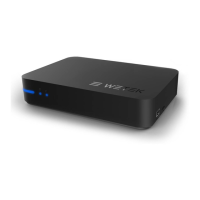
Details the power button, status LED, Ethernet LED, and WiFi LED located on the front panel.
Describes ports on the back of the device: LNB, USB, A/V, Ethernet, HDMI, S/PDIF, Serial, and Power.
Identifies ports on the side of the device: USB and Micro SD card slot.
Explains how to access the device's upgrade button using the provided plastic nail.
Details the functions and layout of the WeTek remote control, including the alphanumeric keypad.
Explains how to use the AirMouse feature for intuitive navigation and interaction with the operating system.
Lists detailed hardware and software specifications of the WeTek Play device.
Outlines the various services offered by WeTek, such as cloud storage and control applications.
Provides step-by-step instructions for connecting the device to a TV, network, sound system, and power.
Directs users to the WeTek website for additional information, tutorials, and community support.
 General
| CPU Frequency | 1.5 GHz |
|---|---|
| GPU | Mali-400 MP |
| Connectivity | Wi-Fi, Ethernet |
| Wi-Fi | 802.11 b/g/n |
| USB Ports | 2x USB 2.0 |
| HDMI | HDMI 1.4 |
| Card Reader | MicroSD |
| Processor | AMLogic AML8726-MX |
| CPU Core | Dual Core |
| Storage | 4 GB |
| Operating System | Android 4.2 |
| Ethernet | 10/100 Mbps |
| Tuner | DVB-S2 |
| Audio Output | S/PDIF |

 To Next Page