6
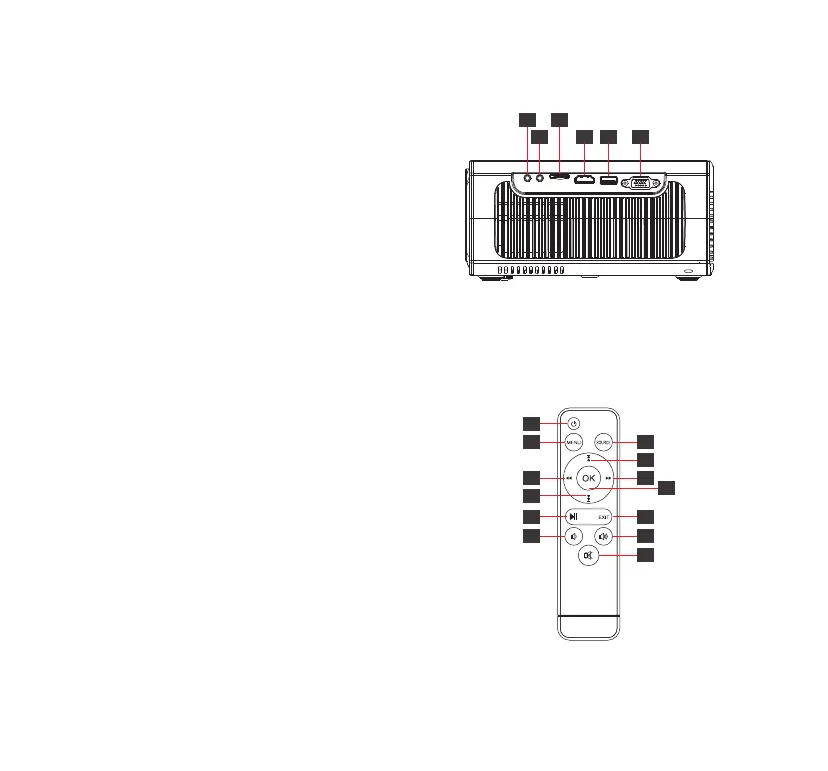
Connection Ports
Remote
1. Headphone Jack
• Connect to earphone or external speakers
2. AV Input Interface
• Connect to DVD player, VCD, etc
3. TF Card Slot
• Maximum reading support 32GB Micro SDHC card
4. HDMI Input Port
• Connect to Laptop, Dongle, PS5, Switch, etc.
5. USB Port
• Maximum reading support 32GB USB ash disk
• File system requirement: FAT32
• Maximum reading support 1TB Portable hard disk
• File system requirement: NTFS
6. VGA Port
• Connect to PC/Laptop including VGA port
1. Power Switch
2. Menu
3. Move Left/Rewind
4. Move Down/Next File
5. Pause/Play
6. Volume -
7. Select Signal Source
8. Move Up/Previous File
9. Move Right/Fast Forward
10. OK/Conrm
11. Exit/Return
12. Volume +
13. Mute
1 3
2 4 5 6
1
2
6
5
7
12
11
9
10
3
4
8
13


 To Next Page