8
Installing the Projector
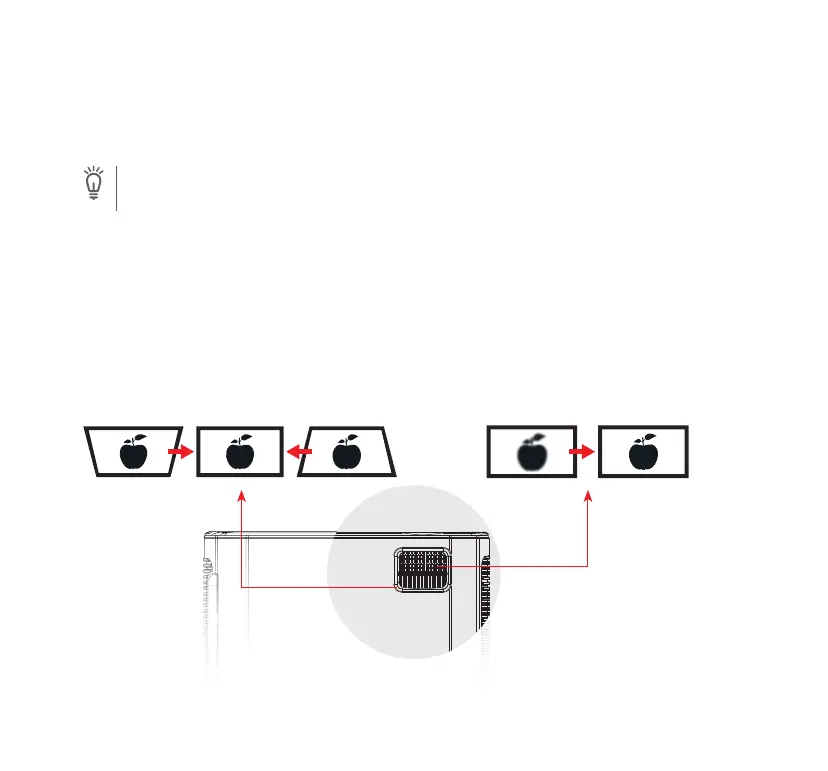
Correcting Keystone
Adjusting Image Clarity
The projector has a screw hole at the bottom allowing it to be mounted on a tripod, on the ceiling or
wall mounted according to the dierent environment.
Note
• Screw size requirement: 1/4in-20 male screw thread.
• The mounting tripod or bracket needs to be purchased separately.
Adjust the keystone dial ring to correct keystone
distortion to make the top or bottom of the
screen longer or shorter so that the projected
image is rectangular.
Tips: The projector has only vertical keystone
correction. When correcting keystone, make sure
the projector is placed in level with the screen.
Rotate the focus ring slowly to sharpen the
image. At the same time, check the resolution
point carefully. The best focus point for the lens
would be where the image is most clear. If it is
still blurry, please try to adjust the projection
distance.


 To Next Page