8. Tone control:
The LOW, MID and HIGH EQ controls independently adjust the bass, middle and treble frequencies for
each channel.
The LOW EQ control allows for up to +15dB of boost or cut at 80Hz or below. The center detented posi-
tion indicates that there is no boost or cut. The Low Frequency control should be used to enhance or
deplete frequencies found in items such as bass guitar or drum.
The MID EQ control is for the Mid Range of EQ, the area in which most frequencies are found. The Mid
EQ control allows boost or cut from -15 to +15dB, shelving at 2.5 KHz.
The HIGH EQ control allows boost or cut from -15 to +15dB, shelving at 12 KHz. You can use this con-
trol to add transparency to keyboards or vocal and to hide any ‘hiss’ from external signal such as tape.
9. Effect send control:
The effects send signal is post-EQ and post-LEVEL, so these controls affect the signal going to the effect
processor, be it internal or external.
The effects send signal for each channel is controlled by the EFX control for that particular channel. The
overall effects send level is controlled by the EFX controls for Main and Monitors, both range from OFF to
+10dB of gain. The EFX to Main control adjusts the amount of effects returned to the main mix. The EFX
to monitor control allows you to add effects to the monitor mix.
10. Monitor send control:
The MONITOR control determines the level of the input signal that is fed to the monitor bus and subse-
quently the MONITOR OUPTUT jack. The MONITOR control is not affected by the channel’s LEVEL con-
trol.
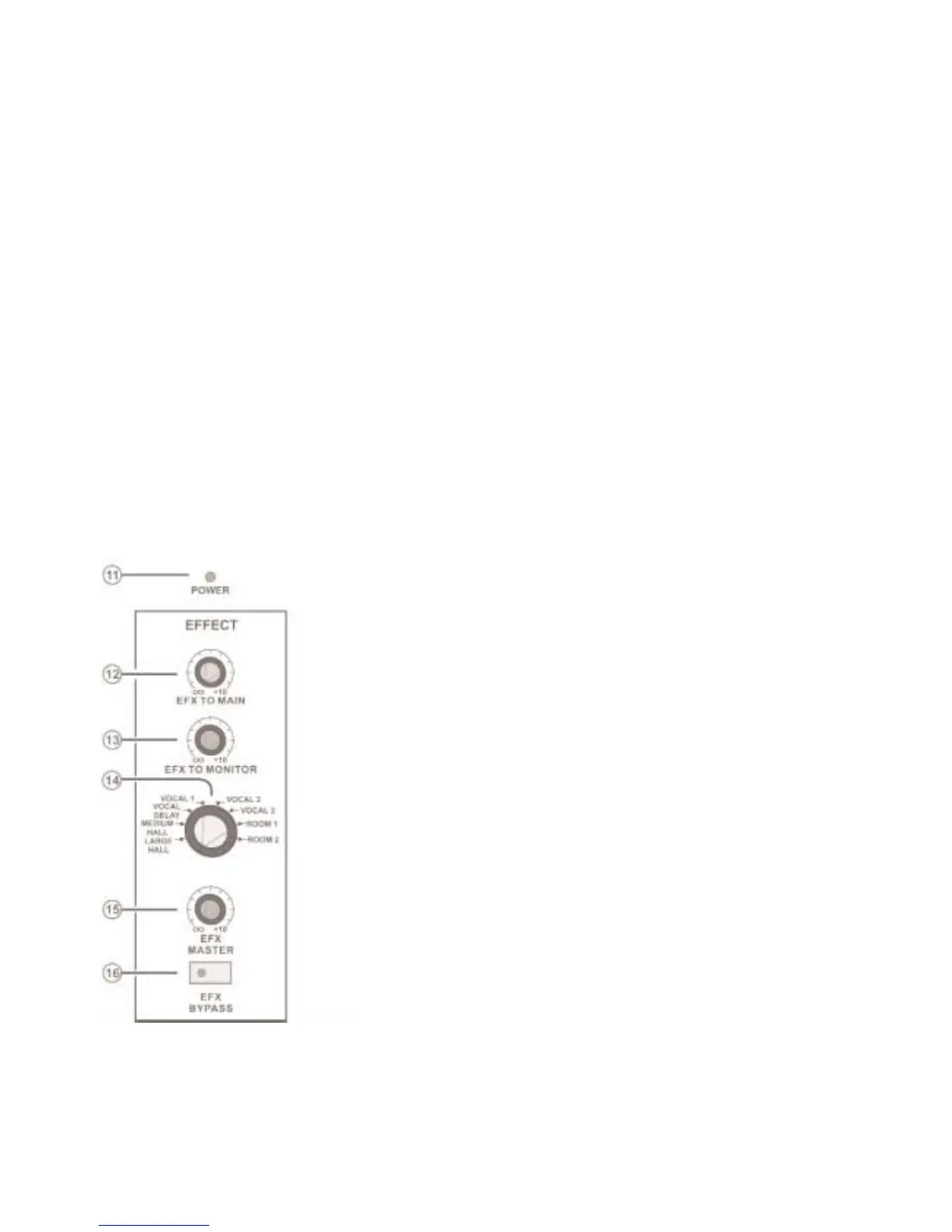
11. Power on LED
12. EFX TO MAIN:
This control is used to add internal or external effect to the
Main Mix and ranges from off to +10dB of extra gain.
13. EFX to MONITOR:
This control is used to add internal or external effect to the
Monitor and ranges from off to +10dB of extra gain.
14. Effect preset select:
The Preset Select allows you to change one preset effect to
another, these are not programmable and allow reverberation
or ambiance to be added to vocals or instrumental sound.
VOCAL DELAY
VOCAL 1
VOCAL 2
VOCAL 3
ROOM 1
ROOM 2
MEDIUM HALL
LARGE HALL
15. EFX MASTER send:
Controls the overall effect signal of all channels to either inter-
nal or external effect processor.
16. EFX BYPASS:
Pushing in this button will mute the effect signal to the internal
processors. When muted the LED indicator light will illuminate.
Page 3



 To Next Page