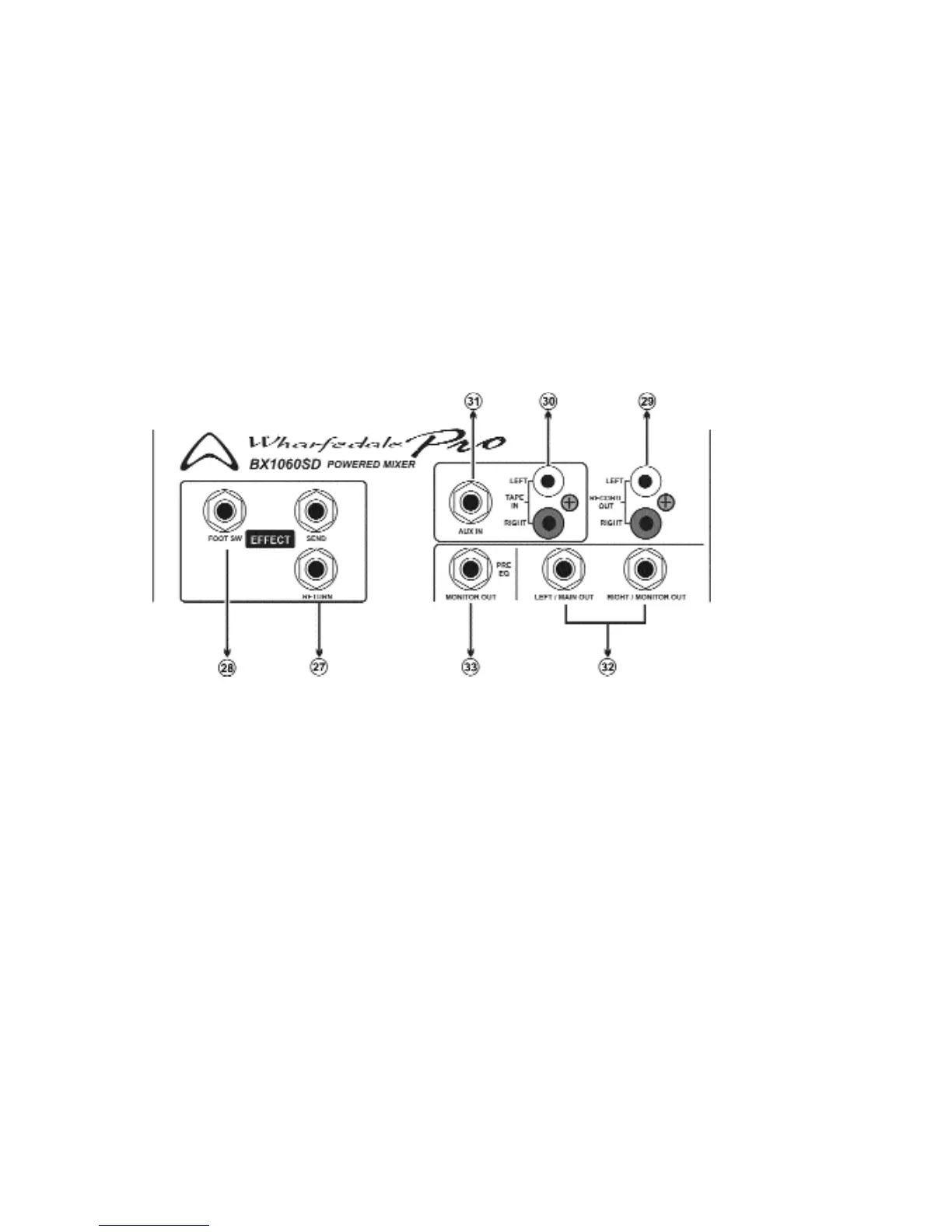
27. Effect Send/Effect Return: The effects send jack is a 1/4” connector that produces an unbalanced
line-level signal. This signal is fed from the internal EFX bus, just after the EFX master level control to
connect an external effect processor. To return the signal use the same type of cable and insert into the
Effect Return jack. If you choose not to use an external effect processor, the signal will automatically go
to EFX to Main and EFX to Monitor.
28. Effect Foot Switch: Connecting an open foot switch to the jack to turn the built - in digital effect
processor on and off.
29. Record Out: These phono connectors carry the pre-EQ(not affected by the MAIN EQ) main mix sig-
nal. RECORD OUT signal levels are regulated by the MAIN master. A stereo recording device can be
connected to this jack.
30. Tape In: Use this jack to connect a stereo device, such as a CD player or TAPE player, the signal
input to these jacks is sent to the stereo (MAIN) bus.
31. Aux In: Use this jack to connect any line-level device. The signal input to these jacks is sent to the
stereo (MAIN) bus.
32. MAIN/MONITOR Out: Can be used to drive an external power amplifier or sound system from the
internal mixer bus, just after the MAIN MASTER control and MAIN EQUALIZER, allowing more speakers
to be connected.
Page 5



 To Next Page