Need help?
Do you have a question about the WHARTON 4000 Series and is the answer not in the manual?
Describes the use of the infrared remote control for easy setup and stopwatch functions.
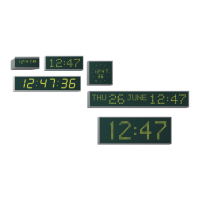
Details features like 83 preset location codes, programmable time zones, and auto/manual brightness.
Covers connection of universal mains, low voltage DC, or PoE power supplies and safety compliance.
Explains the functions of the infrared remote control and rear switches for unit settings.
Lists function menu options, their functions, and corresponding section numbers for setup.
Instructions for setting the seconds count and navigating to the minutes setting.
Procedure for adjusting minutes and proceeding to set the hours.
Guides on how to alter the time zone by selecting a location code from the menu.
Automatic IP, Subnet, and Gateway assignment via DHCP server and NTP server settings.
Setting the IP address byte by byte for static network configuration.
Configuring the subnet mask byte by byte for static network setup.
Setting the gateway address byte by byte for static network setup.
Configures synchronisation via NTP/SNTP on Ethernet TCP/IP network.
Synchronises to GPS, GLONASS, DCF, or MSF time codes.
Synchronises to 48x0, w482, or MOBALine time codes from master clocks.
Configures display style and how long it holds between formats.
Sets calendar display mode and language for the 4500x/4600x series.
Sets the operational mode for the stopwatch, including clock/stopwatch switching.
Defines how the stopwatch counts, such as up from zero or down from a preset time.
Configure interface for temp display, sync output, or disable it.
Adjust display brightness, time format, and view firmware/bootloader versions.
Details the process and dimensions for wall mounting the digital clock.
Instructions and dimensions for mounting the clock into a flush fitting panel.
Details for flush fitting the clock with an integrated mounting box.
Instructions for single or double sided ceiling suspended mounting.

 To Next Page
 General