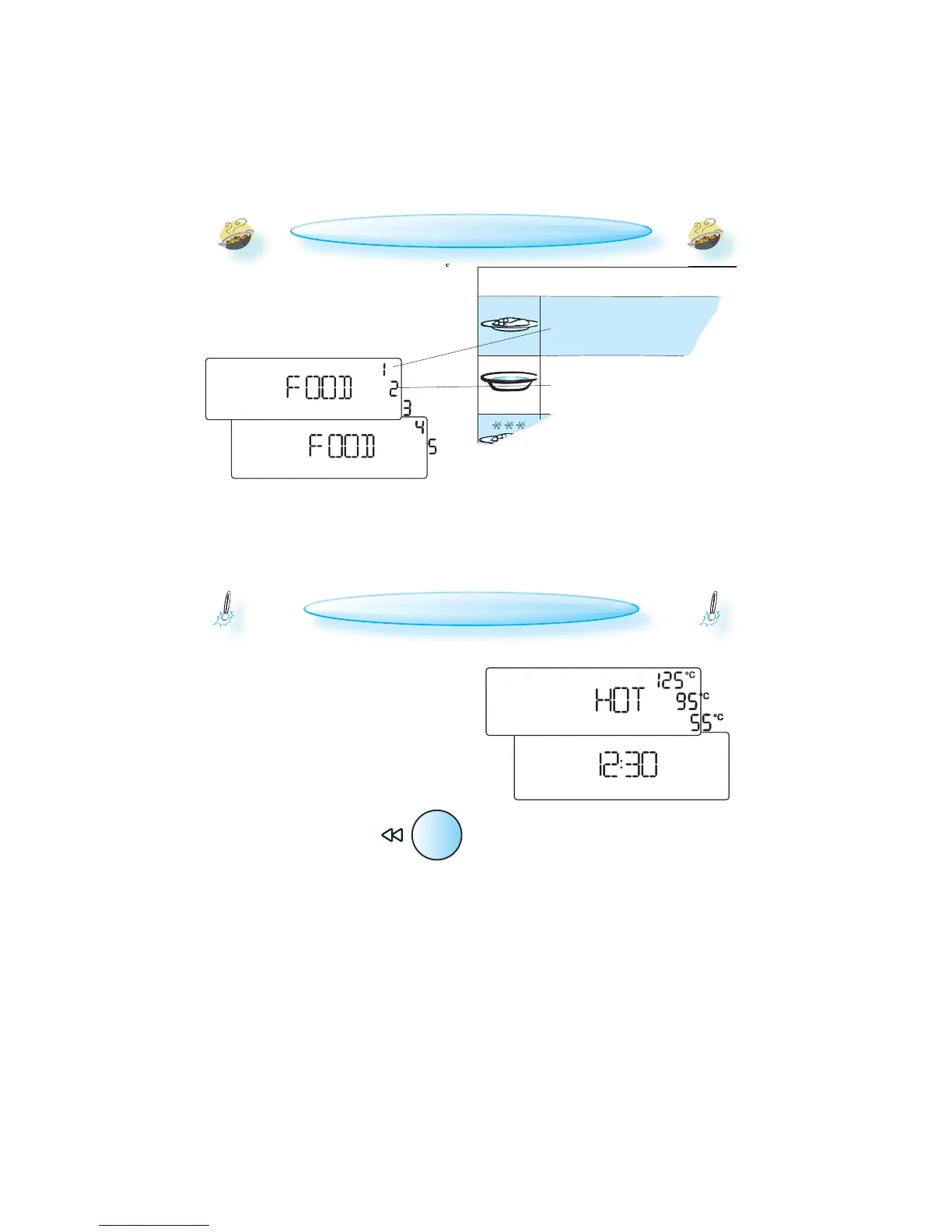
WHEN USING THE AUTO FUNCTIONS the oven needs
to know which food class it is to use to reach
proper results. The word FOOD and a food
class digit is displayed when you are choosing
a food class with the Selector buttons.
COOLING DOWN
WHEN A FUNCTION IS FINISHED, the oven may carry
out a cooling procedure. This is normal.
After this procedure the oven switches off au-
tomatically.
IF THE TEMPERATURE IS HIGHER THAN 100°C, “HOT”
and the current cavity temperature is dis-
played. Be careful not to touch the cavity in-
side when removing food. Use oven mittens.
IF THE TEMPERATURE IS LESS THAN 50°C, the 24 hour
clock is displayed.
PRESS THE BACK BUTTON to temporarily view the
24 hour clock when “HOT” is dis-
played.
THE COOLING PROCEDURE can be in-
terrupted without any harm to the
oven by opening the door.
FOOD CLASSES (AUTO FUNCTIONS ONLY)
F
OR FOOD NOT LISTED IN THE TABLES and if the
weight is lesser or greater than recommended
weights, you should follow the procedure for
”Cook & Reheat with microwaves”.
T
HE FOOD CLASSES are listed in the tables placed
with each Auto function.



 To Next Page