7
●
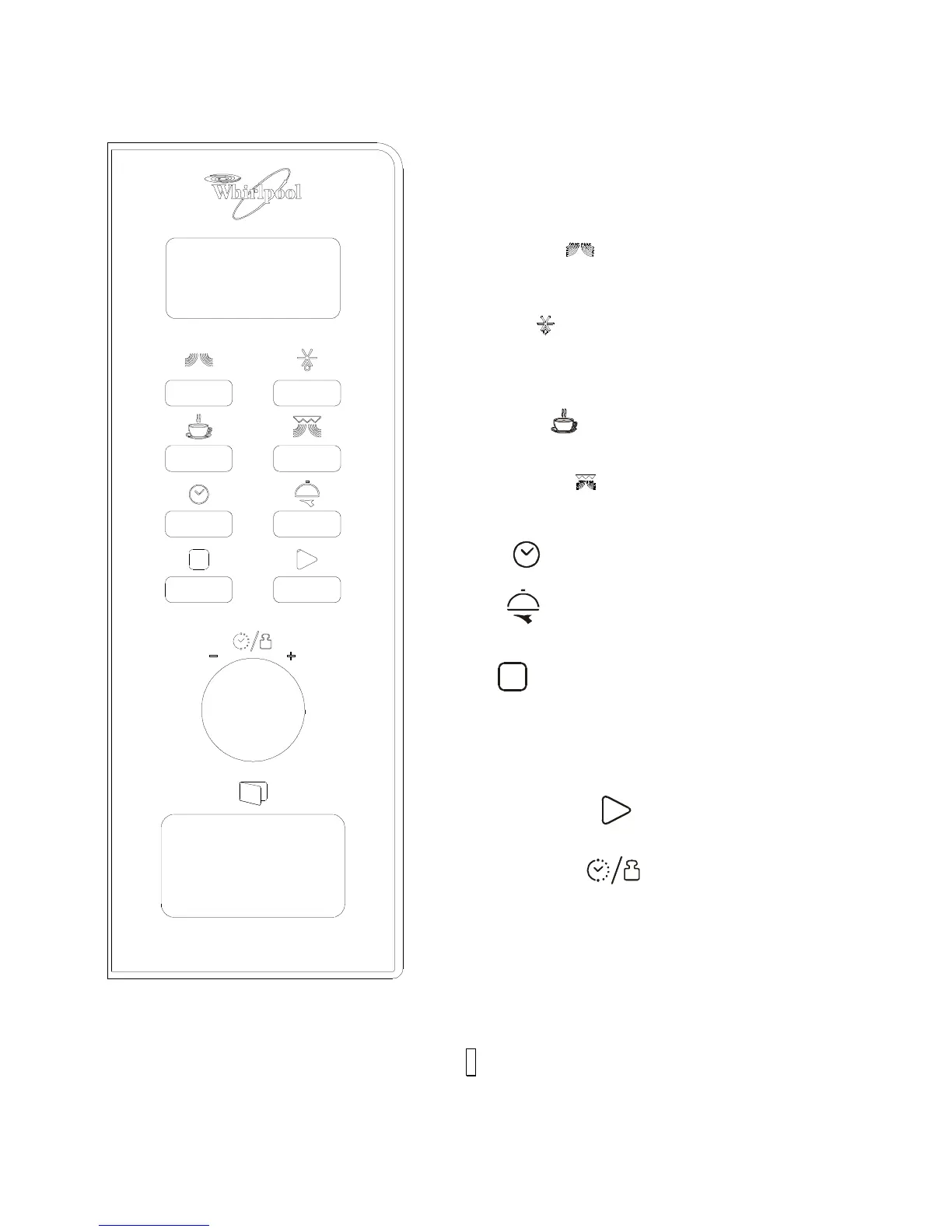
MENU ACTION SCREEN
Cooking time, power, action indicators, weight or serving and
clock time are displayed.
●
MICROWAVE( )
Touch this button a number of times to set microwave cooking
power level.
●
DEFROST( )
Press this button once to defrost food base on time.
Press this button twice to defrost food base on weight.
●
BEVERAGE( )
Touch to heat beverage.
●
GRILL/COMBI.( )
Touch to set a combination cooking with grilling and
microwave.
●
CLOCK( )
Use to set clock function.
●
MENU( )
Use to cook 7 popular kinds of food with weight or serving
inputed.
●
STOP( )
Press to cancel setting or reset the oven before setting a
cooking program.
Press once to temporarily stop cooking, or twice to cancel
cooking altogether.
●
START/EXPRESS( )
Use to start program or setting quick start function.
●
TIME/WEIGHTE( )
Turn to input cooking time ,weight or serving of food.




 To Next Page