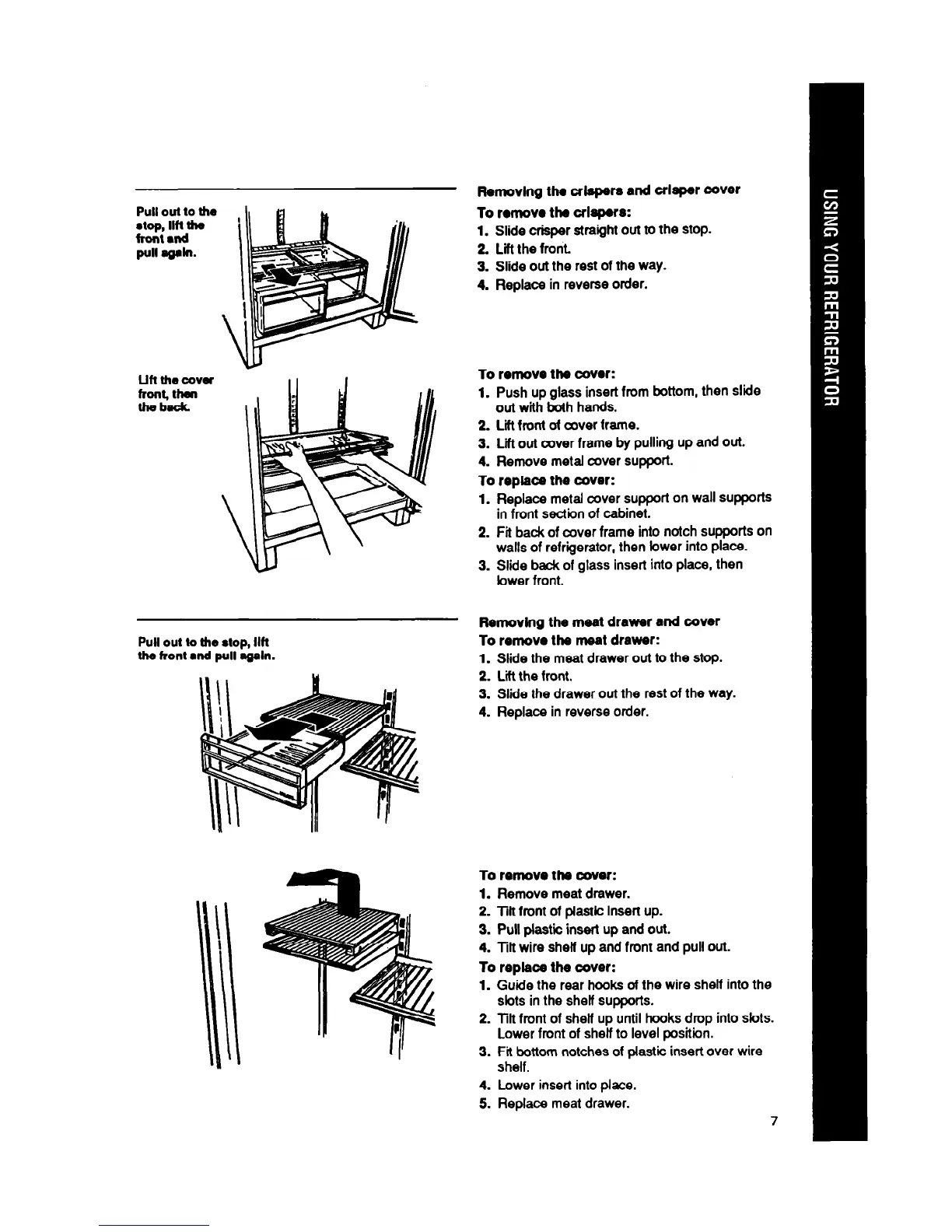
Pull oul to the
stop, Ilfl nm
front and
Pull qpln.
LIH the cova
front# tlKm
theback
Pull out to the
stop,
Ilfl
tlm front
l
nd
Pull mgaln.
Removing the crlapers and crisper cover
To remove the crlapsrs:
1. Slide crisper straight out to the stop.
2. Lift the front.
3. Slide out the rest of the way.
4. Replace in reverse order.
To remove ths cover:
1. Push up glass insert from bottom, then slide
out with troth hands.
2. Lift front ot mver frame.
3. Lii out cover frame by pulling up and out.
4. Remove metal cover support.
To replace the cover:
1.
2.
3.
Replace metal cover support on wall supports
in front section of cabinet.
Fit back of cover frame into notch supports on
walls of refrigerator, then lower into place.
Slide hack of glass insert into place, then
bwer front.
Flsmovlng the meat drawer and cover
To remove the meat drawer:
1.
Slide the meat drawer out to the stop.
2. Lii the front.
3. Slide the drawer out the rest of the way.
4. Replace in reverse order.
slots in the shelf supports.
2. Tilt front of shelf up until hooks drop into slots.
Lower front of shelf to level position.
3.
4.
5.
Fititttom notches of plastic insert over wire
Lower insert into place.
Replace meat drawer.
7
To remove the cover:
1. Remove meat drawer.
2. Tilt front of plastic insert up.
3. Pull plastic insert up and out.
4. Tilt wire shell up and front and pull out.
To replace the cover:
1. Guide the rear hooks of the wire shelf into the



 To Next Page