12
GB
SETTINGS
Here you can easily see and change the product settings (sound, language, factory default settings).
Put the product in Stand-By mode (see the Stand-By mode chapter), and press the Settings button to enter the
Settings Menu, then use the rotating knob and the Confirmation button to change the following settings:
• SET SOUND
Turn the Rotating Knob to select the values of Enable/Disable.
Press the Confirmation Button.
• LANGUAGE
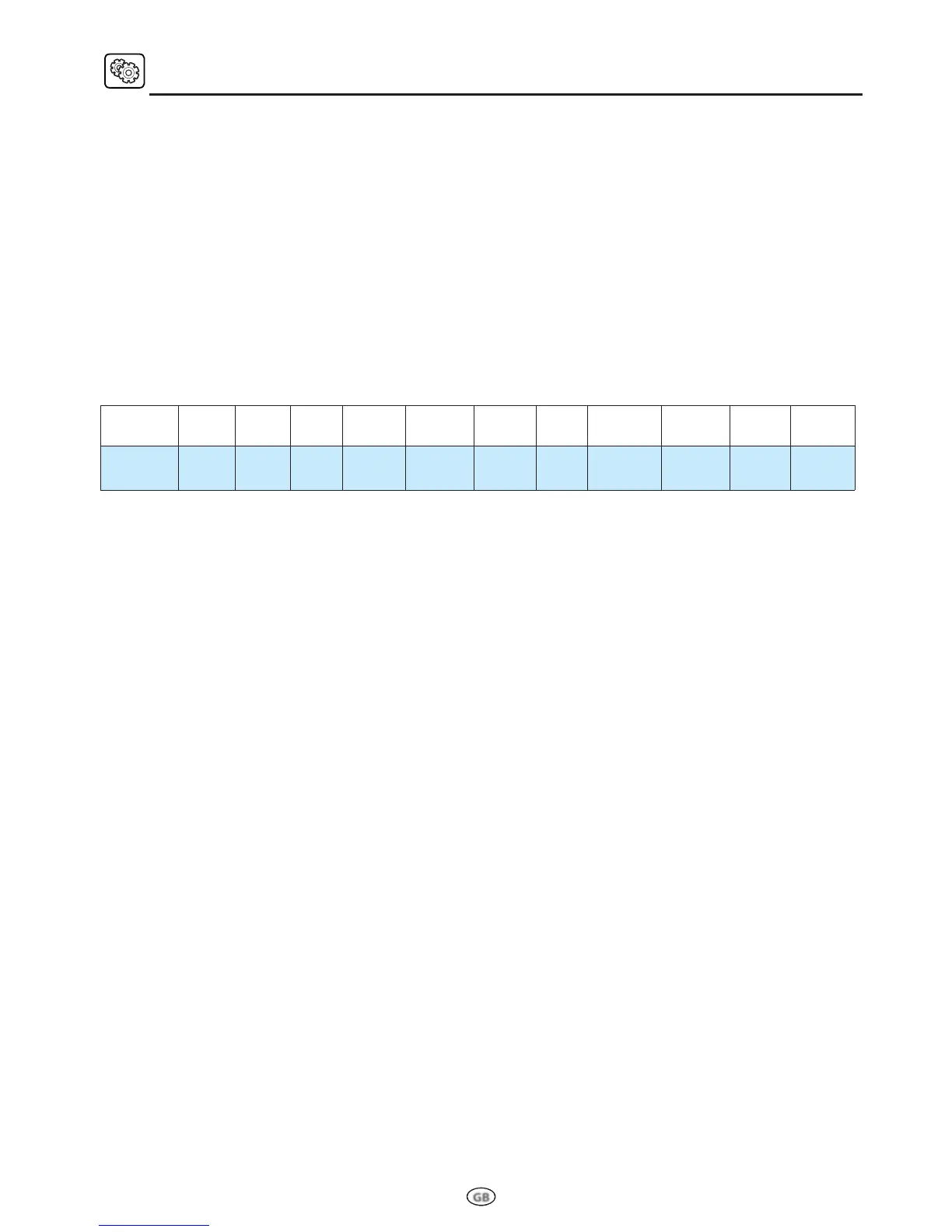
Turn the Rotating Knob to select the available languages (see table).
Press the Confirmation Button.
• RESET TO FACTORY DEFAULT
Turn the Rotating Knob to select the values of Yes/No. (Choosing Yes, the original settings of the product
will be restored).
Press the Confirmation Button.
• DEMO MODE
Turn the Rotating Knob to enable/disable the Demo Mode. Select “ENABLED” to activate the Demo
Mode, or “DISABLED” to deactivate it. (see “DEMO MODE” chapter for additional info).
Press the Confirmation Button.
• EXIT
Turn the Rotating Knob to select Exit.
Press the Confirmation Button to exit the menu.
ITEMS 1 2 3 4 5 6 7 8 9 10 11
Languages English French Italian German Swedish Spanish Dutch Hungarian Slovakian Polish Czech



 To Next Page