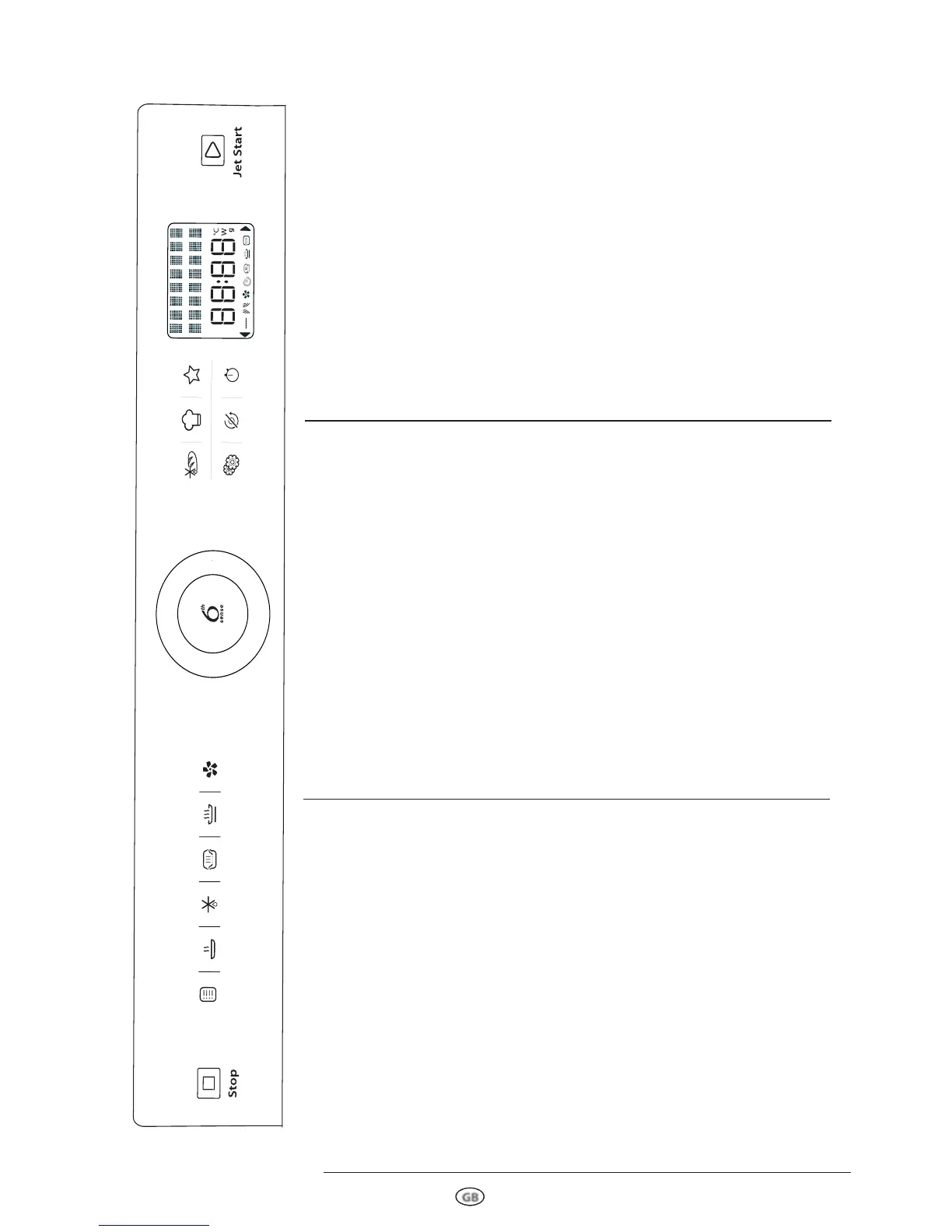
STOP BUTTON
Press to stop or reset any of the oven functions.
MANUAL FUNCTIONS
Use to select:
•Microwave function
•Grill function
•Combi Grill + Micro wa ves fu nction
•Combi Forced Air + Microwaves function
•Quick Heat function
6
TH
SENSE REHEAT BUTTON
Use to select 6
th
Sense reheat function.
DEFROST BUTTON
Use to select manual Defrost / 6
th
sense
Defrost functions.
6
TH
SENSE STEAM BUTTON
Use to select 6
th
Sense Steam function.
CRISP BUTTON
Use to select Crisp function.
FORCED AIR BUTTON
Use to select Forced Air (with or without
preheat) functions.
SETTINGS BUTTON
Use to change the settings, like language,
sounds, etc…
STOP TURNTABLE BUTTON
Use this function when you needed to use very
large vessels that could not turn freely in the
oven. It works only with the following
cooking functions:
•Forced Air
•
Combi Grill + Microwave
•
Combi Forced Air + Microwave
TIMER BUTTON
Use to set the kitchen timer.
TEXT DISPLAY
The display includes indicator text and
symbols.
JET START BUTTON
Product ON: confi rm the cooking parameter
and then start the cooking process.
Product OFF: activate the Jet Start function.
CONFIRMATION BUTTON
Product ON: confi rm the cooking parameter
and then start the cooking process.
Product OFF: activate the Jet Start function.
ROTATING KNOB
According to the different
functions, turn to se-
lect: •Microwave power level
•Grill level
•Cooking time
•Weight
•Temperature
•Food type/category
•Doneness level
6
TH
SENSE BREAD DEFROST BUTTON
Use to select 6
th
Bread Defrost function.
6
TH
SENSE CHEF MENU BUTTON
Use to Access the automatic recipes.
FAVOURITES BUTTON
Use to store and recall your favourite recipes.



 To Next Page