COMPONENT ACCESS
3-2
n
French-Door Boom Mount Refrigerator
Machine Compartment Components
1. Unplug refrigerator or disconnect power.
2. Access the machine compartment components by removing
screws holding machine compartment cover on back of
refrigerator.
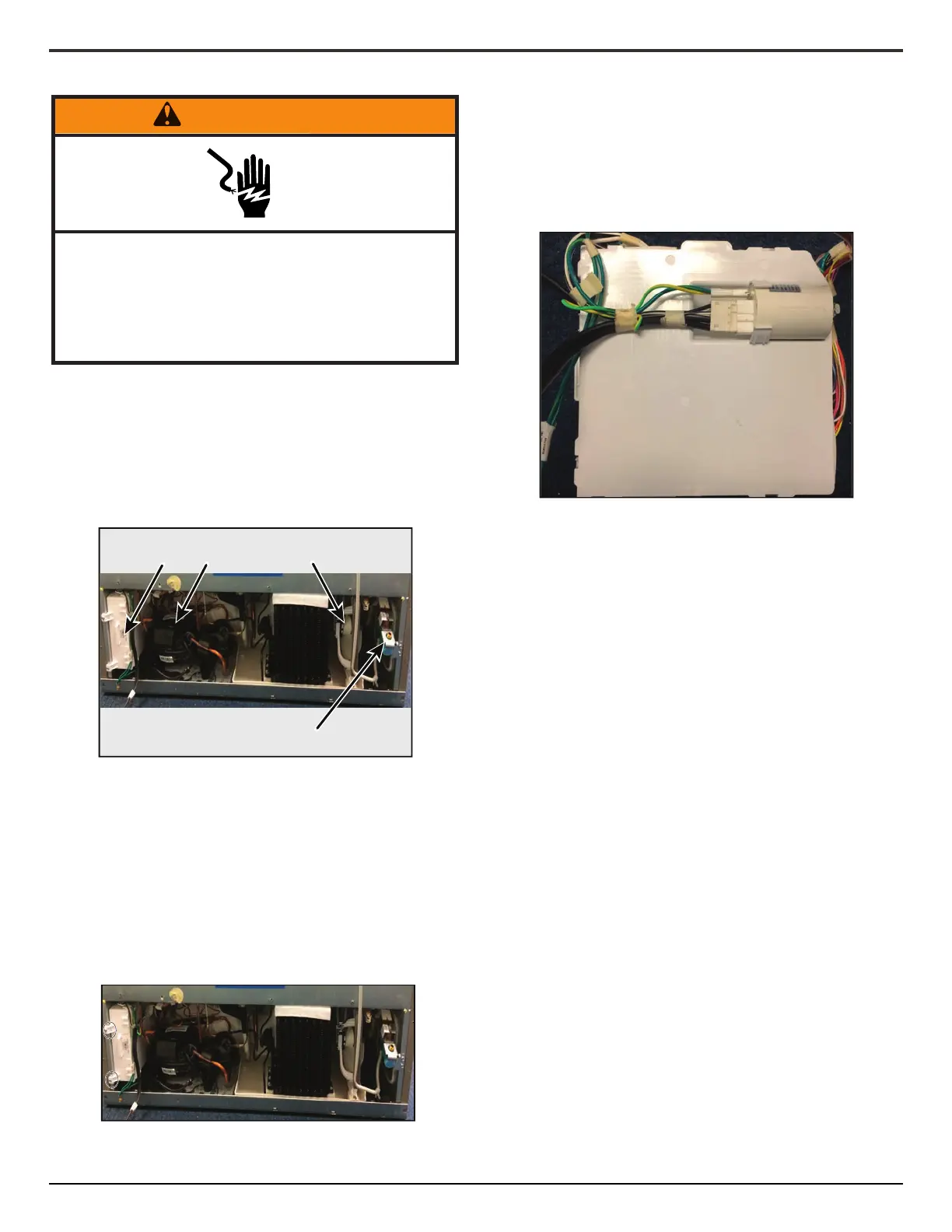
Below picture shows the components located in the machine
compartment:
1. Unplug refrigerator or disconnect power.
2. Access the machine compartment components by removing
screws holding machine compartment cover on back of
refrigerator.
3. Remove the two 1/4" screws holding the Orion Board to the
le rail.
4. Disconnect the three wiring connectors and remove the
Orion Board.
1. Unplug refrigerator or disconnect power.
2. Access the machine compartment components by removing
screws holding machine compartment cover on back of
refrigerator.
3. Remove the 1/4" screw at the top of the EMI lter.
4. Remove the EMI lter from the plasc clip.
5. Disconnect the wiring connectors.
1. Unplug refrigerator or disconnect power.
2. Access the machine compartment components by removing
screws holding machine compartment cover on back of
refrigerator.
3. Remove the single 1/4" screw at the boom of the condenser
fan bracket.
4. Disconnect the wiring connectors and slide out the fan to
remove.
1. Unplug refrigerator or disconnect power.
2. Access the machine compartment components by removing
screws holding machine compartment cover on back of
refrigerator.
3. Shut o external water supply to refrigerator
4. Remove the water supply connecon to the water valve.
5. Disconnect wiring connectors.
6. Disconnect the water valve outlet water tube.
7. Remove the two 1/4" screws securing the water valve to the
right machine compartment rail.
1. Unplug refrigerator or disconnect power.
2. Access the machine compartment components by removing
screws holding machine compartment cover on back of
refrigerator.
3. Remove the four 1/4" screws holding the metal cover in
place.
4. Use a screw driver to release the clip holding the plasc cover
in place.
5. Disconnect all eleven wiring connectors on the GF2 board.
6. Release the plasc clips and remove the GF2 board.
Electrical Shock Hazard
Disconnect power before servicing.
Failure to do so can result in death or
electrical shock.
Replace all parts and panels before operating.
A B C
D
A. Orion Board
B. Compressor
C. Condenser Fan
D. WaterIsolaonValve




 To Next Page