Operating Instructions
Starting your washer
Be sure to measure and add detergent, then place a sorted load in the washer
before starting it. This automatic washer has solid state electronic controls. Read
instructions carefully before setting any cycles,
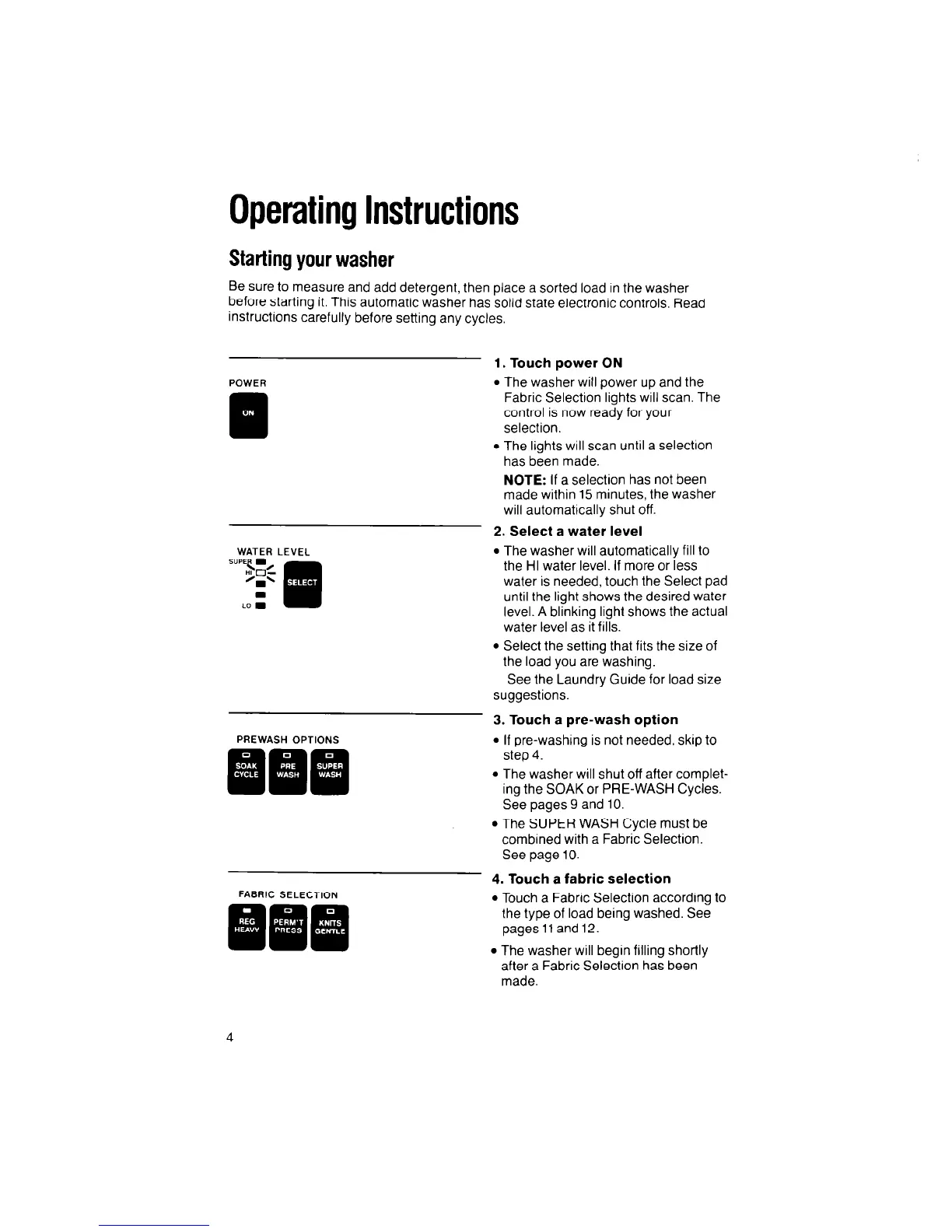
POWER
1. Touch power ON
l
The washer will Dower
UD
and the
1
0
WATER LEVEL
PREWASH OPTIONS
111
Fabric Selection’lights w’ill scan. The
control is now ready for your
selection.
l
The lights will scan until a selectron
has been made.
NOTE: If a selection has not been
made within 15 minutes, the washer
will automatically shut off.
2. Select a water level
l
The washer will automatically fill to
the HI water level. If more or less
water is needed, touch the Select pad
until the light shows the desired water
level. A blinking light shows the actual
water level as it fills.
l
Select the setting that fits the size of
the load you are washing.
See the Laundry Guide for load size
suggestions.
3. Touch a pre-wash option
l
If pre-washing is not needed, skip to
step 4.
l
The washer will shut off after complet-
ing the SOAK or PRE-WASH Cycles.
See pages 9 and 10.
l
The SUPER WASH Cycle must be
combined with a Fabric Selection.
See page 10.
FABRIC SELECTION
4. Touch a fabric selection
l
Touch a Fabric Selection according to
the type of load being washed. See
pageslland12.
l
The washer will begin filling shortly
after a Fabric Selection has been
made.



 To Next Page