13
GB
PRESET
IF THE PRESET TIME COMES, the beep will signal twice, then the cooking
procedure starts. If the oven door is not close at this moment, the
procedure will pause for it.
DURING THE SETTING OF PRESET, if press the Stop button, the oven will
exit from setting state and the setting will be invalid.
NOTE: ,Preset can’t be done if the clock has not been set. (Preset
can’t be set for “Defrost per weight” or “Defrost per time “function.)
U
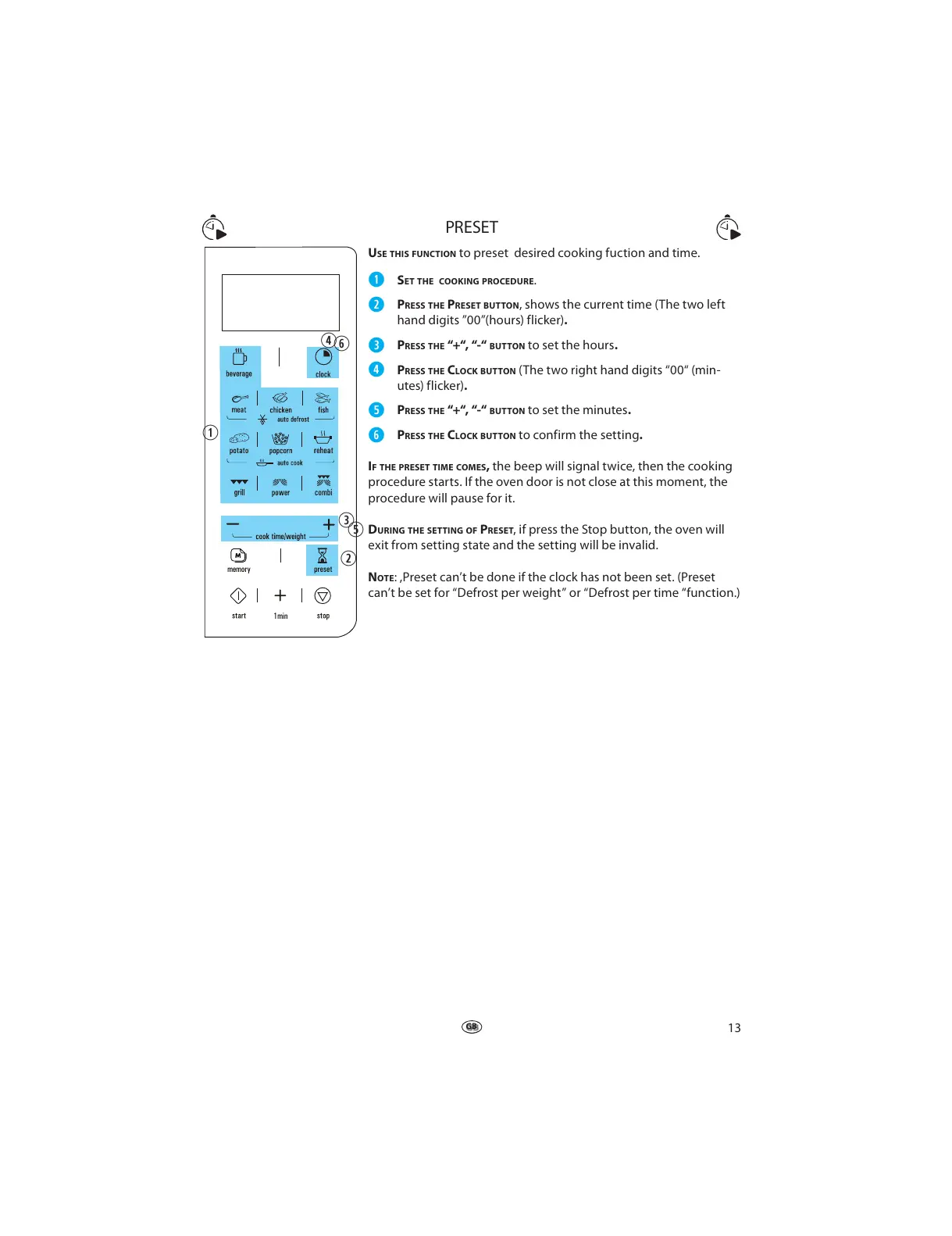
SE THIS FUNCTION to preset desired cooking fuction and time.
q
SET THE COOKING PROCEDURE.
w
PRESS THE PRESET BUTTON, shows the current time (The two left
hand digits ”00”(hours) flicker).
e
PRESS THE “+“, “-“ BUTTON to set the hours.
r
PRESS THE CLOCK BUTTON (The two right hand digits “00“ (min-
utes) flicker).
t
PRESS THE “+“, “-“ BUTTON to set the minutes.
y
PRESS THE CLOCK BUTTON to confirm the setting.
q
w
e
r
t
y



 To Next Page