6
GB
CONTROL PANEL
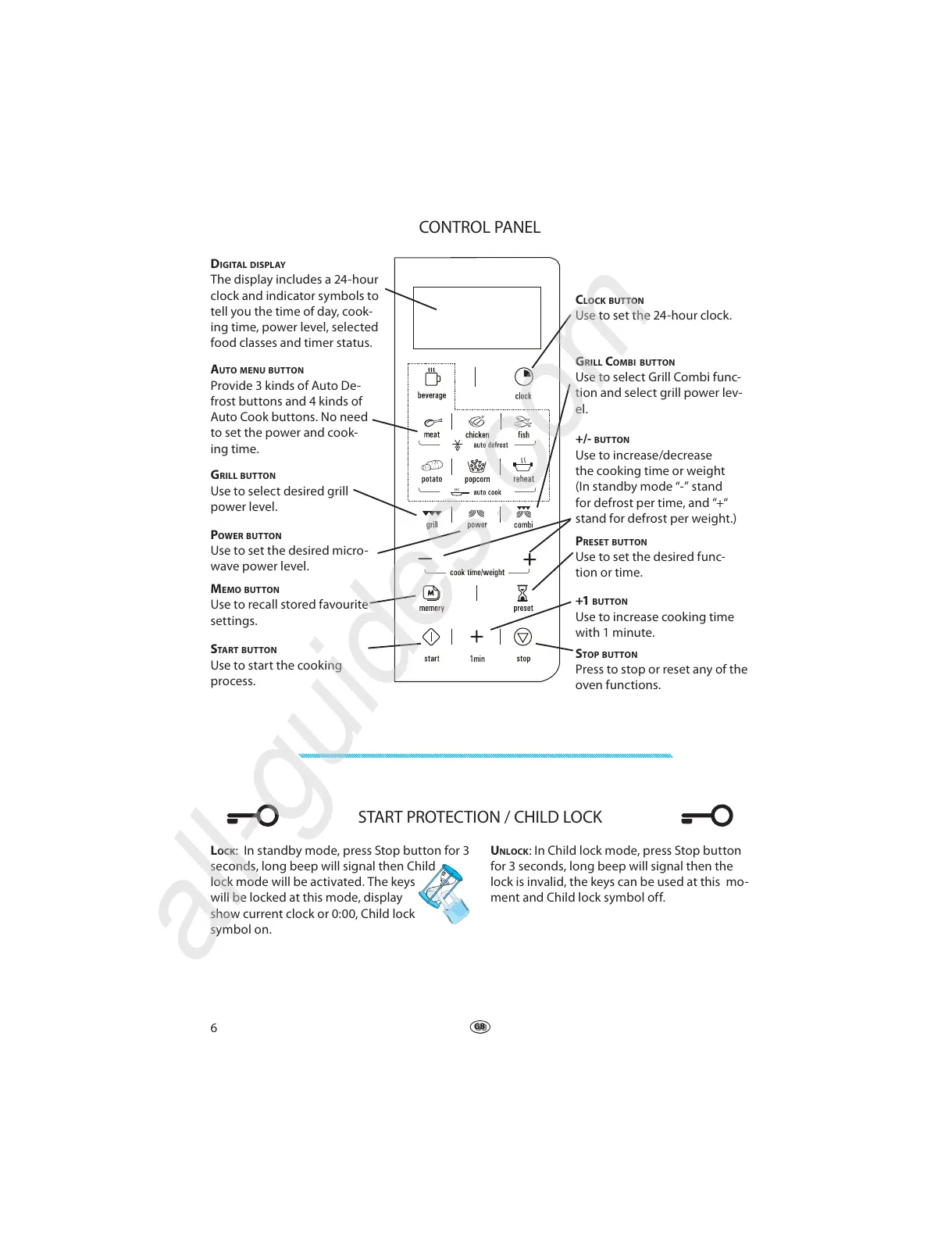
DIGITAL DISPLAY
The display includes a 24-hour
clock and indicator symbols to
tell you the time of day, cook-
ing time, power level, selected
food classes and timer status.
A
UTO MENU BUTTON
Provide 3 kinds of Auto De-
frost buttons and 4 kinds of
Auto Cook buttons. No need
to set the power and cook-
ing time.
GRILL BUTTON
Use to select desired grill
power level.
POWER BUTTON
Use to set the desired micro-
wave power level.
M
EMO BUTTON
Use to recall stored favourite
settings.
S
TART BUTTON
Use to start the cooking
process.
C
LOCK BUTTON
Use to set the 24-hour clock.
+/-
BUTTON
Use to increase/decrease
the cooking time or weight
(In standby mode “-” stand
for defrost per time, and “+“
stand for defrost per weight.)
G
RILL COMBI BUTTON
Use to select Grill Combi func-
tion and select grill power lev-
el.
P
RESET BUTTON
Use to set the desired func-
tion or time.
+1
BUTTON
Use to increase cooking time
with 1 minute.
S
TOP BUTTON
Press to stop or reset any of the
oven functions.
START PROTECTION / CHILD LOCK
LOCK: In standby mode, press Stop button for 3
seconds, long beep will signal then Child
lock mode will be activated. The keys
will be locked at this mode, display
show current clock or 0:00, Child lock
symbol on.
UNLOCK: In Child lock mode, press Stop button
for 3 seconds, long beep will signal then the
lock is invalid, the keys can be used at this mo-
ment and Child lock symbol off.



 To Next Page