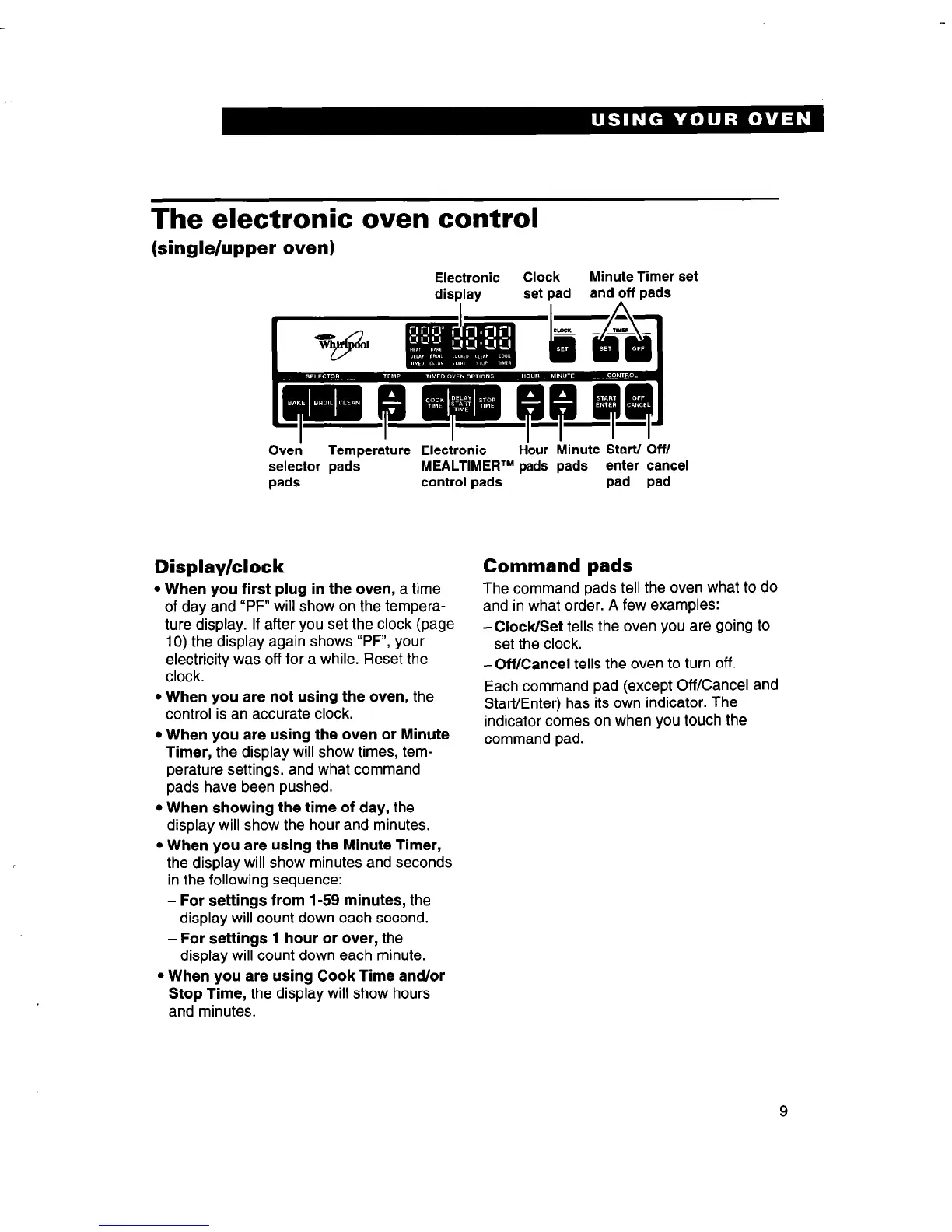
The electronic oven control
(single/upper oven)
Electronic
Clock
Minute Timer set
display
set pad
and off pads
Oveti
Temperature Electronic
Hbur Minute Start/ Off/
selector pads
MEALTIMEFP pads pads enter cancel
pads
control pads
pad pad
Display/clock
l When you first plug in the oven, a time
of day and “PF” will show on the tempera-
ture display. If after you set the clock (page
10) the display again shows “PF”, your
electricity was off for a while. Reset the
clock.
l When you are not using the oven, the
control is an accurate clock.
l When you are using the oven or Minute
Timer, the display will show times, tem-
perature settings, and what command
pads have been pushed.
l When showing the time of day, the
display will show the hour and minutes.
l When you are using the Minute Timer,
the display will show minutes and seconds
in the following sequence:
- For settings from 1-59 minutes, the
display will count down each second.
- For settings 1 hour or over, the
display will count down each minute.
l When you are using Cook Time and/or
Stop Time, the display will show hours
and minutes.
Command pads
The command pads tell the oven what to do
and in what order. A few examples:
-Clock/Set tells the oven you are going to
set the clock.
-Off/Cancel tells the oven to turn off.
Each command pad (except Off/Cancel and
Stat-t/Enter) has its own indicator. The
indicator comes on when you touch the
command pad.
9



 To Next Page