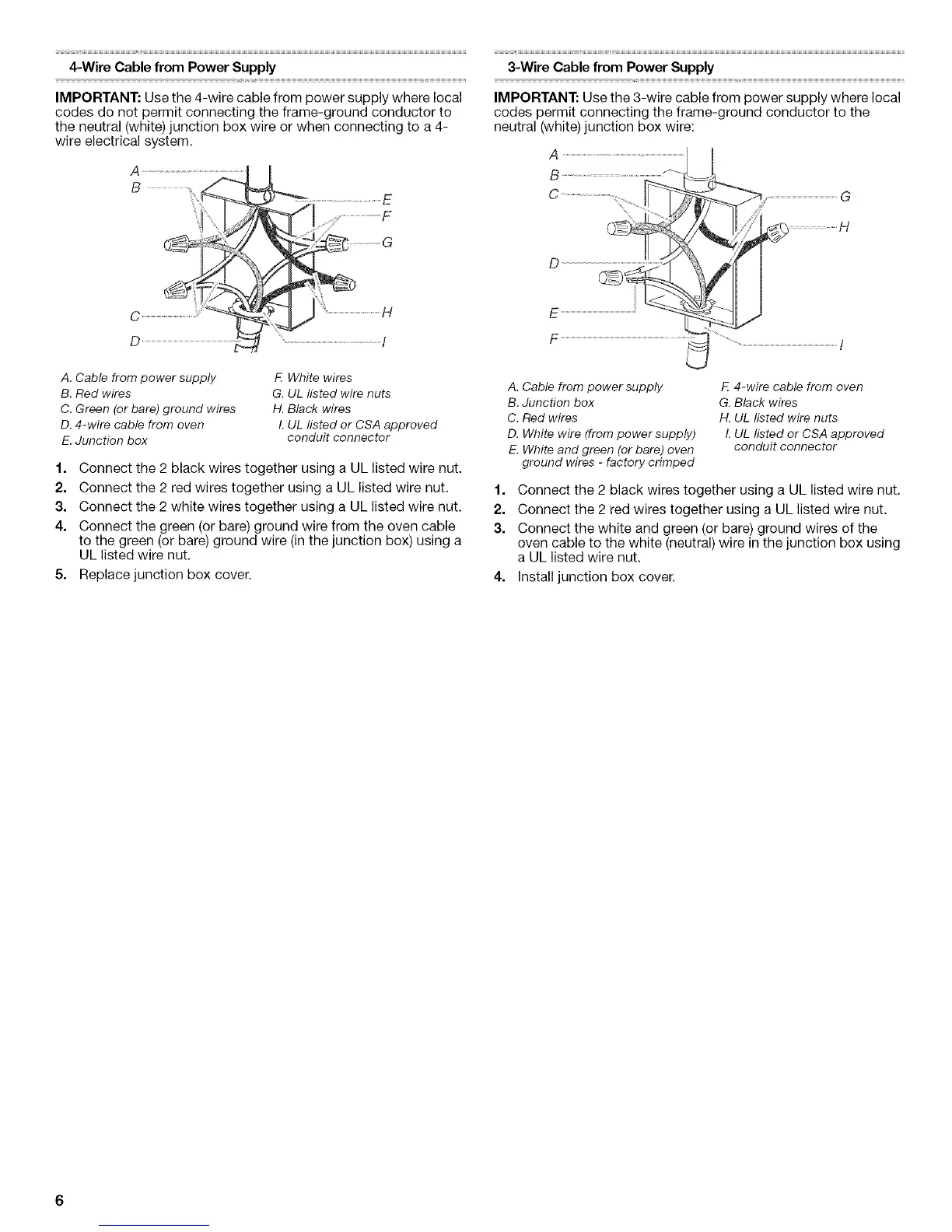
4-Wire Cable from Power Supply
IMPORTANT: Use the 4-wire cable from power supply where local
codes do not permit connecting the frame-ground conductor to
the neutral (white) junction box wire or when connecting to a 4-
wire electrical system.
A
B
C
D
H
A. Cable from power supply
B. Red wires
C. Green (or bare) ground wires
D. 4-wire cable from oven
E. Junction box
F. White wires
G, UL listed wire nuts
H. Black wires
L UL listed or CSA approved
conduit connector
1. Connect the 2 black wires together using a UL listed wire nut.
2. Connect the 2 red wires together using a UL listed wire nut.
3. Connect the 2 white wires together using a UL listed wire nut.
4. Connect the green (or bare) ground wire from the oven cable
to the green (or bare) ground wire (in the junction box) using a
UL listed wire nut.
5. Replace junction box cover.
A. Cable from power supply
B. Junction box
C. Red wires
D. White wire (from power supply)
E. White and green (or bare) oven
ground wires - factory crimped
F 4-wire cable from oven
G. Black wires
H. UL listed wire nuts
L UL listed or CSA approved
conduit connector
1. Connect the 2 black wires together using a UL listed wire nut.
2. Connect the 2 red wires together using a UL listed wire nut.
3. Connect the white and green (or bare) ground wires of the
oven cable to the white (neutral) wire in the junction box using
a UL listed wire nut.
4. Install junction box cover.





 To Next Page