DRYER DIAGNOSTIC MODE
This mode is entered by depressing COLORS/DELICATES for one second
while in either of the set-up codes 6 xx or 7 xx or with a diagnostic code
present. Diagnostic codes are cleared on entry and all display segments
should flash. If a diagnostic code persists, it must be corrected before the
diagnostic cycle can be entered.
All Models:
With all segments flashing, the diagnostic cycle is started by depressing
the PERM PRESS button. The cycle consists of 7 minutes of heat and
1 minute of cooldown.
The COTTON/WHITES button will increment the diagnostic cycle
minutes up to 99, then roll over to 2 minutes. The COLORS/DELICATES
button will cancel this cycle and exit the diagnostic mode.
DRYER HELP MODE
Dryer help mode is entered by pressing the COTTON/WHITES button
while in special pricing option 2.XX. In help mode, the software revision is
displayed. The help mode is advanced by pressing the PERM PRESS button.
See Help Mode Submenu below for the order in which items are displayed.
Press the COTTON/WHITES button at any time to exit help mode.
S
Display
Indication
Step
1 1h.XX Help Code 1, where XX is the help code
number. *
2 2h.XX Help Code 2, where XX is the help code
number. *
3 3h.XX Help Code 3, where XX is the help code
number. *
4 1.X## Error history code 1, where X is the F or d
code, and ## is the code number. **
5 2.X## Error history code 2, where X is the F or d
code, and ## is the code number. **
6 3.X## Error history code 3, where X is the F or d
code, and ## is the code number. **
7 4.X## Error history code 4, where X is the F or d
code, and ## is the code number. **
8 SC.XX CCU software revision, where XX is the
software revision number.
9 SU.XX UI software revision, where XX is the
software number.
10 UI EEPROM revision, where XX is the
EEPROM number.
EU.XX
Help Mode Submenu
Explanation
* To erase the 3 help codes, press COLORS/DELICATES button.
** The Errors displayed in this section are the history errors that have occurred in the dryer (not
necessarily an error that is in progress). The current error is displayed in the MANUAL KEY
FUNCTION IN DIAGNOSTIC SUB-MODE.
*
Code
Help Codes
Description
Help
71
74
75
88
Generation 2 debit card cycle polling message out of sequence
Generation 2 debit card remaining balance message out of sequence
Generation 2 debit card new card balance message out of sequence
d
Invalid messaging state found in data acquisition communications
comm_suprv ( ) routine
É
In help mode, other display symbols and elements are mapped to reflect the
state of various inputs and outputs as follows:
ALL DRYERS:
*. . . . . ... . . . .......low voltage present (below about 90 VAC)
° (circle above digit) . . ...... . . . . .... . . . . . . . . door closed
OR . . . . . . . . . . . ....... . . . . . . . . . motor sensed running
AIR. . . . . . . . . . . . . . . . ... . . . . . . . heater/gas valve relay on
FLUFF.. . . . . . . . . .... . .... . . . . . . . . . . motor relay on
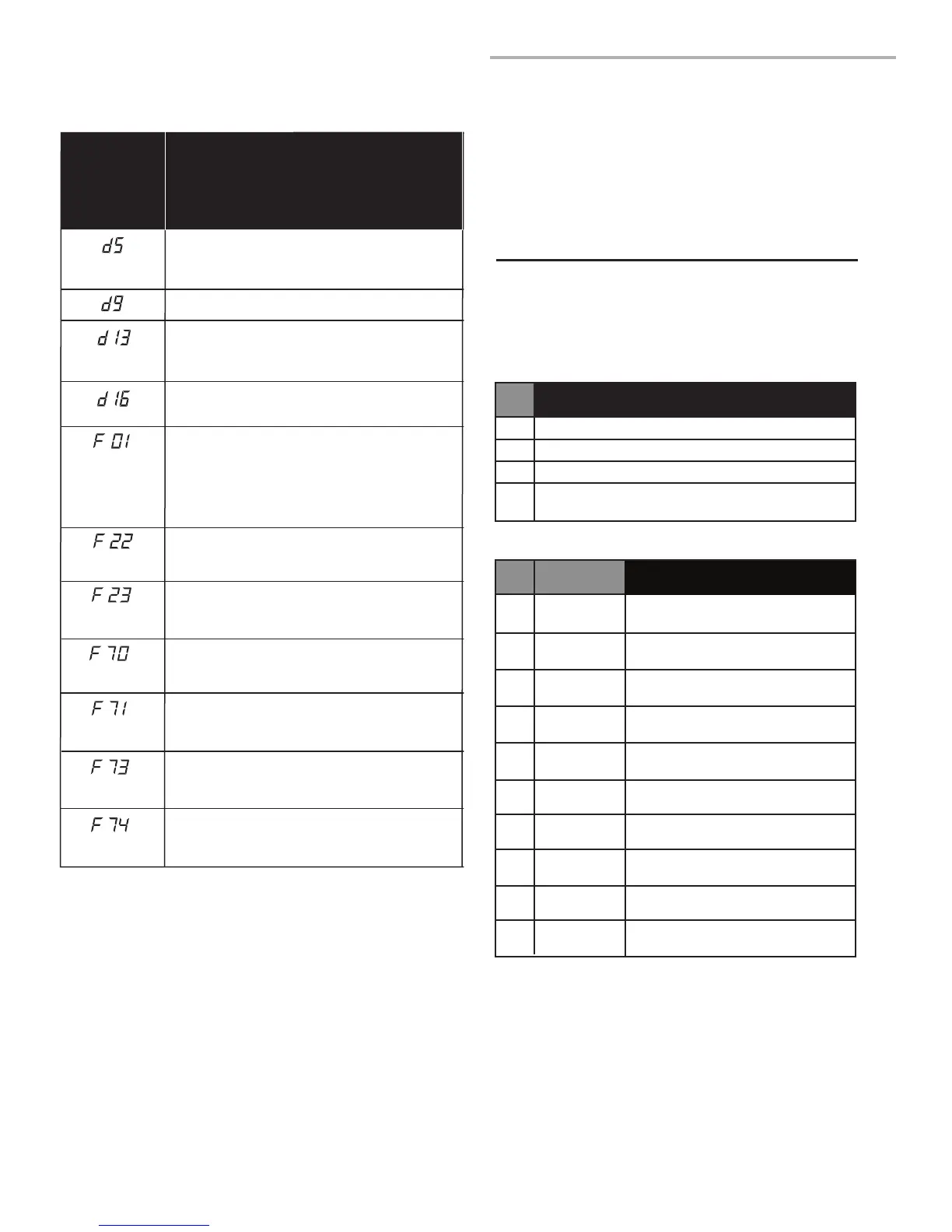
DIAGNOSTIC CODES
If the set-up mode is entered and one of the following has previously occurred,
the appropriate diagnostic code will be in the display.
C
EXPLANATION
DRYER
DISPLAY/
AFFICHAGE
DE LA
SÉCHEUSE
E
Blocked coin 1 or coin drop UI control circuit failure
(coin recognition and customer display disabled while
blockage persists).
Blocked coin 2 or coin drop UI control circuit failure
(coin recognition and customer display disabled while
blockage persists).
Not receiving communications from installed debit
card reader in Enhanced (Generation 2) Debit mode.
Voltage detected below 90 VAC for 8 seconds.
UI Microprocessor is not able to read or verify EEPROM
(cycles and price display disabled until diagnostic code is
manually cleared).
Dryer motor control circuit error (cycles and price
display disabled until diagnostic code is manually cleared).
The control doesn’t know if the motor relay is bad (stuck
on), the motor relay drive circuit is bad (shorted), causing
the motor relay to stay on, or the motor relay feedback
circuit is bad.
Exhaust thermistor open, temperature drops below 18°F
(>50 kΩ) for 1 minute in Run mode, or immediately in
Factory Diagnostic Mode.
Exhaust thermistor shorted, temperature above 250°F
(<500Ω) for 1 minute in Run mode, or immediately in
Factory Diagnostic Mode.
CCU is not receiving communications from UI (cycles and
price display disabled while error persists or is manually
cleared).
UI is not receiving communications from CCU (cycles and
price display disabled while error persists or is manually
cleared).
UI EEPROM memory is a CRC failure (cycles and price
display disabled until diagnostic code is manually cleared).





 To Next Page