EasyManua.ls Logo

White 1425 - 5. Selecting the Stitch

White 1425
62 pages
Print Icon
To Next Page IconTo Next Page
To Previous Page IconTo Previous Page
Loading...
Page
22_J
English
Espanol
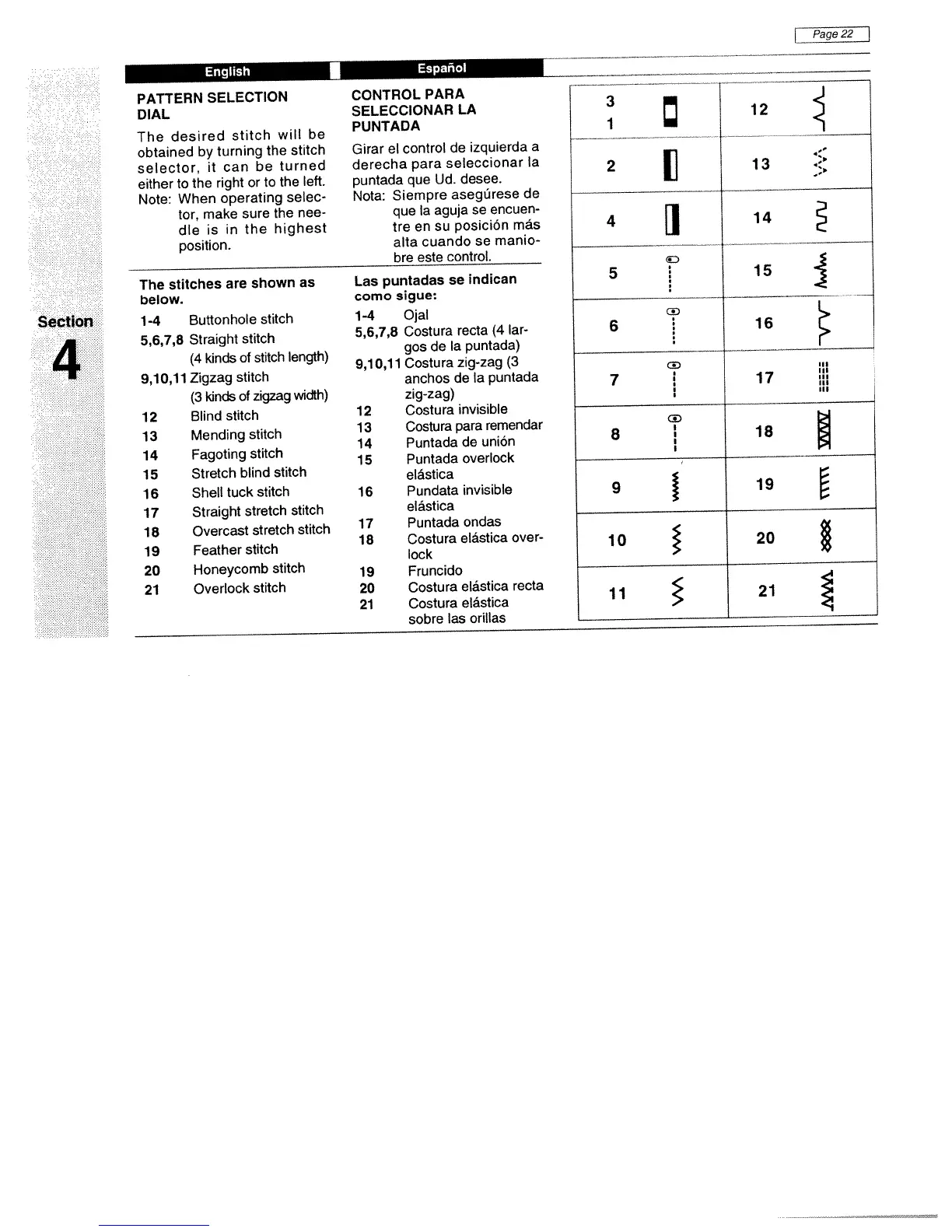
PATTERN
SELECTION
DIAL
The
desired
stitch
will
be
obtained
by
turning
the
stitch
selector,
it
can
be
turned
either
to
the
right
or
to
the
left.
Note:
When
operating
selec
tor,
make
sure
the
nee
dle
is
in
the
highest
position.
The
stitches
are
shown
as
below.
1-4
Buttonhole
stitch
5,6,7,8
Straight
stitch
(4
kinds
of
stitch
length)
9,10,11
Zigzag
stitch
(3
kinds
of
zigzag
width)
12
Blind
stitch
13
Mending
stitch
14
Fagoting
stitch
15
Stretch
blind
stitch
16
Shell
tuck
stitch
17
Straight
stretch
stitch
18
Overcast
stretch
stitch
19
Feather
stitch
20
Honeycomb
stitch
21
Overlock
stitch
CONTROL
PARA
SELECCIONAR
LA
PUNTADA
Girar
el
control
de
izquierda
a
derecha
para
seleccionar
Ia
puntada
que
Ud.
desee.
Nota:
Siempre
asegârese
de
que
Ia
aguja
se
encuen
tre
en
su
posiciOn
más
alta
cuando
se
manio
bre
este
control.
Las
puntadas
se
indican
como
sigue:
1-4
Ojal
5,6,7,8
Costura
recta
(4
lar
gos
de
Ia
puntada)
9,10,11
Costura
zig-zag
(3
anchos
de
Ia
puntada
zig-zag)
12
Costura
invisible
13
Costura
para
remendar
14
Puntada
de
uniOn
15
Puntada
overlock
elástica
16
Pundata
invisible
elástica
17
Puntada
ondas
18
Costura
elástica
over-
lock
19
Fruncido
20
Costura
elástica
recta
21
Costura
elástica
sobre
las
orillas
Section
4
12
__
2
1]
13
4
El
14
15
cD
6
16
c
III
7
17
,
II,
I
II,
I
III
CD
8
I
18
j
9
19
10
20
11
21

Related product manuals