EasyManua.ls Logo

White 2137 - Zigzag Stitching; Setting Stitch Width and Locks for Zigzag

Default Icon
38 pages
Print Icon
To Next Page IconTo Next Page
To Previous Page IconTo Previous Page
Loading...
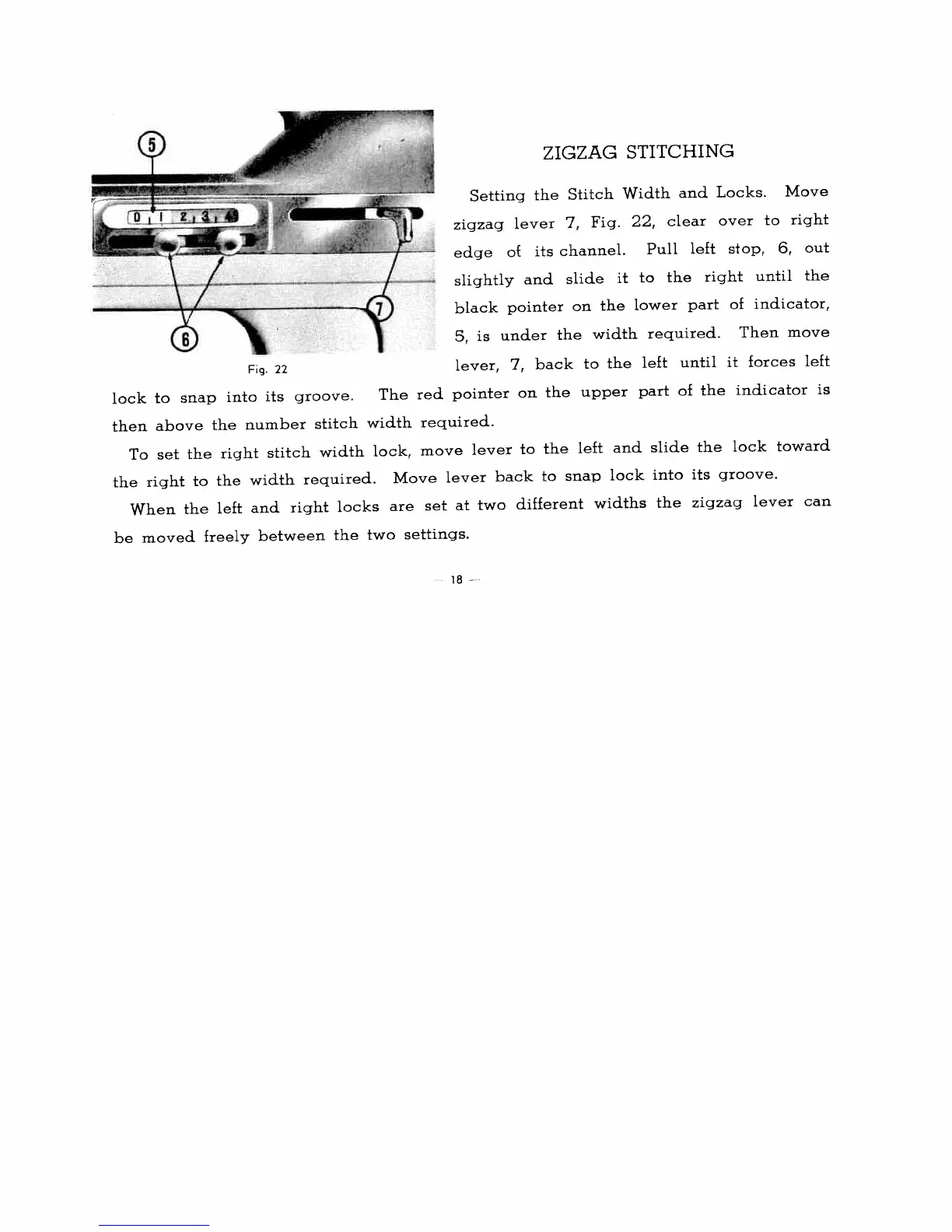
ZIGZAG
STITCHING
Setting
the
Stitch
Width
and
Locks.
Move
zigzag
lever
7,
Fig.
22,
clear
over
to
right
edge
of
its
channel.
Pull
left
stop,
6,
out
slightly
and
slide
it
to
the
right
until
the
black
pointer
on
the
lower
part
of
indicator,
5,
is
under
the
width
required.
Then
move
Fg.
22
lever,
7,
back
to
the
left
until
it
forces
left
lock
to
snap
into
its
groove.
The
red
pointer
on
the
upper
part
of
the
indicator
is
then
above
the
number
stitch
width
required.
To
set
the
right
stitch
width
lock,
move
lever
to
the
left
and
slide
the
lock
toward
the
right
to
the
width
required.
Move
lever
back
to
snap
lock
into
its
groove.
When
the
left
and
right
locks
are
set
at
two
different
widths
the
zigzag
lever
can
be
moved
freely
between
the
two
settings.
18
-

Related product manuals