EasyManua.ls Logo

White 750 - Removing Front Cover; Tool Box Machine; To Open the Cover

White 750
40 pages
Print Icon
To Next Page IconTo Next Page
To Previous Page IconTo Previous Page
Loading...
0
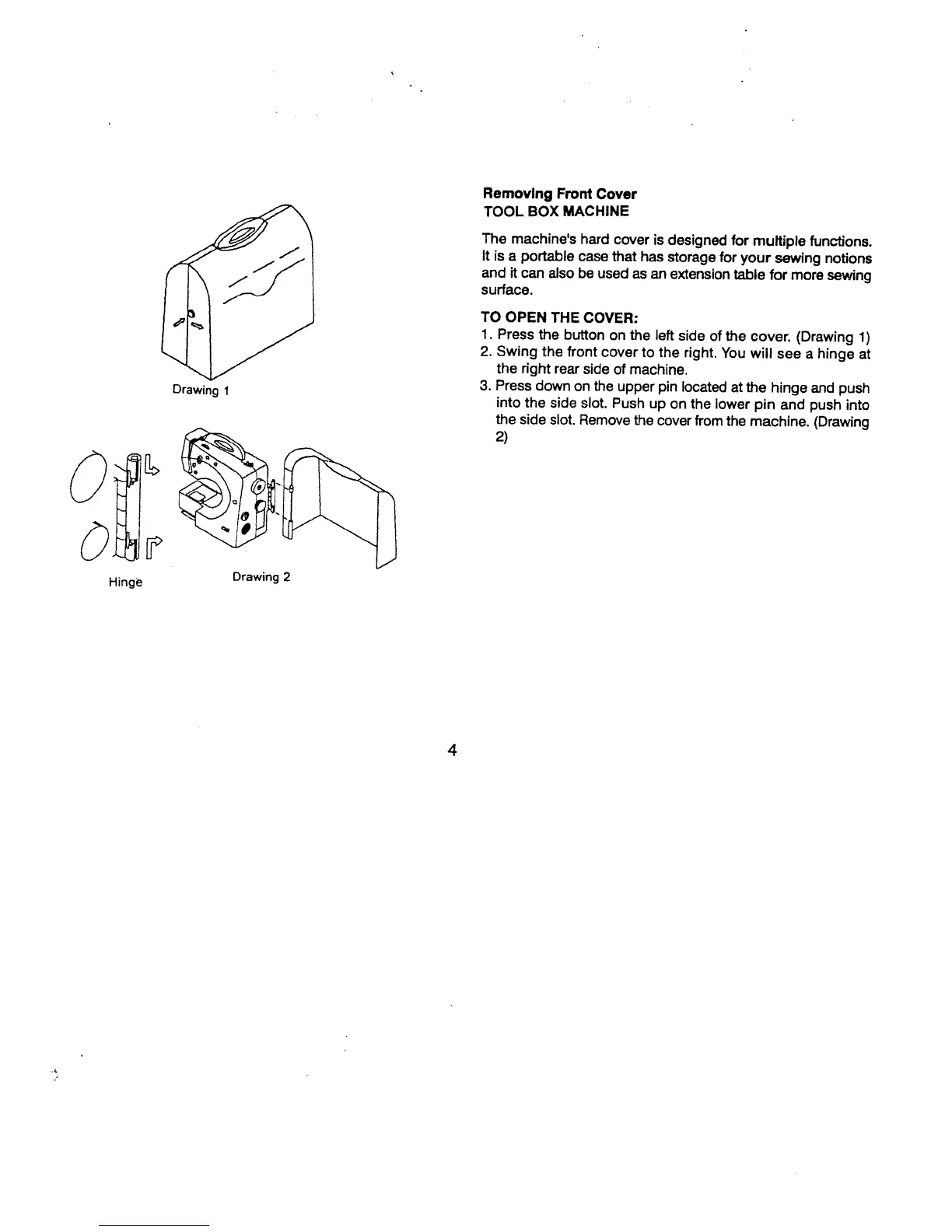
Hinge
Removing
Front
Cover
TOOL
BOX
MACHINE
The
machine’s
hard
cover
is
designed
for
multiple
functions.
It
is
a
portable
case
that
has
storage
for
your
sewing
notions
and
it
can
aiso
be
used
as
an
extension
table
for
more
sewing
surface.
TO
OPEN
THE
COVER:
1.
Press
the
button
on
the
left
side
of
the
cover.
(Drawing
1)
2.
Swing
the
front
cover
to
the
right.
You
will
see
a
hinge
at
the
right
rear
side
of
machine.
3.
Press
down
on
the
upper
pin
located
at
the
hinge
and
push
into
the
side
slot.
Push
up
on
the
lower
pin
and
push
into
the
side
slot.
Remove
the
cover
from
the
machine.
(Drawing
2)
Drawing
2
4

Table of Contents