EasyManua.ls Logo

White YARD BOSS 950 - Attaching Chipper Chute and Clutch Cable

Default Icon
24 pages
Print Icon
To Next Page IconTo Next Page
To Previous Page IconTo Previous Page
Loading...
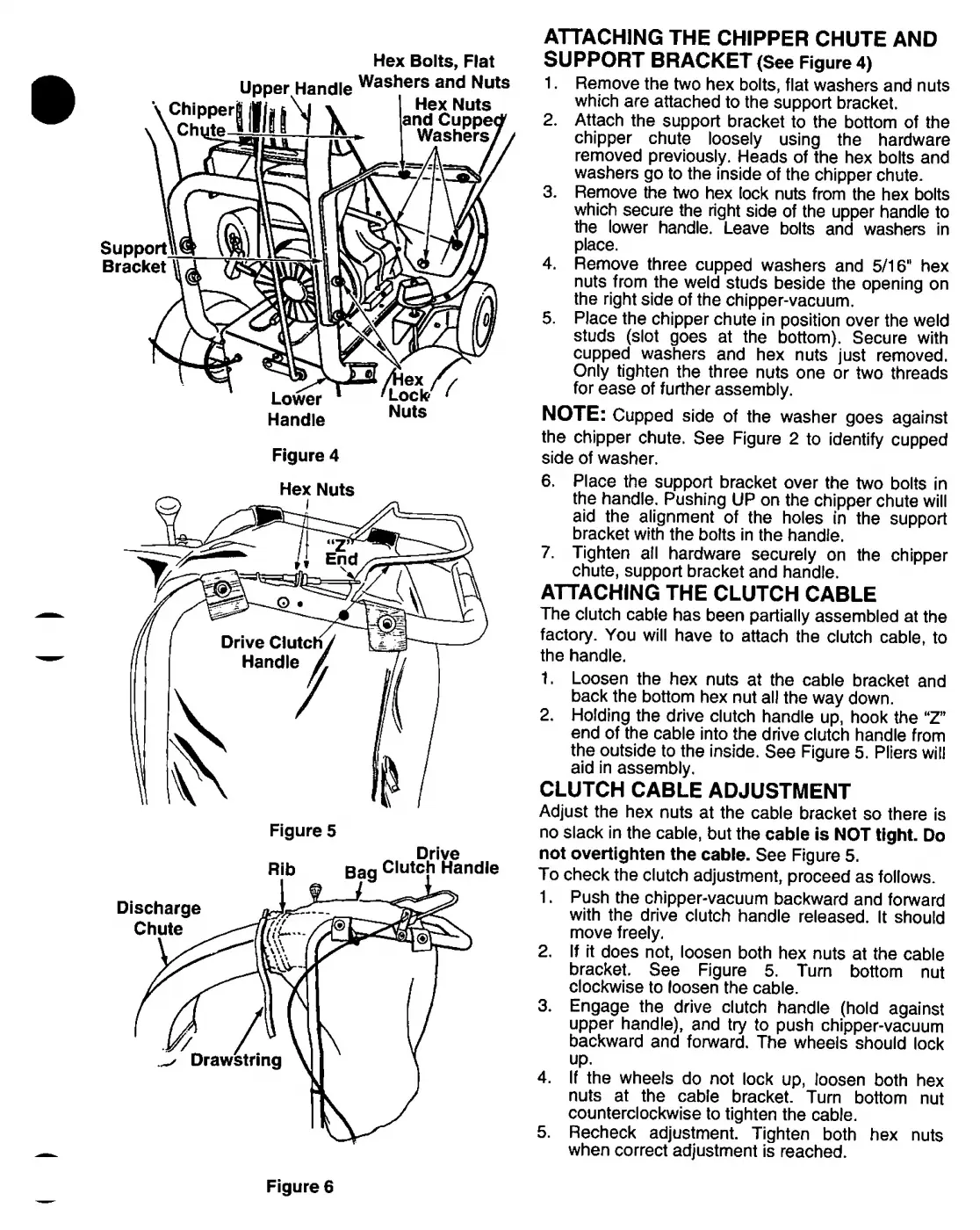
ATTACHING
THE
CHIPPER
CHUTE
AND
SUPPORT
BRACKET
(See
Figure
4)
1.
Remove
the
two
hex
bolts,
flat
washers
and
nuts
which
are
attached
to
the
support
bracket.
2.
Attach
the
support
bracket
to
the
bottom
of
the
chipper
chute
loosely
using
the
hardware
removed
previously.
Heads
of
the
hex
bolts
and
washers
go
to
the
inside
of
the
chipper
chute.
3.
Remove
the
two
hex
lock
nuts
from
the
hex
bolts
which
secure
the
right
side
of
the
upper
handle
to
the
lower
handle.
Leave
bolts
and
washers
in
place.
4.
Remove
three
cupped
washers
and
5/16“
hex
nuts
from
the
weld
studs
beside
the
opening
on
the
right
side
of
the
chipper-vacuum.
5.
Place
the
chipper
chute
in
position
over
the
weld
studs
(slot
goes
at
the
bottom).
Secure
with
cupped
washers
and
hex
nuts
just
removed.
Only
tighten
the
three
nuts
one
or
two
threads
for
ease
of
further
assembly.
NOTE:
Cupped
side
of
the
washer
goes
against
the
chipper
chute.
See
Figure
2
to
identify
cupped
side
of
washer.
Hex
Nuts
Figure
5
Drive
6.
Place
the
support
bracket
over
the
two
bolts
in
the
handle.
Pushing
UP
on
the
chipper
chute
will
aid
the
alignment
of
the
holes
in
the
support
bracket
with
the
bolts
in
the
handle.
7.
Tighten
all
hardware
securely
on
the
chipper
chute,
support
bracket
and
handle.
ATTACHING
THE
CLUTCH
CABLE
The
clutch
cable
has
been
partially
assembled
at
the
factory.
You
will
have
to
attach
the
clutch
cable,
to
the
handle.
1.
Loosen
the
hex
nuts
at
the
cable
bracket
and
back
the
bottom
hex
nut
all
the
way
down.
2.
Holding
the
drive
clutch
handle
up,
hook
the
“Z”
end
of
the
cable
into
the
drive
clutch
handle
from
the
outside
to
the
inside.
See
Figure
5.
Pliers
will
aid
in
assembly.
CLUTCH
CABLE
ADJUSTMENT
Adjust
the
hex
nuts
at
the
cable
bracket
so
there
is
no
slack
in
the
cable,
but
the
cable
is
NOT
tight.
Do
not
overtighten
the
cable.
See
Figure
5.
To
check
the
clutch
adjustment,
proceed
as
follows.
1.
Push
the
chipper-vacuum
backward
and
forward
with
the
drive
clutch
handle
released.
It
should
move
freely.
2.
If
it
does
not,
loosen
both
hex
nuts
at
the
cable
bracket.
See
Figure
5.
Turn
bottom
nut
clockwise
to
loosen
the
cable.
3.
Engage
the
drive
clutch
handle
(hold
against
upper
handle),
and
try
to
push
chipper-vacuum
backward
and
forward.
The
wheels
should
lock
up.
4.
If
the
wheels
do
not
lock
up,
loosen
both
hex
nuts
at
the
cable
bracket.
Turn
bottom
nut
counterclockwise
to
tighten
the
cable.
5.
Recheck
adjustment.
Tighten
both
hex
nuts
when
correct
adjustment
is
reached.
Figure
6