4
WHY-EP
ROLLING SIMPLE
DUPLICATING PROCEDURES
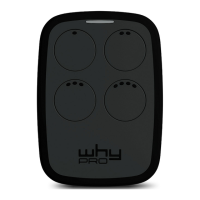
1. While pressing the button 1 of the “WHY-EP”, at the same time press 4 times the 2 button.
2. Release both buttons. Now the WHY-EP LED will emit a short flash every 2 seconds.
3. Place the original remote control to be programmed in front of the “WHY-EP”, at about 5 cm of distance (as shown in the picture).
4. Press and retain pressed the button of the original remote control and wait for a change flash (as a faster flash) of WHY-EP LED
and a change of its color that confirms the correct learning of code. This step may take a few seconds.
5. While the LED is flashing, press the button of the “WHY-EP” where you want to program the code just learnt, and retain pressed
until the LED will switch o.
6. The copy has been happened with success.
7. Activate now the correct procedure for the programmed model and insert the new remote control on the receiver (see the
compatibility list present in this manual).
Notes:
• If the LED flashes only 3 times and switches o, the code has not learnt correctly. Please repeat the operation from the step 1.
• The WHY-EP memory is completely re-writable.
• To duplicate further buttons of WHY-EP, please repeat the operation from the step 1.
To activate the remote control on the receiver for models marked with
proceed as below:
1. First of all you must be closed to the automation.
2. Press and retain pressed the programmed button during 10 seconds, when the LED start to flash, release the button.
3. Wait until the LED will turn o. The operation has been done, now you can use your new remote control.
To activate on the receiver all the other models: Refer you to the instructions of the original model.
NOTE: THE SEED CODE OF THE WHY-EP CAM BE EMITTED AS HERE BELOW:
1. Press the buttons 1 and 2 simultaneously for 8 seconds and release them when the LED start to flash;
2. While the LED is flashing press the button with the seed code needed.
ATTENTION!! Every kind of receiver can have the “radio-mode” disarmed. In this cases will be necessary insert the new remotes controls with the “manual procedures”.


 To Next Page
 Loading...