15
OPERATION
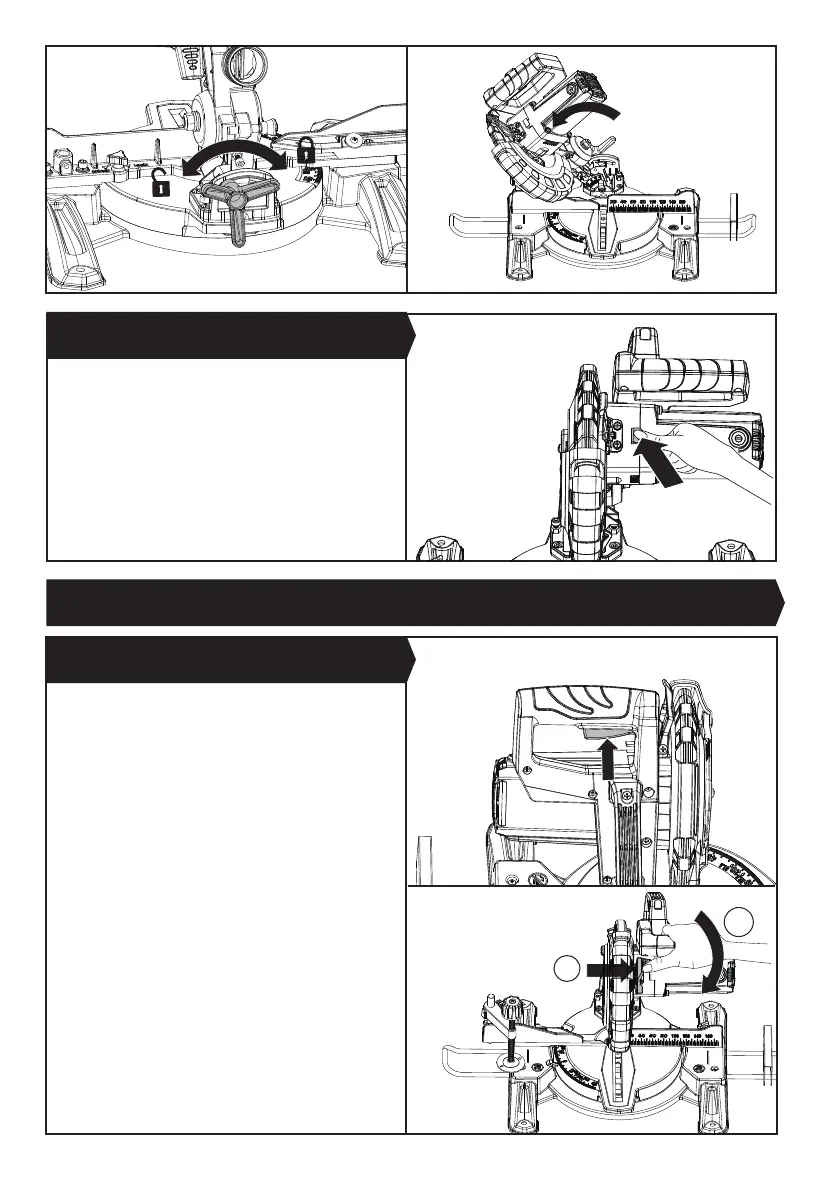
1) Push the lower blade lock lever outwards a little and
hold it, so that the lock lever is far away from the
upper xed guard, and the lower rotating guard can
rotate upwards. Then press down the saw head by
holding the operating handle.
2) Squeeze the on/off switch to turn on the saw and
allow the blade to reach full operational speed.
4) Gently but rmly lower the saw head and allow the
blade to cut through the workpiece.
5) When the cut has been completed, hold the saw head
in the down position and release the on/off switch.
6) Let the blade stop completely before allowing the
saw head to rise to its upper position.
7) Remove your hand from the operating handle only
when the saw head is raised, the blade is stationary
and the lower blade guard is covering the blade.
1. STARTING THE SAW (SEE FIG. I1, I2)
The spindle lock button prevents the blade in the saw
from rotating. Depress and hold the spindle lock button
while installing, changing, or removing the blade.
4. SPINDLE LOCK BUTTON (SEE FIG. H)
1
2
Fig. G3 Fig. G4
Fig. H
Fig. I1
Fig. I2


 To Next Page