This document describes the Wickes 900W Planer, model PPL900B.1 (SKU 223739), a power tool designed for planing firmly supported wooden materials, including beams and boards, and is also suitable for beveling edges and rebating.
Technical Specifications
- Rated Voltage: 220-240V~50/60Hz
- Rated Power: 900W
- Rated No-load Speed: 16000/min
- Max Cutting Depth: 3 mm
- Max Cutting Width: 82 mm
- Max Rebate Depth: 16 mm
- Machine Weight: 2.8 Kg
- Protection Class: Double insulated
- Noise Information:
- A-weighted sound pressure level (LPA): 80dB(A)
- A-weighted sound power level (LWA): 91dB(A)
- Uncertainty (KPA & KWA): 3.0dB(A)
- Vibration Information (determined according to EN 62841):
- Vibration emission value (ah,B): 5.20 m/s²
- Uncertainty (K): 1.5 m/s²
Component List
The planer features several key components for operation and adjustment:
- Hand grip areas: For secure handling.
- Lock-off button: Prevents unintentional starting.
- On/off switch: Activates and deactivates the tool.
- Dust extraction cover: For connecting dust collection systems.
- Belt cover: Protects the drive belt.
- Parallel guide: Assists in making straight cuts.
- Base plate: The flat surface that rests on the workpiece.
- Parallel guide locking screw: Secures the parallel guide.
- Planing depth scale: Indicates the current planing depth.
- Cutting depth adjustment knob: Used to set the desired planing depth.
- Rebate guide: Used for creating rebates.
- Spanner: For blade adjustments and maintenance.
- Dust bag: Collects wood chips during operation.
Accessories
The planer comes with the following accessories:
- Parallel guide (1)
- Rebate guide (1)
- Dust bag (1)
- Spanner (1)
- 82mm blades (2, pre-installed on the machine)
It is recommended to purchase additional accessories from the same store where the tool was bought, ensuring good quality and brand compatibility for the intended work.
Safety Warnings and Guidelines
The manual emphasizes general power tool safety warnings, electrical safety, and personal safety. Users are advised to read all instructions, illustrations, and specifications to prevent electric shock, fire, or serious injury.
General Power Tool Safety:
- Work Area Safety: Keep the work area clean, well-lit, and free from children and bystanders. Do not operate in explosive atmospheres.
- Electrical Safety: Ensure power tool plugs match outlets, avoid body contact with earthed surfaces, do not expose tools to rain or wet conditions, and do not abuse the cord. When operating outdoors, use an outdoor-suitable extension cord. In damp locations, use a residual current device (RCD) protected supply.
- Personal Safety: Stay alert, use common sense, and do not operate while tired or under the influence. Wear eye protection and other personal protective equipment (dust mask, non-skid safety shoes, hard hat, hearing protection). Prevent unintentional starting by ensuring the switch is off before connecting to power. Remove adjusting keys/wrenches before turning on. Do not overreach; maintain proper footing and balance. Dress properly, keeping hair and clothing away from moving parts. Connect and properly use dust extraction facilities. Do not become complacent from frequent use.
- Power Tool Use and Care: Do not force the tool; use the correct tool for the application. Do not use if the switch is faulty. Disconnect from power before making adjustments, changing accessories, or storing. Store idle tools out of reach of children and untrained users. Maintain tools and accessories, checking for misalignment, binding, or breakage. Keep cutting tools sharp and clean. Use the tool, accessories, and bits according to instructions and working conditions. Keep handles and grasping surfaces dry, clean, and free from oil and grease.
Planer Specific Safety Warnings:
- Wait for the cutter to stop before setting the tool down to prevent loss of control and injury.
- Hold the power tool by insulated gripping surfaces only, as the cutter may contact its own cord, leading to electric shock.
- Use clamps or other practical means to secure the workpiece to a stable platform to prevent instability and loss of control.
- Kickback Warning: Always grip the machine with both hands to maintain control and avoid kickback. The workpiece must be properly supported and clamped.
- Blade Safety: Always remove the power cord from the socket before any adjustments or blade changes. Wear gloves when replacing blades. Ensure cutting blades have stopped turning.
Operating Instructions
-
ON/OFF Switch (Fig. A):
- The switch is locked off to prevent accidental starting.
- To operate, depress the lock-off button (2), then the on/off switch (3), and release the lock-off button (2).
- To switch off, release the on/off switch (3).
- Warning: Danger of kickback! Apply the machine to the workpiece only when switched on and up to speed.
-
Cutting Depth Adjustment (Fig. B):
- The planing depth can be adjusted from 0 to 3mm.
- Rotate the cutting depth adjustment knob (10) to set the desired depth using the scale (9).
- Clockwise rotation increases depth; anticlockwise rotation reduces depth.
- Always work from a rough cut to a finish cut.
- Test cuts on scrap wood are recommended after each adjustment.
- Note: To protect blades during storage or transport, set the blade depth adjustment knob to 0.
-
Standard Surface Planing:
- Set the desired cutting depth.
- Position the front part of the base plate flat on the work surface, ensuring blades are not touching.
- Switch on the machine and push forward evenly.
- Maintain the entire base plate flat on the work surface to prevent the cutting blade from jumping.
- Avoid hitting nails, which can nick, crack, or damage blades. Keep extra blades on hand.
-
Edge Chamfering (Fig. C):
- Use the V-groove (A) in the base plate (7) to create a chamfer on the workpiece edge.
- Guide the planer along the edge, maintaining a constant angle and force for a good finish.
- Control the chamfer angle with your hands.
- Perform a test chamfer on scrap wood.
- Maintain downward pressure at the beginning and end of the work surface.
-
Using the Parallel Guide (Fig. D):
- Insert the screw through the hole on the support of the parallel guide (B) and turn it into the nut on the housing.
- Fix the parallel guide (6) on its support with the screw and nut, ensuring they are tightened securely.
- Note: The parallel guide should be fitted on the left side of the housing.
- To adjust the width of cut, loosen the nut, slide the parallel guide (6) to the desired position, and retighten.
- Hold the parallel guide firmly against the edge of the workpiece during cutting.
-
Using the Rebate (Fig. E):
- Insert the screw through the slot on the rebate (11) and turn it into the nut on the housing.
- The cut depth adjustment can be set from 0 to 16mm.
- To adjust depth, place the planer on a flat board, loosen the screw, slide the cut depth adjustment guide up or down, and then fully tighten the thumb screw.
-
Rebating (Fig. F):
- The width of the rebating cut (C) is adjustable by moving the parallel guide (6).
- The depth of the rebating cut (D) is determined by moving the rebate (11) and the number of passes.
- Ensure the planer is guided with lateral supporting pressure.
Maintenance
- Always remove the plug from the socket before any adjustment, servicing, or maintenance.
- There are no user-serviceable parts inside the power tool.
- Clean the tool with a dry cloth; do not use water or chemical cleaners.
- Store the power tool in a dry place.
- Keep motor ventilation slots and all working controls free of dust.
- Sparks through ventilation slots are normal and do not indicate damage.
- If the supply cord is damaged, it must be replaced by the manufacturer, its service agent, or similarly qualified persons.
Blade Fitting and Changing (Fig. G1-G4):
- Dull or worn blades cannot be reground and must be replaced in pairs.
- Remove the power cord from the socket before changing blades.
- Wear gloves when replacing blades.
- Use the provided spanner to loosen the three installation screws approximately 1/2 rotation anticlockwise.
- Do not over-loosen screws to ensure accurate alignment.
- Note the direction of cut and tapered edge orientation of old blades to match with new blades.
- Press the safety cover down, push the blade out with the tip of a spanner or screwdriver, and remove.
- There is no need to remove the blade clamp, as this affects factory settings for blade height control.
- If a blade is stuck, use a piece of wood and a sharp blow, then a screwdriver to remove.
- Before inserting new or reverse blades, clean both the blade and the blade seat.
- Slide the blade into the clamp in the correct orientation, ensuring it is level with the clamp.
- Retighten the three blade screws fully.
- After replacing blades, use a ruler to check if they are parallel with the rear base plate. Adjust using the hexagonal wrench: loosen screws, turn clockwise to raise, anticlockwise to lower, then retighten.
Replacing a Drive Belt (Fig. H1, H2):
- Remove the plug from the socket before maintenance.
- Ensure cutting blades have stopped turning.
- Wear gloves.
- Loosen screws (E) and remove the belt cover.
- Remove the worn drive belt from the large pulley and pinion, then clean them.
- Place the new belt on top of the pinion and turn it manually, pressing it onto the large pulley.
- Ensure the drive belt runs exactly along the length grooves of the pinion and pulley.
- Replace the belt cover, install the cover screw, and tighten fully.
Correct Planer Blade Setting (Fig. I):
- Proper blade setting is crucial for a smooth, even planing surface.
- The blade must be mounted absolutely level, parallel to the surface of the rear base.
- Correct Setting (1): Blade edges run perfectly parallel to the rear base surface.
- Nicks in Surface (2): Caused by one or both blades not being parallel to the rear base line.
- Gouging at Start (3): Caused by one or both blade edges not protruding enough in relation to the rear base line.
- Gouging at End (4): Caused by one or both blade edges protruding too far in relation to the rear base line.
Fitting a Dust Bag (Fig. J):
- Slide the dust bag inlet over the planer dust extraction tube as far as possible.
- The dust bag (13) reduces exhaust efficiency and must be emptied frequently.
- Chips are ejected from the right side of the machine only.
External Dust Extraction:
- The dust extraction tube can be connected to a suitable external dust extraction machine (e.g., vacuum cleaner).
- Chips are ejected from the right side of the machine only.
- Using vacuum extraction does not negate the need for personal protective equipment, especially respiratory protective equipment.
Environmental Protection
Waste electrical products must not be disposed of with household waste. Users are encouraged to recycle where facilities exist and check with local authorities or retailers for recycling advice.
Plug Replacement (Only for Rewirable Plug of UK & Ireland)
- Important: The wires in the mains lead are colored Blue (Neutral) and Brown (Live).
- Connect the blue wire to the terminal marked N and the brown wire to the terminal marked L.
- Warning: Never connect live or neutral wires to the earth terminal of the plug.
- Only fit an approved 13A BS1363/A plug and the correct rated fuse.
- If a moulded plug is removed, dispose of it carefully to prevent it from being engaged into a socket.
- Ensure the outer sleeve is firmly clamped and the cable grip is secure.
Wickes Building Supplies Limited declares that the PLANER (SKU 223739) complies with the following directives and regulations as of January 28, 2021:
- 2006/42/EC (Machinery Directive)
- 2014/30/EU (Electromagnetic Compatibility Directive)
- 2011/65/EU & (EU)2015/863 (RoHS, Restriction of Hazardous Substances Directive)
And conforms to the following standards:
- EN 62841-1
- EN 62841-2-14
- EN 55014-1
- EN 55014-2
- EN 61000-3-2
- EN 61000-3-3

 Need help?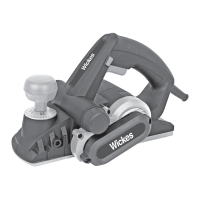

 To Next Page
 General