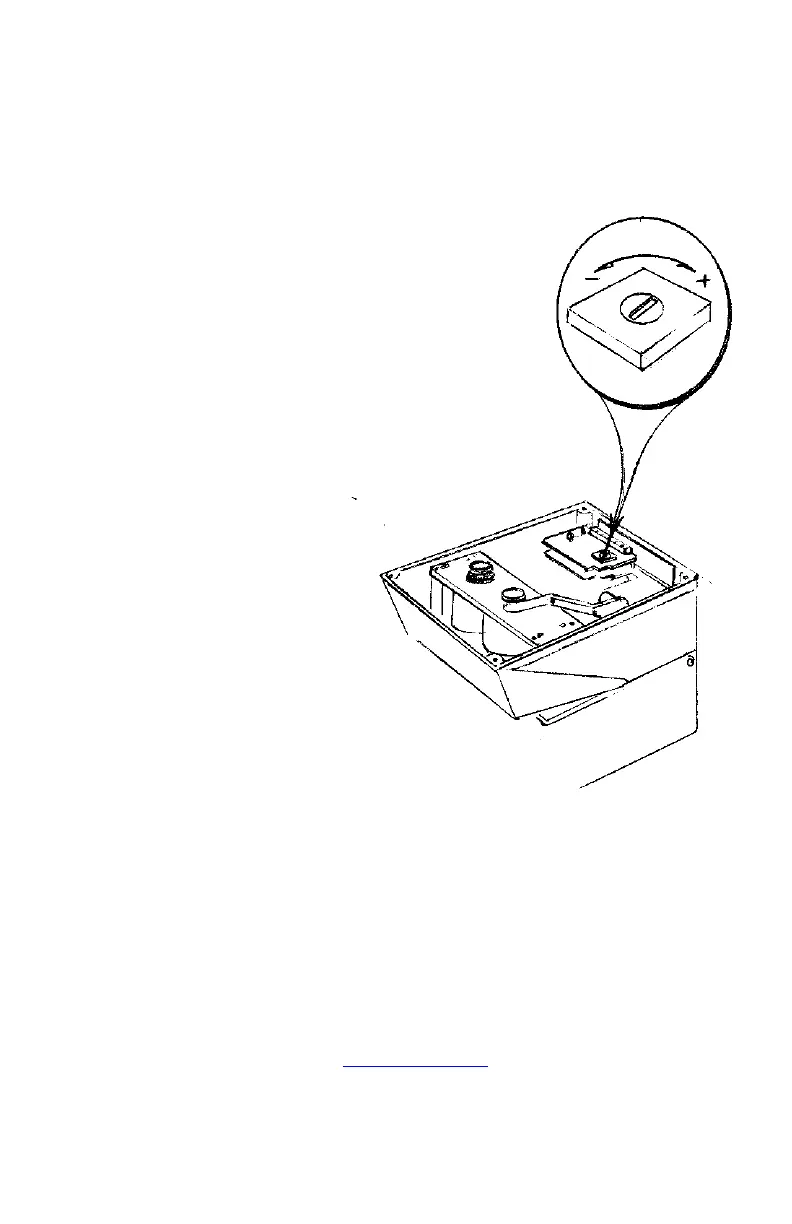
TO ADJUST THE PRINTING PRESSURE - THROUGH THE RIBBON
- CAUTION -
ALWAYS UNPLUG THE UNIT FIRST.
Note: Imprint pressure is pre-set at
the factory. However, if a further
adjustment is needed, turn the
machine upside down and unscrew
the 4 rubber feet. Remove the
bottom aluminum cover, taking note
as to which way the double dimples
in the cover are facing. With a small
screwdriver, adjust the
potentiometer. In this case,
clockwise increases the impact and
counter clockwise decreases it. A
small turn may be all that is
necessary. DO NOT OVER
ROTATE. Replace bottom cover,
turn the unit upright, plug it in and
stamp it. Repeat if necessary.
Widmer Time Recorder Co., Inc.
Manufacturing Plant and Service Center:
228 Park Street, Hackensack, New Jersey 07601
Tel: (201) 489-3810 (in New Jersey)
Fax: (201) 489-3478
(800) 424–4459 (Outside New Jersey)
Website – www.widmertime.com



 To Next Page