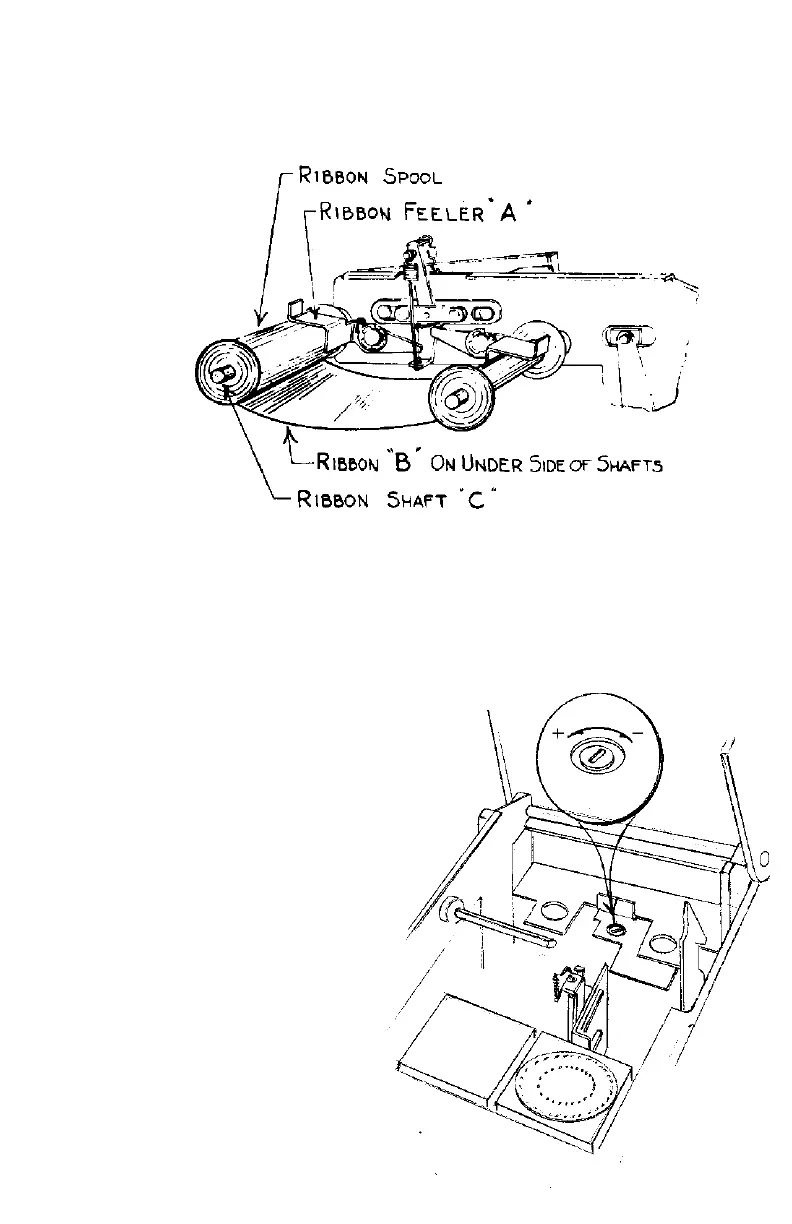
TO CHANGE THE RIBBON:
Lift ribbon feeler A and slide ribbon B off shaft C. Accomplish this on both the front rear
ribbon feelers. Replace with No. 1000 single or tri-color P,G,R ribbon.
Warning: Never attempt to re-ink ribbons, this will only clog the wheel and cause a failure of the
machines’ operations.
ADJUSTING PRESSURE
Although both impressions stamp
simultaneously, triggered by insertion of the
document, their stamping pressures can be
adjusted independently of each other.
ADJUSTING THE SEAL EMBOSSING
PRESSURE
- CAUTION -
Always lock the case cover before stamping.
Seal pressure is pre-set at the
factory. However, documents may vary in
thickness and paper quality. To decrease or
increase the stamping pressure, unplug the
unit, open the case and adjust the
potentiometer with a small screwdriver –
clockwise to decrease or counter clockwise
to increase the impact. A small turn may be
all that is necessary. DO NOT OVER
ROTATE. Plug unit in and re-stamp it.
Repeat if necessary.



 To Previous Page