Version 1.0
5.2 PAIR WITH WIIM DEVICE
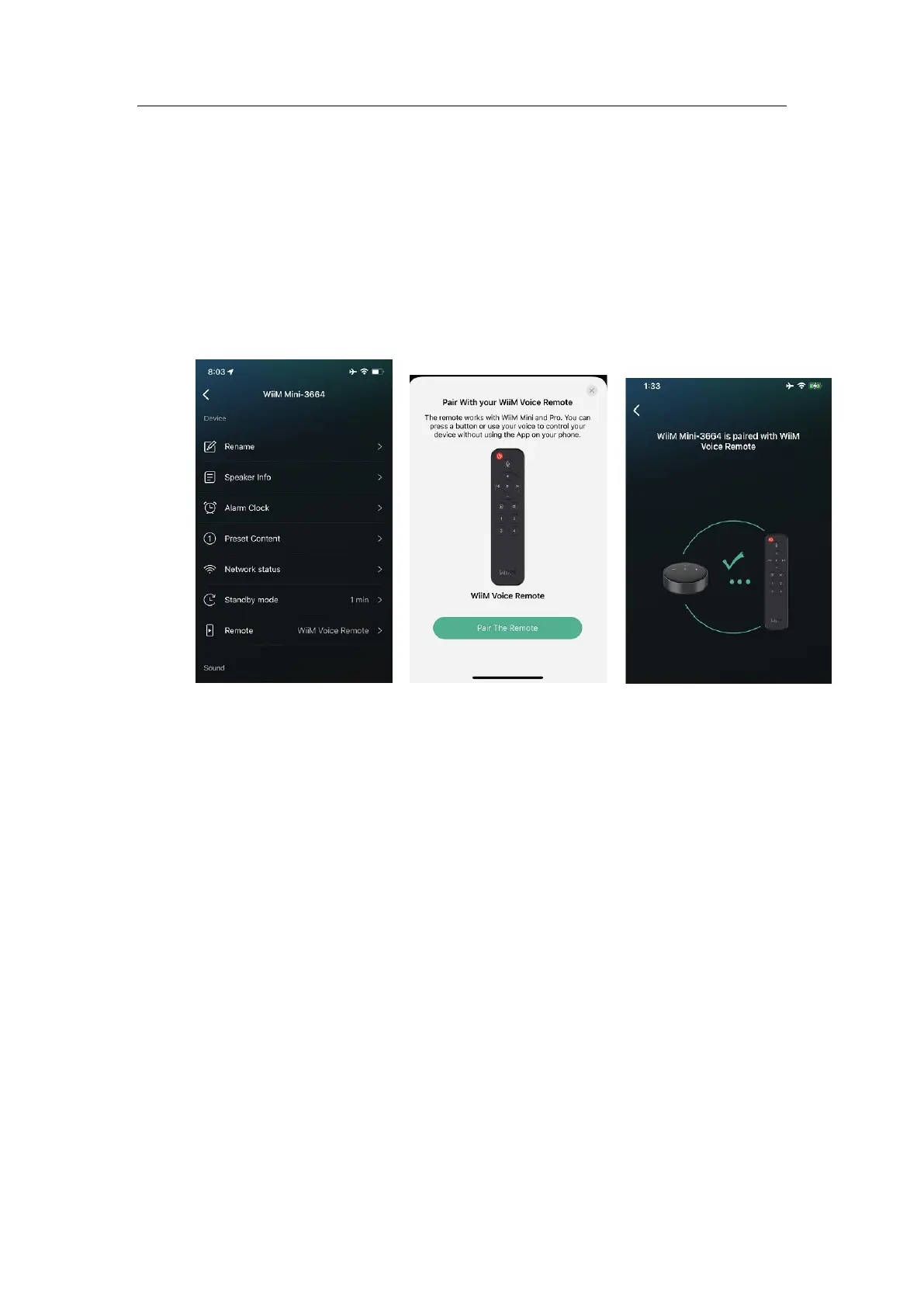
• Open the WiiM Home App.
• Select the Device tab > Tap the device setting gear icon > Scroll down and select
the “Remote” to add a voice remote.
• If the remote is in the pairing mode, you can see the following card.
• Follow the instruction on the App to finish the pairing.
5.3 USE YOUR REMOTE
• Try the playback control
o Play/Pause
o Mute
o Volume up, down
o Next, previous track
o Switch input sources
• Try the presets
o By default, the preset buttons 1~4 correspond to the presets 1 to 4 on the
WiiM Home App
o Tap it to play the corresponding preset
• Try the “Push-to-talk” Alexa
o Press and hold “MIC” button to speak your Alexa command. When finish
recording, release the MIC button
o Try any Alexa command (i.e., similar to your other far field Alexa devices
without saying “Alexa” trigger word)
o Here are few things to try:
“Play daily lift from Spotify”
“Play my soundtrack from Amazon Music”
“Volume 5”
“My daily brief”


 To Next Page