
 Need help?
Do you have a question about the Wikipad 7 and is the answer not in the manual?
Turn on the Wikipad by pressing the On/Off button and follow onscreen instructions for initial setup.
Access more features at wikipad.com and find support resources at wikipad.com/support.
Lists processor, OS, display, wireless, storage, camera, sensors, I/O, battery, user interface, and dimensions.
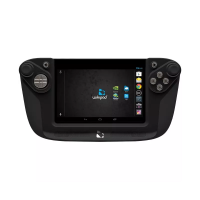
Identifies the 7" LCD screen and the front-facing camera on the device's front.
Identifies the stereo speakers located on the rear of the Wikipad device.
Identifies the memory card compartment on the side of the Wikipad device.
Step-by-step guide for charging the tablet using the provided charger and micro-USB cable.
Explains the meaning of LED indicator colors (Green/Red) for battery status during charging.
Guide for inserting and removing microSD cards to expand storage capacity.
Instructions for turning the tablet on and off using the power button.
Details Bluetooth wireless connection and USB/HDMI wired connections for data and display.
Procedure to force reboot the tablet when it becomes unresponsive.
Instructions for inserting the tablet into the game controller and confirming a proper connection.
Advisories on photosensitive seizures and musculoskeletal disorders related to playing video games.
Outlines copyright notice and limitations of liability for Wikipad, Inc. products and services.
Details FCC rules compliance, interference guidelines, and RF exposure information for the device.

 To Next Page
 General