Only change gears while the bike is in motion. Shifting gears at a standstill may damage
the drivetrain. Do not change gears tooquickly as doing so could cause the chain to fall off
and the rider to lose control, which could result in serious injury. If the chain falls off, turn the
bike off before fixing the chain. If you do not, and the motor turns on, you could sustain
serious injury.
DISC BRAKES
The
WILDEWAY electric bike is equipped with disc brakes to ensure that you can stop quickly,
even at high speeds. The brakes are engaged by squeezing the brake levers towards the
handlebars. This pulls the brake cable, which closes the brake caliper. The brake caliper then
makes contact with the brake rotor which is attached to the bike wheels. The more you squeeze
the brake lever, the more force will be applied and thus the faster the bike will slow down. The
left brake lever activates the brake on the front wheel and the right brake lever activates the
brake on the rear wheel. The right brake lever should always be applied before and while the
front brake is also being applied. If only the front brake is applied while slowing or
stopping quickly, the rider may be ejected over the front handlebars. This could result in
serious harm, injury, or death. To avoid this, always apply even pressure to both brakes
when slowing down or stopping.
Before riding, ensure the brake lever does not touch the handlebars when fully applied.
If it does, screw or unscrew the barrel adjuster to increase tension in the brake cable. If this
does not fix the problem, take the bike to an experienced bicycle mechanic for further
adjustment.
Note: Disc brake rotors will become hot during use and will stay hot for a short period after
use. This is due to the high amount of friction between the brake pad and the rotor. Ensure
you do not touch the disc rotor right after use.
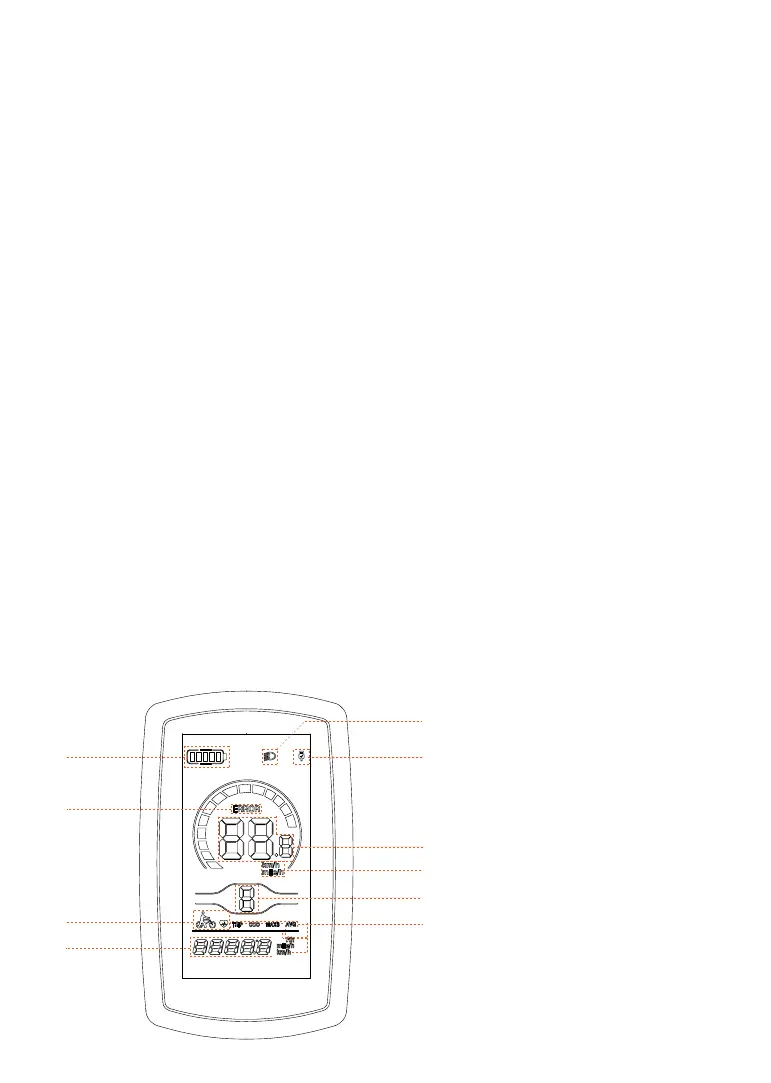
LCD DISPLAY FUNCTIONS
1
2
5
6
7
9
4
8
3
10
1. Light On/Off Indicator
2. USB Charging Indicator
3. Battery Level Indicator
4. Error Code
5. Real-time Speed Indicator
6. Speedometer in MPH or KM/H
7. Pedal assist (PAS) Level Indicator
8. Walk Mode/Cruise Control
9. Odometer, Trip, Maximum Speed
and Average Speed
10.Odometer, Trip, Maximum Speed
and Average Speed in MPH, KM/H
and Controller output current
16


 To Next Page
 Loading...