3. Configuration of the gateway
•
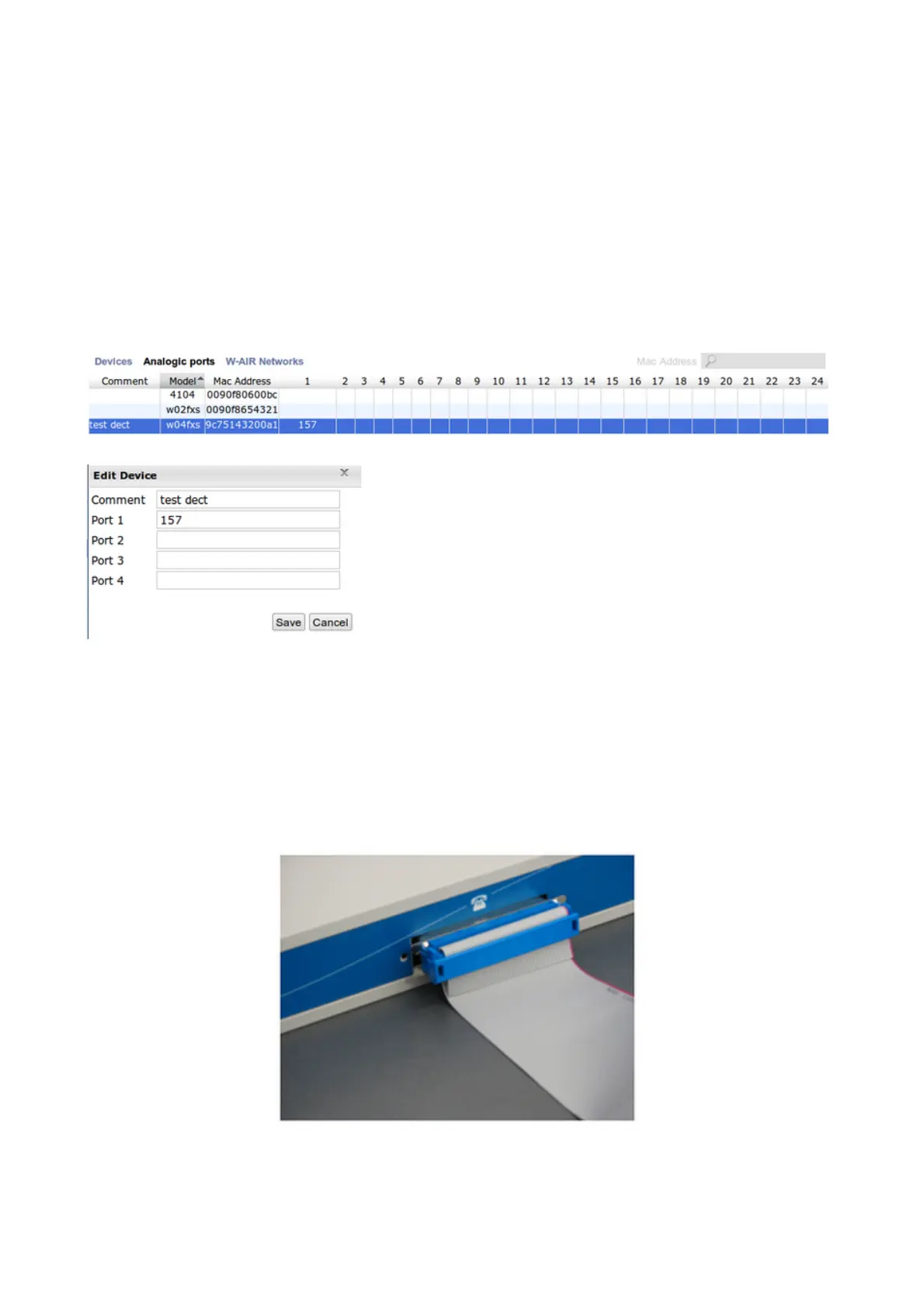
Go to WMS > Devices → press “Scan” to search for the device → press “Configure /
Sync device” and wait till the device is synchronized
•
Move to the tab “Analogic ports” and click twice on the device, in order to assign the ports
of the gateway to the analog users (corresponding to the analog extensions connected to
the gateway) → press “Save”
•
Move back to the tab “Devices” → select the gateway and press “Configure / Sync
device”
4. Connection of analog phones
All the models except W24FXS have rj-21 ports for the direct connection to the analog
devices. To connect the devices to the W24FXS, you should install an external patch panel
(mod. W24FXSCAB), as it is shown on the picture below.6. Access to web interface
W04FXS-W08FXS-W16FXS-W24FXS Quick Installation Guide 4


 To Next Page