Swift 2 X User Manual | English
44
phone moves while you walk to lock the phone when it moves in a way that doesn’t resemble your natural
rhythm.
Note: On-body detection can’t tell whose body is connected to on-body detection. If you give your device to
someone else while it’s unlocked, your device may stay unlocked using on-body detection.
5.5 Screen Lock
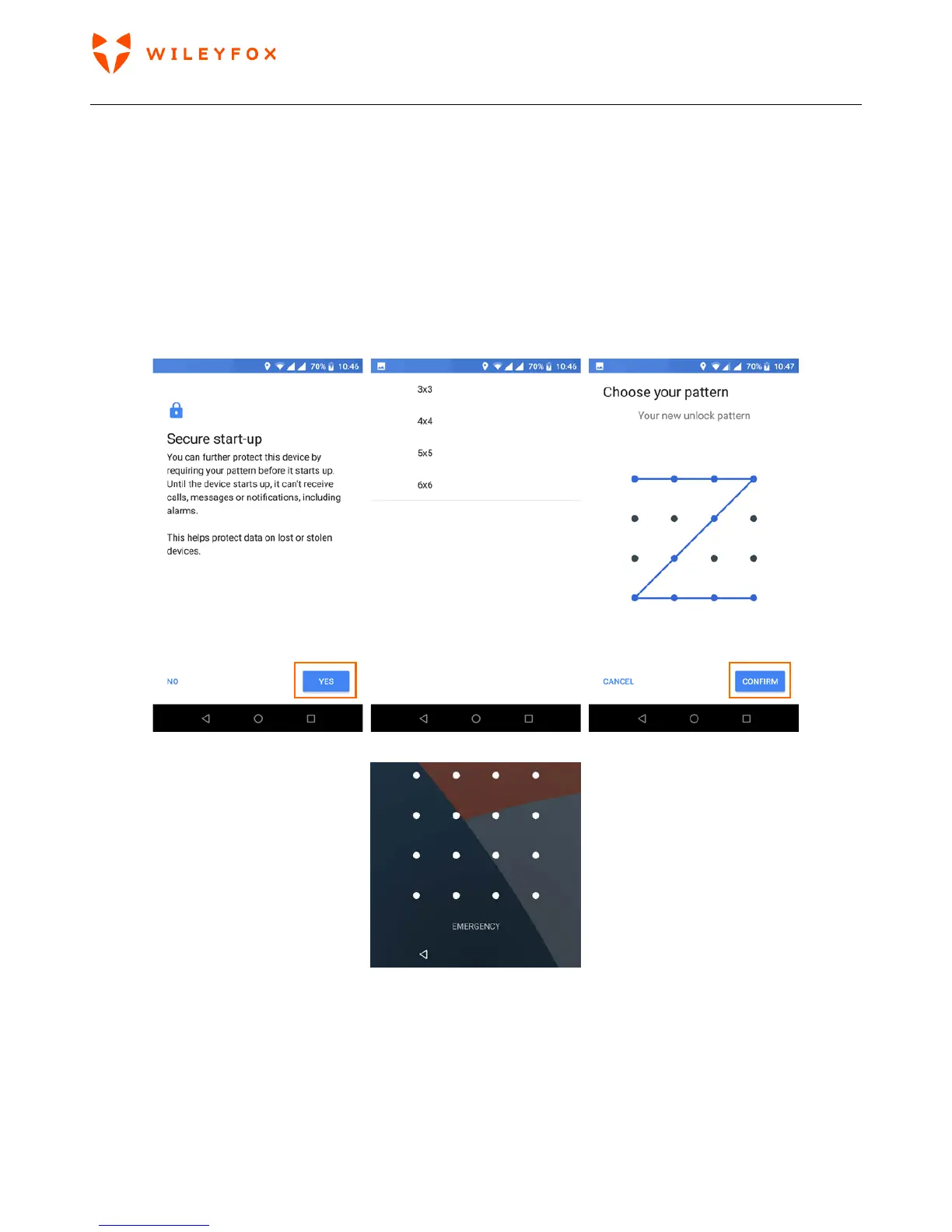
• Pattern. Draw a unique pattern on a grid of dots. They vary from 3-by-3 to 6-by6. Select your pattern and
confirm it. The disadvantage is that if your display easily pics up fingerprints it might reveal simple
patterns. The example shows a simple pattern, but you should use a more complex pattern to be safe.
You can also decide what content/pop up notifications to show on your lock screen.
Your lock screen would look like the image below. You can swipe your pattern to unlock.
• Pin. A 4-to-17-digit numerical code, as if you were going to take cash out of the ATM. The disadvantage
is that it might be easier for someone to crack short PIN than a full-blown password. If you find it easier
to remembers numbers only we’d advise you to use longer PIN – minimum 8 digits and no repetitions.
Avoid dates of birth, marriage, kids’ ages, address house numbers etc. Your lock-screen would look
different from PIN lock screen or Pattern Lock screen (see images below)
You can also decide what content/pop up notifications to show on your lock screen.


 To Next Page