Game-Adjustment Tables continued
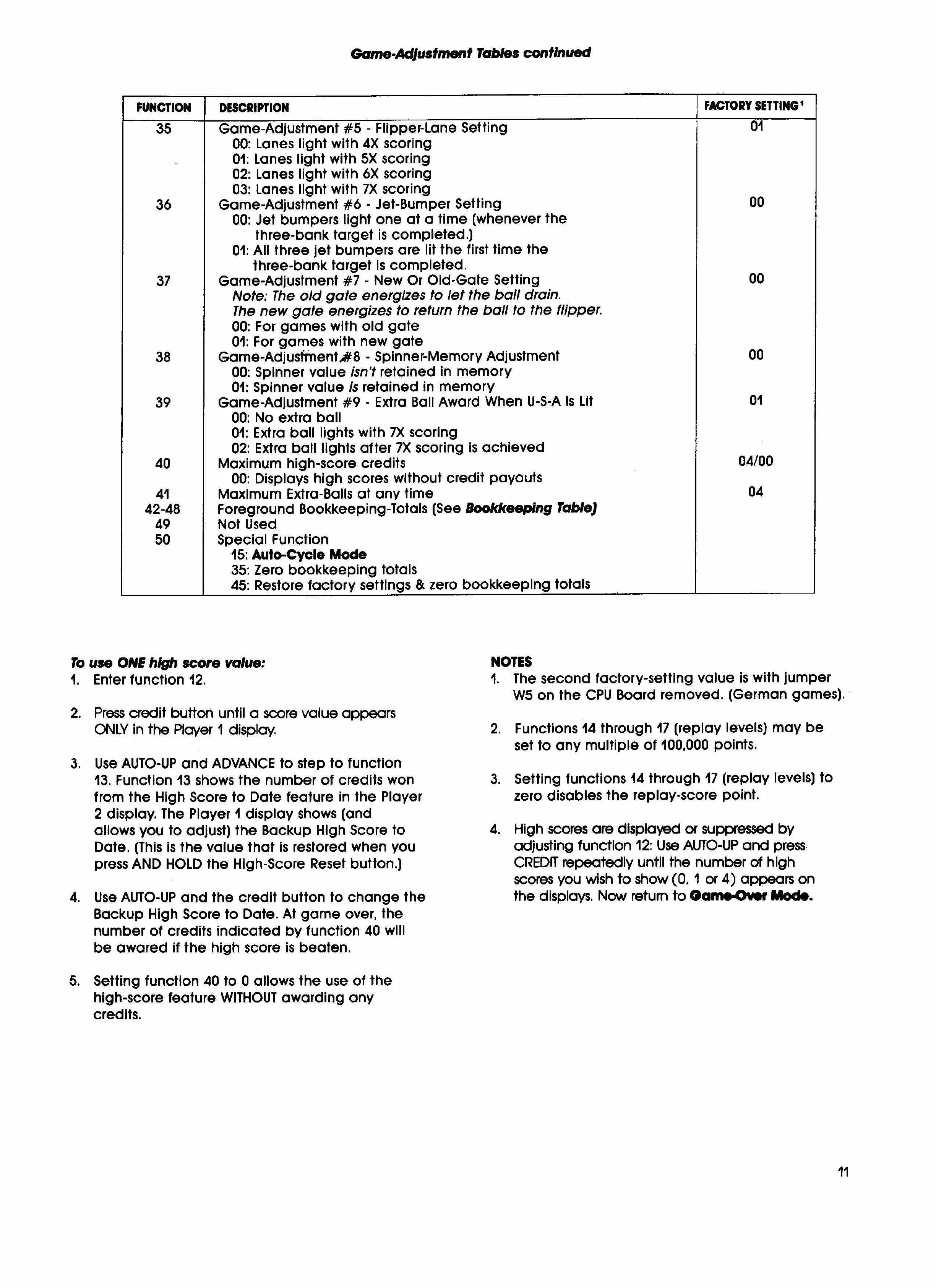
FUNCTION I DESCRIPTION
35
Game-Adjustment #5 -
Flipper-Lane Setting
00: Lanes light with 4X scoring
-
1:
Lanes light with 5X scoring
2:
Lanes light with oX scoring
3:
Lanes
light with 7X
scoring
36
Game-Adjustment #6 -
Jet-Bumper Setting
00: Jet bumpers light one at a time
(whenever the
three-bank target is completed.)
01: All three jet bumpers are lit the first time the
three-bank target is completed.
37
Game-Adjustment #7 - New Or Old-Gate Setting
Note: The old gate energizes to let the ball drain.
The new gate energizes to return the ball to the flipper.
00: For games
with old
gate
01: For games
with new gate
38
Game-Adjusfrnentft8 - Spinner-Memory Adjustment
00: Spinner value
isn't
retained in memory
01: Spinner value
is
retained in memory
39
Game-Adjustment #9 -
Extra Ball Award When U-S-A Is Lit
00: No extra ball
1:
Extra ball lights with 7X scoring
2:
Extra ball lights after 7X scoring is achieved
40
Maximum high-score credits
00: Displays high scores without credit payouts
41
Maximum Extra-Balls at any time
42-48
Foreground Bookkeeping-Totals (See
Bookkeeping
Table)
49
Not Used
50
Special Function
15: Auto-Cycle Mode
35: Zero bookkeeping totals
45: Restore factory settings
& zero bookkeeping totals
FACTORY SETTING'
01
NEI
Kc
01
04/00
To use ONE high score value:
NOTES
1.
Enter function 12.
1. The second factory-setting value is with jumper
W5 on the CPU Board removed. (German games).
2.
Press credit button until a score value appears
ONLY in the Player I display.
2. Functions 14 through 17 (replay levels)
may be
set to any multiple of 100,000 points.
3.
Use AUTO-UP and ADVANCE to step to function
13. Function 13 shows the number
of credits won
3. Setting functions 14 through 17
(replay levels) to
from the High Score to Date feature in the Player
zero disables the replay-score point.
2 display. The
Player
I display shows (and
allows you to adjust) the Backup High Score to
4. High scores are displayed or suppressed by
Dote. (This is the value that is restored when you
adjusting function 12: Use AUTO-UP and press
press AND HOLD
the
High-Score Reset button.)
CREDIT repeatedly until the number of high
scores you wish to show (0. 1 or 4) appears on
4.
Use AUTO-UP and the credit button to change the
the displays. Now return to
Oam.Or
Mode
Backup High Score to Date. At game over, the
number of credits indicated by function 40 will
be awared if the high score is beaten.
5.
Setting function 40 to 0 allows the use of the
high-score feature WITHOUT awarding any
credits.
11



 To Next Page
 Loading...