Instructions continued >>
Attaching your Flash Unit:
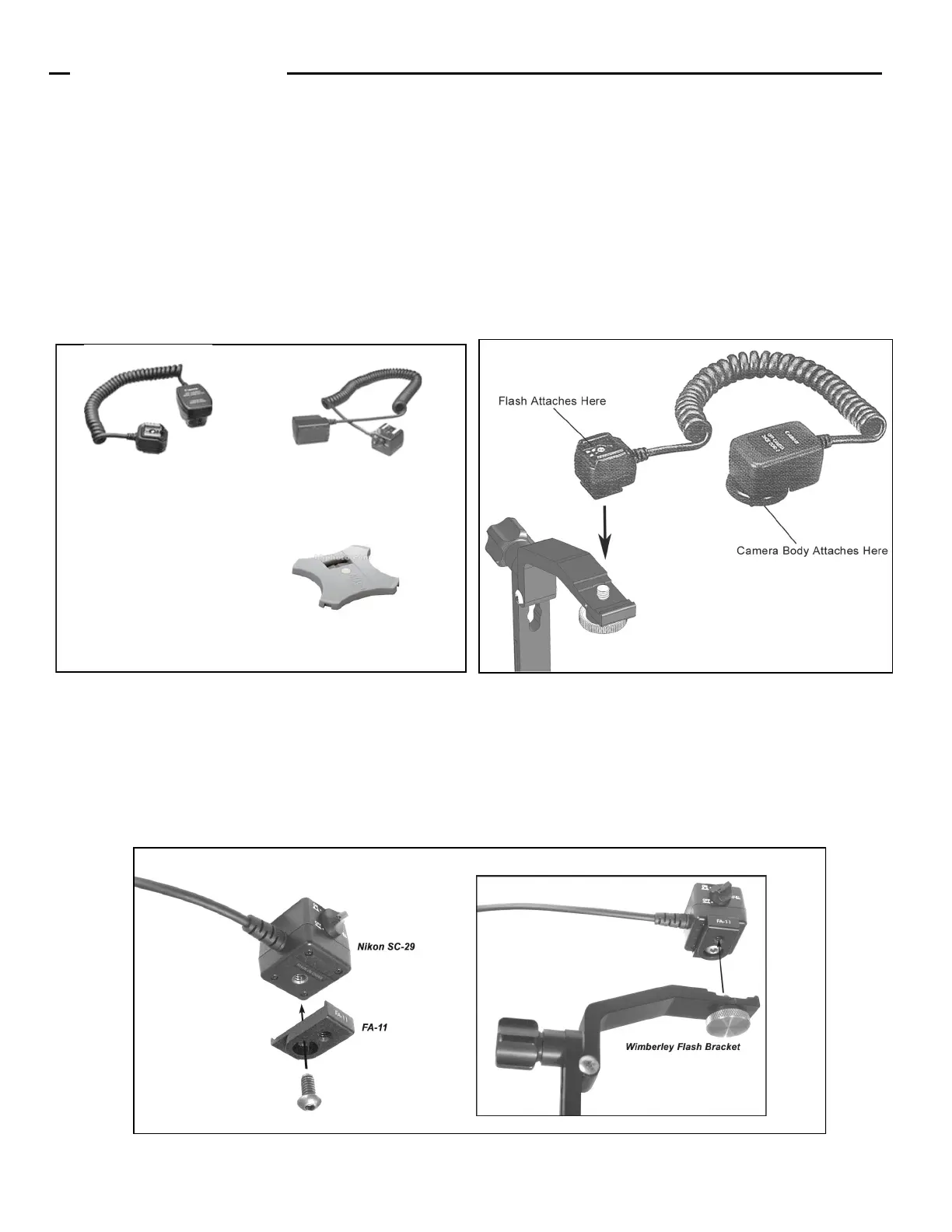
Wimberley Flash brackets are designed to screw into the 1/4” threaded hole found on the bottom of an off-camera shoe adapter
(usually on one end of a flash cord cable) that connects the camera to the flash. To attach your flash unit, you will need a flash cord
or wireless flash adapter (Fig. 3). The flash cord (or wireless adapter) connects the electrical signal from the hot shoe on your
camera body to the flash unit allowing it to fire properly. We recommend purchasing an adapter that is recommended by your cam-
era manufacturer so it will be compatible with both your flash unit and your camera body. Wimberley does not sell flash cords. We
recommend that you contact your local camera shop for in-depth guidance.
The flash cord has one end that slides into the camera’s flash hot shoe, and another end that slides onto the bottom of the flash
unit. Attach the flash cord to the top of the flash bracket using the silver, captive knurled fastener on the M-3 Tilt Arm. To remove
the flash, be sure to lift up lightly on the flash unit while unscrewing the knurled knob. This will prevent the fastener from
unscrewing from the flash bracket and possibly jamming.
Instructions (Continued)
Figure 4
Flash Cord Compatibility Notes: Nikon Users: the Nikon SC-29 cord requires the use our FA-11 Flash Cord Adapter
(Fig. 4) to attach the cord snugly to the bracket. Canon users: some older Canon off-camera flash cords have a mounting
foot that is slightly too wide to fit properly in the slot on the flash arm. The off-camera adapter has a square footprint. If one of
the sides of the flash adapter square has a lump on it, remove material from the side of the square opposite this lump with a file
until it fits into the groove on the M-3. We apologize for this dimensional incompatibility. We made this design sacrifice so that
the bracket would fit newer Canon cords snuggly.
Figure 3
Canon Off-camera Shoe Cord 3
For wireless set up: the Nikon AS-20 flash unit
stand can be used to mount the Nikon unit to
the Macro Bracket’s round mounting platform.
Nikon SC-29 Off-Camera Shoe
Cord (this cord requires an FA-11
adapter when used with the
following modular brackets: F-1,
F-4, F-6, F-9)
For wireless set up: the Canon
flash unit stand can be used to
mount the Speedlight unit to the
Macro Bracket’s round mounting
platform.


 To Next Page
 Loading...