ENEN
support@wimius.com
01 02 03 04 05 06 07 08 09 10 11 12 13 14 15 16 17 18
19 20 21 22 23 24 25 26 27 28 29 30 31 32 33 34 35 36
37 38 39 40 41 42 43 44 45 46 47 48 49 50 51 52 53 54
55 56 57 58 59 60 61 62 63 64 65 66 67 68 69 70 71 72
73 74 75 76 77 78 79 80 81 82 83 84 85 86 87 88 89 90
91 92 93 94 95 96 97 98 99 100 101 102 103 104 105 106 107 108
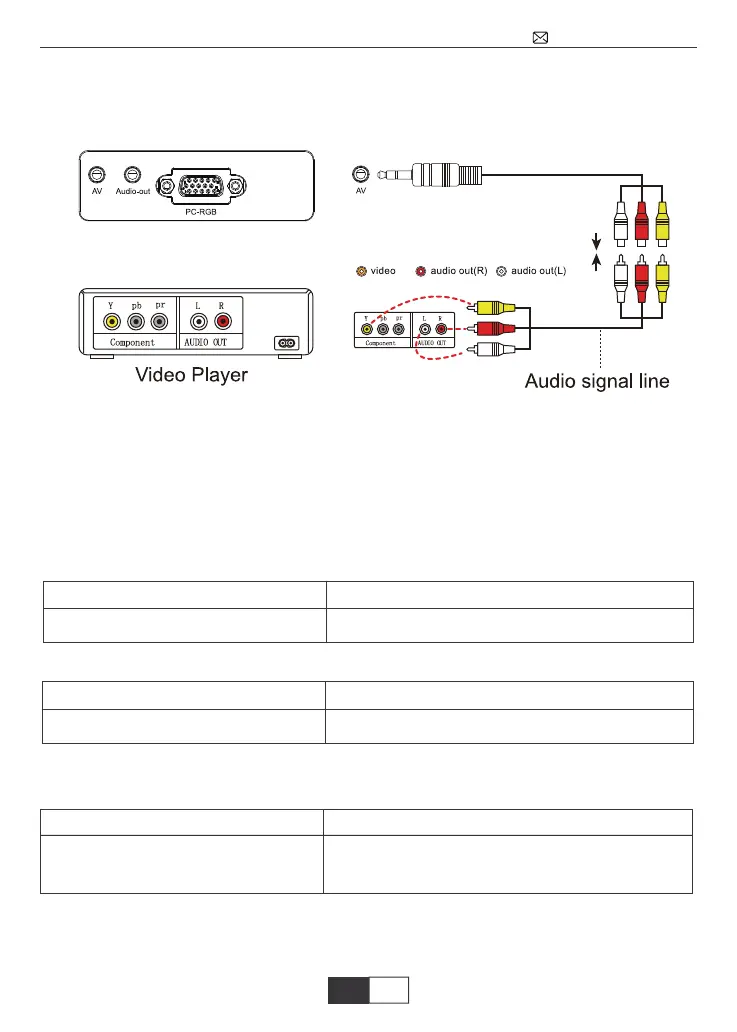
Connecting with DVD
①Use the AV cable coming with the projector to connect with DVD.
②Turn on the projector and DVD player.
USB Multimedia Connecting
① Insert the USB drive to corresponding interface.
② Choose the video or picture to play.
PS: the projector only supports USB 2.0 stick, and 1080P 30FPS video.
the USB Drive file system must to be FAT32/NTFS, no exFAT
Multimedia File Specification
Image Format
Doesn’t support: Dolby AC3/AAC, DTS, WMA, DivX, VC1, RM, RMVB, FLV, etc
Video Format (Bit Rate up to 30~40 Mbs)
Doesn’t support:MSVC/CRAM, MP42, GMC, IV32, RLE, cvid, RV20, DivX, RM, RMVB,
VC1, FLV, etc
Audio Format
Support
JEPG, PNG, BMP
File extgension
.jpg/.png/.bmp
Support
MPEG1, MPEG2, LPCM,
File extension
.avi/.ts/.dat/.vob/.wmv/.mkv/.mp3/.mp4/.m4a
Support
MPEG1, MPEG2, H.263, H.264,
AVS, VC1, MJPEG, RV30, RV40,
HEVC
File extension
.dat/.ts/.mp4/.mpg/mpeg/.avi/.mkv/.mov/.as-
f/.flv/.3gp/.3gpp/.tp



 To Next Page