ENIT
support@wimius.com
01 02 03 04 05 06 07 08 09 10 11 12 13 14 15 16 17 18
19 20 21 22 23 24 25 26 27 28 29 30 31 32 33 34 35 36
37 38 39 40 41 42 43 44 45 46 47 48 49 50 51 52 53 54
55 56 57 58 59 60 61 62 63 64 65 66 67 68 69 70 71 72
73 74 75 76
77 78 79 80 81 82 83 84 85 86 87 88 89 90
91 92 93 94 95 96 97 98 99 100 101 102 103 104 105 106 107 108
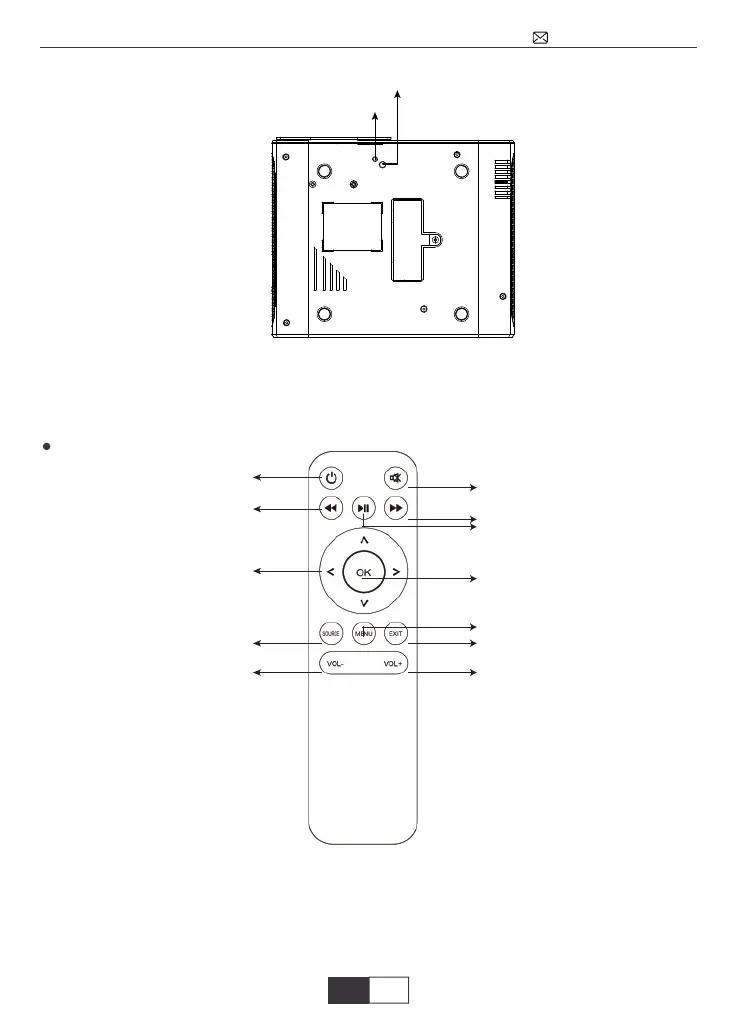
Ingresso perno di supporto
Ingresso per cavalletto treppiede
Tasto di accensione
Silenzioso
Menu
Accesso
Inoltrare
Ritorno
Volume +
Home/Play
Indietro
Tasti direzionali
Sorgente
Volume –
Nota: Il perno di supporto regolabile può garantire un angolo di proiezione
massimo di 15, per ottenere una buona visualizzazione dell’ immagine consiglia-
mo un angolo di proiezione di 0°~ 8°.
Note:
1.While using the remote control, point it toward IR receiver
2.The remote control doesn’t come with the battery, required 2*AAA batteries
3.To avoid battery leakage corrision, please take the batteries out if not use it for
a long time.
Telecomando



 To Next Page