EasyManua.ls Logo

Wimius K7 - Page 21

Wimius K7
25 pages
Print Icon
To Next Page IconTo Next Page
To Previous Page IconTo Previous Page
Loading...
support01@wimius.com
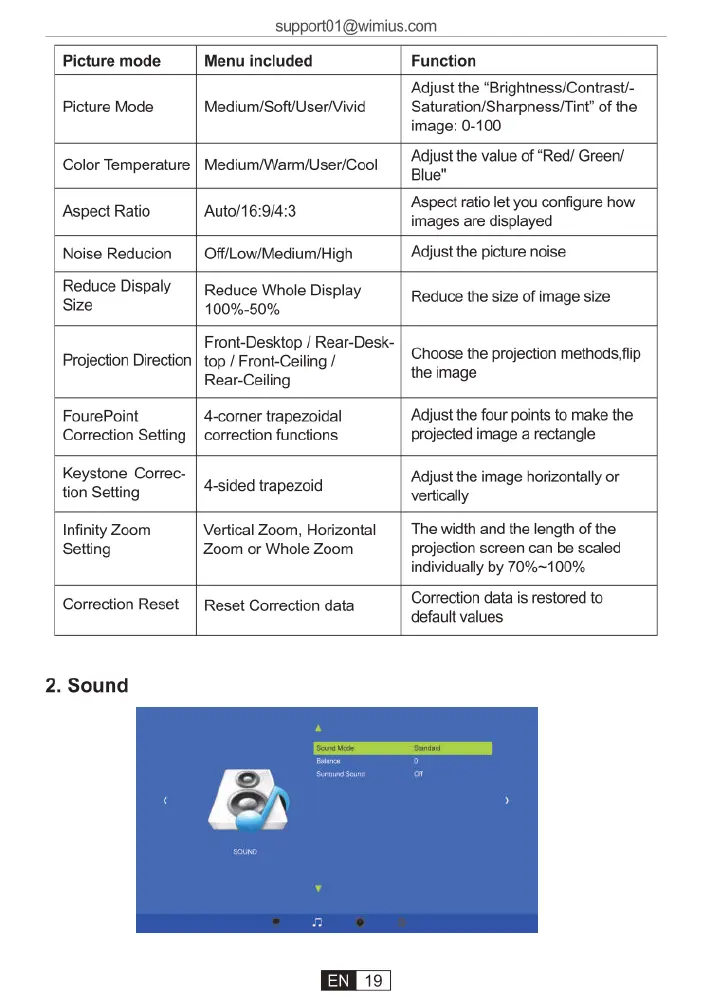
Picture
mode
Menu
included
Function
‘Adjust
the
‘Brightness/Contrast/-
Picture
Mode
|
Medium/SoftUseriVivid
|
Saturation/Sharpness/Tint”
of
the
image:
0-100
Color
Temperature
|
Medium/Warm/User/Cool
Qfij:f‘
the
value
of
“Red/
Green/
Aspect
Ratio
Auto/16:9/4:3
Aspect
ratio
let
you
configura
haw
images
are
displayed
Noise
Reducion
|
OffiLow/Medium/High
Adjust
the
picture
noise
Reduce
Dispaly
|
Reduce
Whole
Display
Reduce
the
size
of
image
size
Size
100%-50%
Projection
Direction
Front-Desktop
/
Rear-Desk-
top
/
Front-Ceiling
/
Rear-Ceiling
Choose
the
projection
methodsfiip
the
image
FourePoint
Correction
Setting
4-comner
trapezoidal
correction
functions
Adjust
the
four
points
to
make
the
projected
image
a
rectangle
Keystone
Correc-
Adjust
the
image
horizontally
or
{ion
Setting
4-sided
trapezoid
vettcally
Infinity
Zoom
Vertical
Zoom,
Horizontal
|
The
width
and
the
length
of
the
Setting
Zoom
or
Whole
Zoom
projection
screen
can
be
scaled
individually
by
70%~100%
Correction
Reset
Reset
Correction
data
Correction
data
is
restored
to
default
values
2.
Sound

Related product manuals