EasyManua.ls Logo

Wimius K7 - INSTALLATION; Installation Method; Install on the Ceiling

Wimius K7
25 pages
Print Icon
To Next Page IconTo Next Page
To Previous Page IconTo Previous Page
Loading...
support01@wimius.com
Note:
1.
Install
2
pieces
of
AAA
batteries(not
included)
into
the
remote
before
using
it,
do
not
combine
new
batteries
with
old
ones
in
remote
control,
which
can
cause
operation
failure
due
to
insufficient
power
supply.
2.
When
using
the
remote
control,
please
let
the
remote
control
aims
at
infrared signal
of
the
projector.
3.
When
you
are
not
using
the
remote
control
for
a
long
period.
Please
take
out the batter-
ies
to
prevent
it
from
leakage.
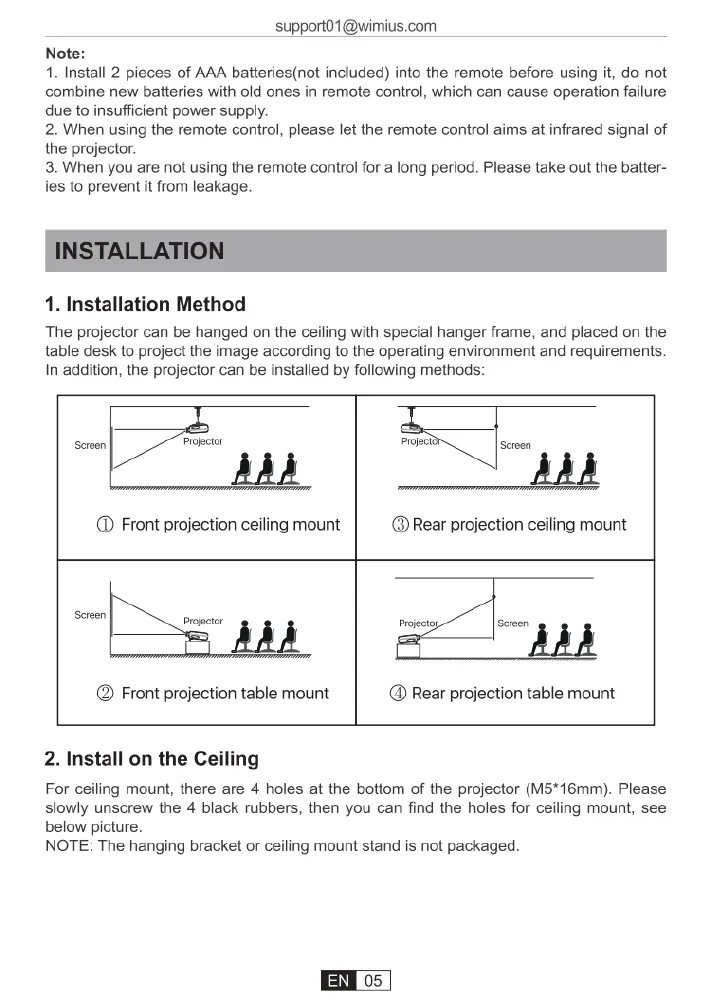
1.
Installation
Method
The
projector
can
be
hanged
on
the
ceiling
with
special
hanger
frame,
and
placed
on
the
table
desk
to
project
the
image
according
to
the
operating
environment
and
requirements.
In
addition,
the
projector
can
be
installed
by
following
methods:
Seeen
Projector
Projecty
Sereen
(@
Front
projection
ceiling
mount
(@
Rear
projection
ceiling
mount
Scroen
Projoctor
!
!
_&
Projecto
Screenl
l l
@
Front
projection
table
mount
@
Rear
projection
table
mount
2.
Install
on
the
Ceiling
For
ceiling
mount,
there
are
4
holes
at
the
bottom
of
the
projector
(M5*16mm).
Please
slowly
unscrew
the
4
black
rubbers,
then
you
can
find
the
holes
for
ceiling
mount,
see
below
picture.
NOTE:
The
hanging
bracket
or
ceiling
mount
stand
is
not
packaged.

Related product manuals