OTHER SETTINGS
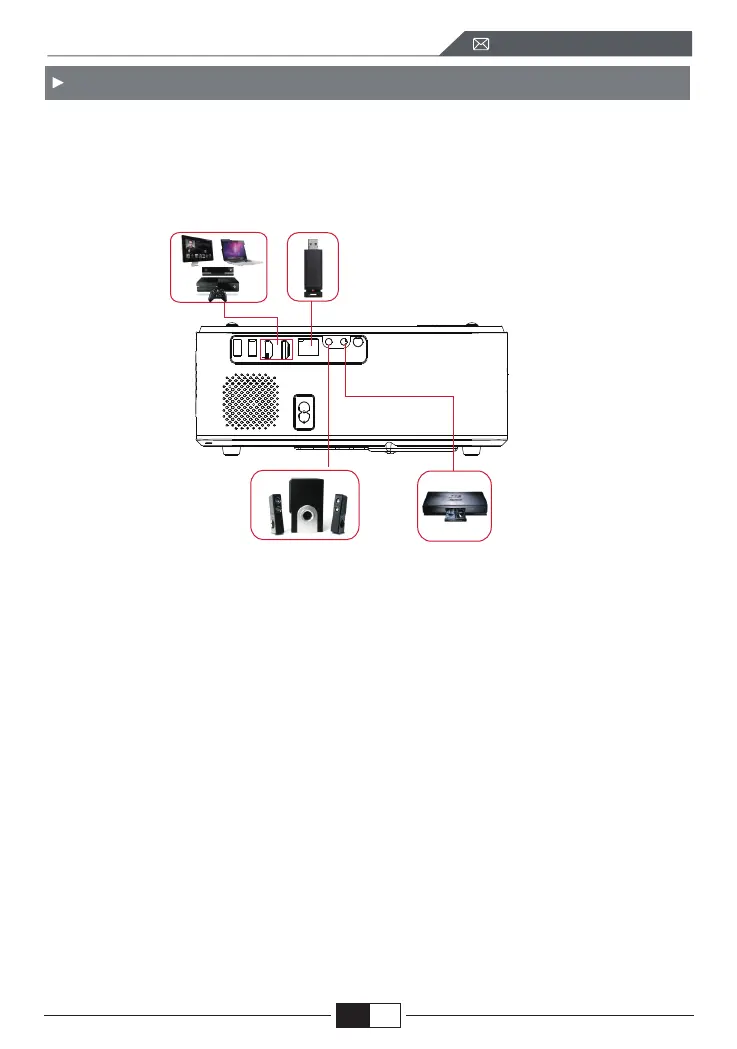
WiMiUS K8 projector has 6 interfaces, HDMI ports*2/USB ports*2/3.5mm head-
phone output/AV output. Please select the correct connecting port to
connect your device (PC, Phone, DVD Player, Sound bar, USB, PS4 etc.)
1.Connect USB Disk
1) Insert the U disk into either of the two USB input ports;
2) You can directly enter the start-up screen on the home page, select the option
[ Video/Music/Picture/Office]
3) Select the desired file (or folder to enter the sub folder) in the USB disk, then
press the [ OK ] button to play it.
2.Connect the Devices via the HDMI ports
1) Connect your TV stick or laptop to any HDMI port of the projector;
2) Enter the home page to select the corresponding HDMI1 or HDMI2 as the
signal source.
3) On your laptop, hold down the key “Win+P” board keys to change your
display mode.
EN
support01@wimius.com



 To Next Page