Aspect Ratio: 16:9t
Distance
1.6m
2m
2.5m
3m
3.5m
4m
4.5m
5m
6m
Screen Size
49”
60”
75”
93”
109’’
125’’
141’’
157’’
300’’
* The image size depends on the distance between projector and screen.
there may be 3% measure difference among above listed data.
* The recommended projection distance is 2.5-3m.
* Ambient darkness will improve the clarity of the projected images.
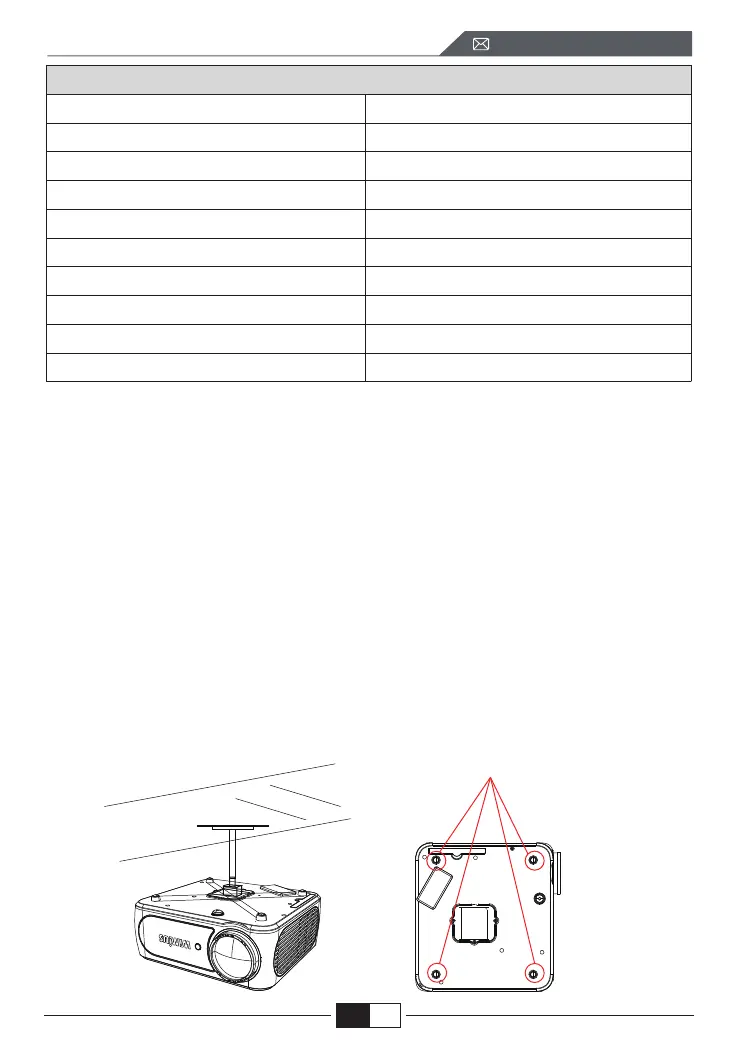
2. Install on the Ceiling
Keep the projector vertical and towards the mid of projector screen, keep the
projection image flat on the screen.
1.To adjust the tilt base, unscrew the support rod at the bottom of the projector,
see below picture.
2.For Ceiling mount, there are 4 holes at the bottom of the projector (M4*10mm).
Please slowly unscrew the 4 black rubbers, then you can find the holes for ceiling
mount, see below picture.
NOTE: The hanging bracket or ceiling mount stand is not packaged.
Screwholes
EN
support01@wimius.com



 To Next Page