EasyManua.ls Logo

Wimius P60 - iOS Cast (for iOS Devices)

Wimius P60
26 pages
Print Icon
To Next Page IconTo Next Page
To Previous Page IconTo Previous Page
Loading...
3
Support01@wimius.com
.
The fluency
of
screen
mirroring
with
wireless
connection
will
be
affected
by
the
network
environment.
A
bandwidth
of
100Mbit
or
more
is
recommended
when
using
screen
mirroring.
2.
Make
sure
your
mobile
device
is
close
to
the
projector
when
using
wireless
connection.
A
distance
within
1
meter
is
recommended.
3.
Some
mobile
devices
may
not
support
screen
mirroring
due
to
the
compatibility.
4.
Any
questions,
please
feel
free
to
email
WiMiUS
via
support01@wimius.com.
i0S
Cast
(for
iOS
Devices)
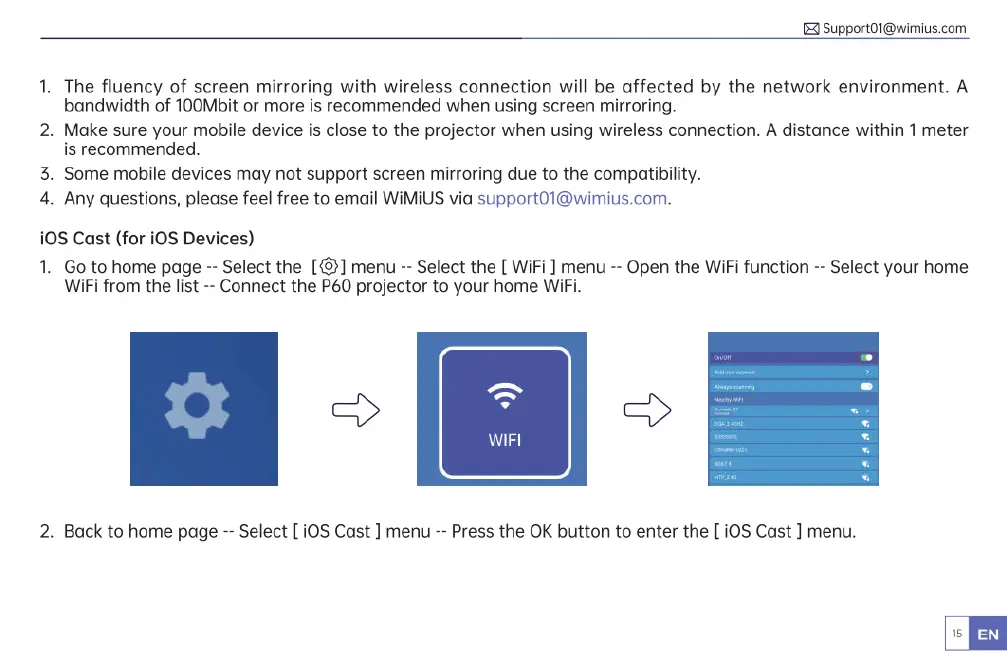
1.
Go
to
home
page
--
Select
the
[@]
menu
-
Select
the
[
WiFi
]
menu
--
Open
the
WiFi
function
--
Select
your
home
WiFi
from
the
list
--
Connect
the
P60
projector
to
your
home
WiFi.
2.
Back
to
home
page
--
Select
[
i0S
Cast
]
menu
--
Press
the
OK
button
to
enter
the
[0S
Cast
]
menu.

Related product manuals