EasyManua.ls Logo

Wimius P60 - Remote Control

Wimius P60
26 pages
Print Icon
To Next Page IconTo Next Page
To Previous Page IconTo Previous Page
Loading...
(X0
Support01@wimius.com
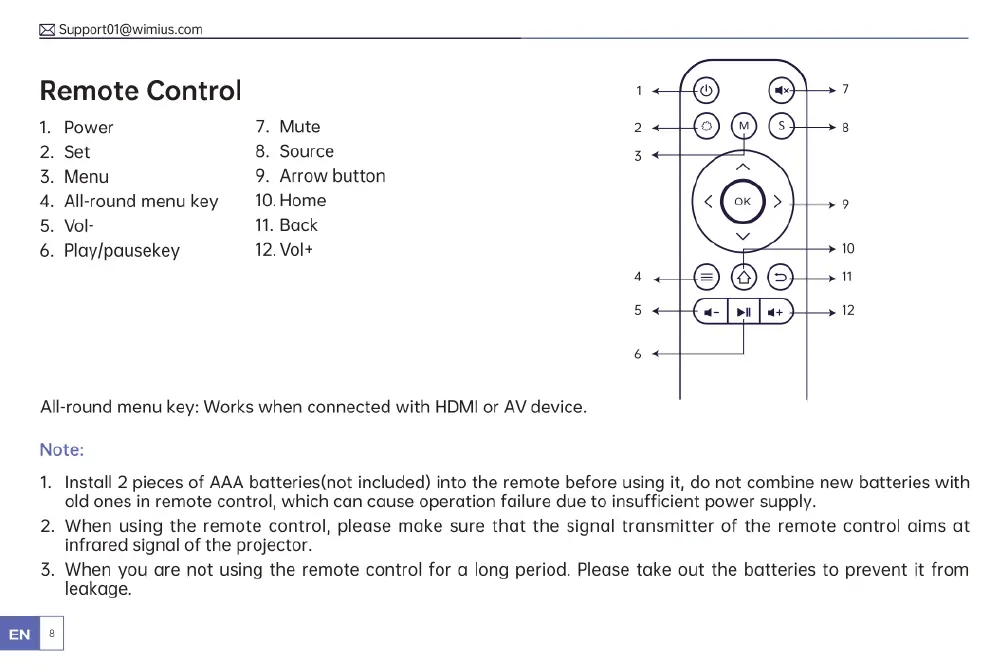
Remote
Control
1.
Power
7.
Mute
2.
Set
8.
Source
3.
Menu
9.
Arrow
button
4.
All-round
menu
key
10.Home
5.
Vol-
11.
Back
6.
Play/pausekey
12.Vol+
All-round
menu
key:
Works
when
connected
with
HDMI
or
AV
device.
Note:
1.
Install
2
pieces
of
AAA
batteries(not
included)
into
the
remote
before
using
it,
do
not
combine
new
batteries
with
old
ones
in
remote
control,
which
can
cause
operation
failure
due
to
insufficient
power
supply.
2.
When
using
the
remote
control,
please
make
sure that
the
signal
transmitter
of
the
remote
control
aims
at
infrared
signal
of
the
projector.
3.
When
you
are not
using
the
remote
control
for
a
long
period.
Please
take
out
the
batteries
to
prevent
it
from
leakage.
B
|

Related product manuals