EasyManua.ls Logo

Wimius P64 - MacBook;Mac Book Air Connectivity; Sound Bar Audio Connection; DVD Player Connection (AV;HDMI)

Wimius P64
31 pages
Print Icon
To Next Page IconTo Next Page
To Previous Page IconTo Previous Page
Loading...
[
supportol@wimius.com
3.Connecting
with
MacBook
or
Mac
Book
Air
Choose
the
media
signal
channel
:"HDMI”
«
Use
a
Type~C
to
HDMI
adapter
to
connect
your
MacBook,
or
a
Mini
Display
to
HDMI
adapter
to
connect
with
your
MacBook
Air
(adapter
not
included).
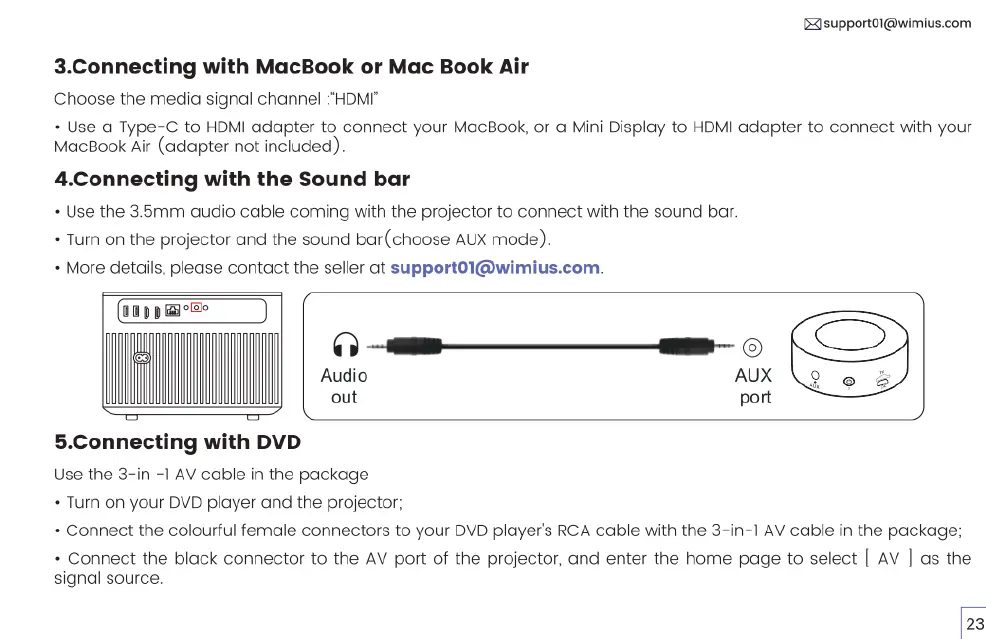
4.Connecting
with
the
Sound
bar
+
Use
the
3.5mm
audio
cable
coming
with
the
projector
to
connect
with
the
sound
bar.
«
Turn
on
the
projector
and
the
sound
bar(choose
AUX
mode).
«
More
details,
please
contact
the
seller
at
supportol@wimius.com.
IR
———
O]
.”
Audio
AUX
out
port
5.Connecting
with
DVD
Use
the
3-in
-1
AV
cable
in
the
package
«
Turn
on
your
DVD
player
and
the
projector;
+
Connect
the
colourful
female
connectors
to
your
DVD
player's
RCA
cable
with
the
3-in-1
AV
cable
in
the
package;
«
Connect
the
black
connector
to
the
AV
port
of
the
projector,
and
enter
the
home
page
to
select
[
AV
|
as
the
signal
source.

Related product manuals