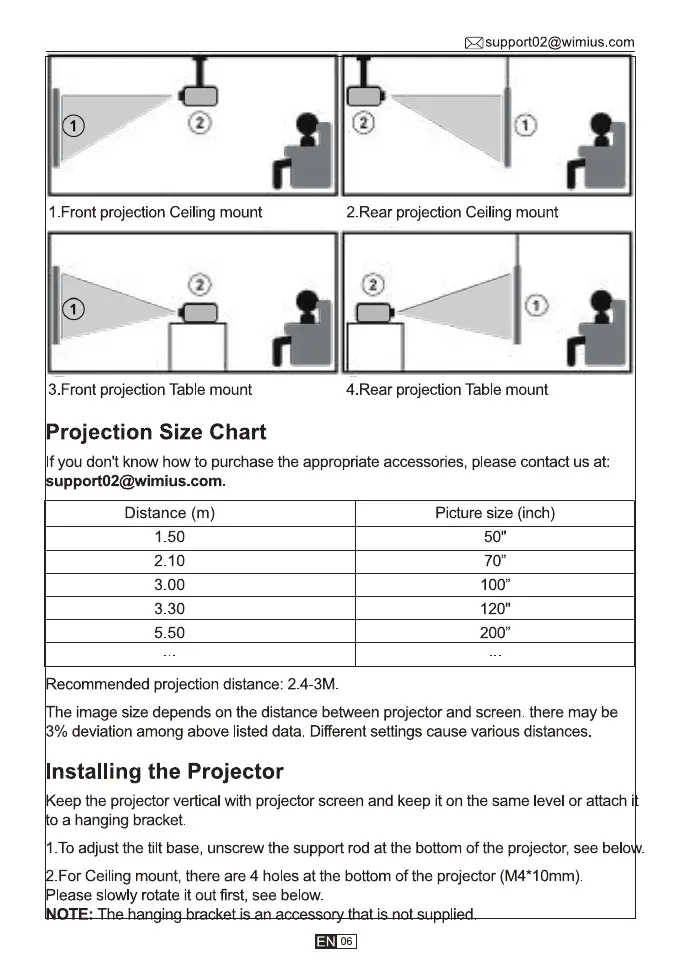
1 Front projection Ceiling mount
6)
3.Front projection Table mount
Projection Size Chart
Asupport02@wimius.com
2.Rear projection Ceiling mount
4.Rear projection Table mount
If you don't know how to purchase the appropriate accessories, please contact us at:
upport02@wimius.com.
Distance (m)
1 50
2.10
3 00
330
5 50
Recommended projection distance: 2.4-3M.
Picture size (inch)
50"
70"
100"
120"
200"
he image size depends on the distance between projector and screen. there may be
% deviation among above listed data. Different settings cause various distances.
Installing the Projector
Keep the projector vertical with projector screen and keep it on the same level or attach i
o a hanging bracket.
I. To adjust the tilt base, unscrew the support rod at the bottom of the projector, see bel
For Ceiling mount, there are 4 holes at the bottom of the projector (M4*1Omm).
Please slowly rotate it out first, see below.
06



 To Next Page