Hardware Guide for miniVNA PRO2
www.wimo.com info@wimo.com WiMo 2018
Battery Connection and/or Replacement.
! For safety, the unit is shipped with the battery disconnected. It is necessary to connect the battery to the relative PCB
connector for operation of the unit:
MAX + 10 dBm /10mW
25 VDC
MAX + 10 dBm /
25 VDC
MAX + 10 dBm /10mW
25 VDC
Retaining screws for the
bottom cover
Battery connector to
connect prior to run the
analyzer
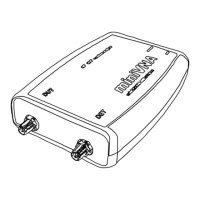
Connection from - RF side
• DUT Port is typically connected to the antenna under test when
the analyzer is set by the software interface to work in Reflection
mode.
! Caution
Not apply to this port DC signals over 25 VDC and RF signals
over 10 mW. (Voids Warranty)
• DET Port is used to check filters and amplifiers when the
analyzer is set by the software interface to work in Transmission
mode.
! Caution
Not apply to this port DC signal over 25 VDC and RF signal
over 10 mW. (Voids Warranty)
How to connect the battery
Proceed as follow:
1. Remove the bottom cover (side
where the serial number label is
present) and remove the two
screws shown in the drawing below.
Retain these screws.
2. Connect the battery connector as
shown in the drawing below while
assuring the polarity is correct.
3. Reassemble the bottom cover using
the two screws previously removed
in Step 1.


 To Next Page
 Loading...