06
Button
+
-
Button
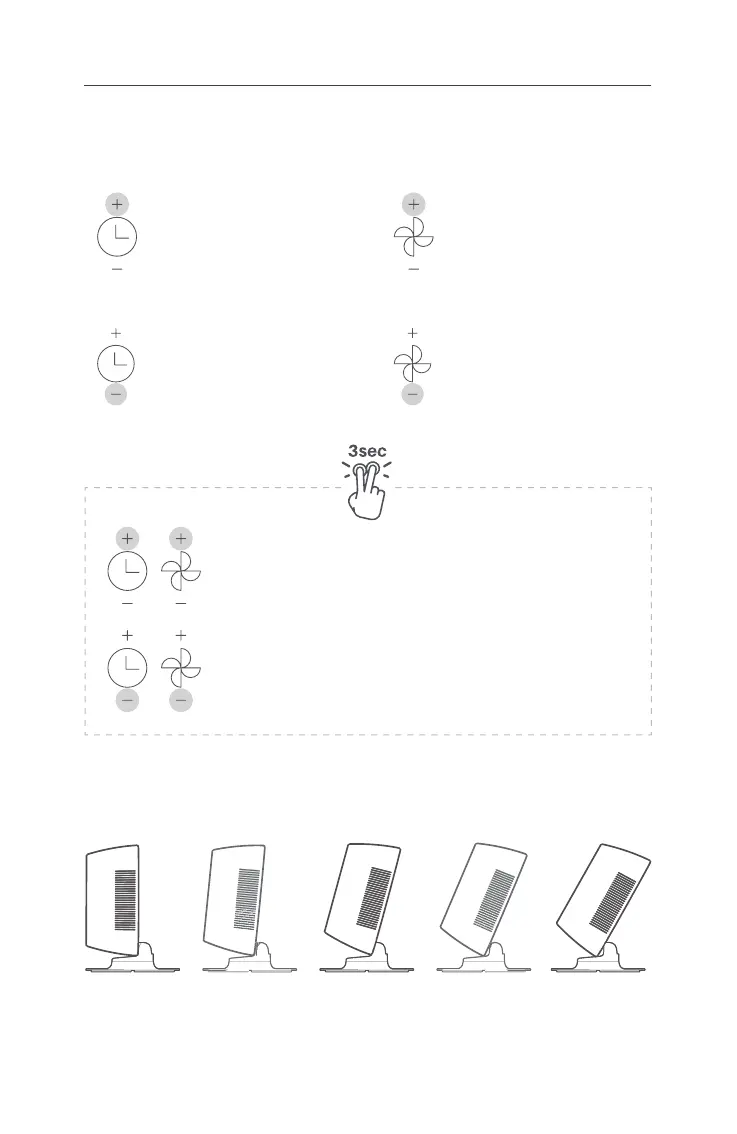
TILT
The head of the fan can be manually adjusted from 0° to 30°.
0°
15° 30°
How to use
Touch the “+” button (top of the
clock button) to extend 1 hour.
Touch the “-“ button (bottom of the
clock button) to reduce 1 hour.
Touch the “+” button (top of fan
button) to increase the wind
volume.
Touch the “-” button (bottom of the
fan button) to decrease the wind
volume.
Mute
Touch these two "+" buttons (on the top of the clock and fan buttons)
and hold for at least 3 seconds.
Lock
Touch these two "-" buttons (underneath of the clock and fan
buttons) and hold for at least 3 seconds.
CONTROLS


 To Next Page